
The GH5 has so many options to choose from, which recording format do you pick? I’ll simplify it for you.
C4K or UHD?
Both are equally good. I’ve tested both and here’s a blind test for you. One is C4K and the other is UHD uprezzed to match. Can you tell which is which (right-click for full-rez version)?


Bottom line? It doesn’t matter. Nobody can tell.
My suggestion? Pick UHD (3840×2160) because you can shoot 50/60p, and you get a vertical height in case you want to crop for widescreen.
There is one use for C4K though, and that is you can use the Tele Conv. Zoom feature, which gives you a 1.4x TC built-in without a loss in quality.
8-bit or 10-bit?
This is controversial. For now, until the 400 Mbps update arrives, I recommend 8-bit, simply because it’s easier to edit and work with.
There is a very slight advantage to 10-bit, but it’s not worth the extra hassle at this point.
The new v2.1 firmware update review is out and you should shoot in 10-bit 400 Mbps for best quality, especially if you’re shooting V-Log:
Here are the videos I have published earlier:
My findings?
- For chroma keying,
use an external recorder and shoot Prores HQ.shoot 400 Mbps 10-bit 4:2:2 ALL-I. - You can also shoot in the 5K Anamorphic mode (4:3, without anamorphic lenses), and then later crop and resize in post. The mode gives a slightly wider field of view and probably the best compromise. The only downside is it’s 10-bit 4:2:0, a strange variation. If color grading is critical for your anamorphic workflow, then shoot 3.3K anamorphic instead.
- For everything else, 8-bit should still be fine.
, stick to whatever works best for you. It doesn’t really matter. Right now people have issues playing back 10-bit footage so I recommend you stick to 100 Mbps 8-bit 4:2:0. Wait for the internal 400 Mbps firmware update. If Panasonic does a good job on that, then that’s the file format you will get the best quality from.
Video Record Modes
There’s a lot of confusion about the video modes, here’s the complete table:
Tip: Start with the resolution you want. Then work your way to ‘Frame rates’ and choose the frame rate you want. Finally, select from one of the ‘Data Rates’. That’s it!
| Internal Recording Only | ||||||
| Resolution | System Frequency | Frame rates | Data Rate | Color | Codec^ | Availability |
| 4096 x 2160 | 24 Hz | 24p | 400 Mbps | 10-bit 4:2:2 | All-Intra MOV/MP4 | |
| 150 Mbps | 10-bit 4:2:2 | H.264 MOV/MP4 | Now | |||
| 100 Mbps | 8-bit 4:2:0 | H.264 MOV/MP4 | Now | |||
| 59.94 Hz | 23.976p | 400 Mbps | 10-bit 4:2:2 | All-Intra MOV/MP4 | ||
| 150 Mbps | 10-bit 4:2:2 | H.264 MOV/MP4 | Now | |||
| 100 Mbps | 8-bit 4:2:0 | H.264 MOV/MP4 | Now | |||
| 3840 x 2160 | 24 Hz | 24p | 400 Mbps | 10-bit 4:2:2 | All-Intra MOV/MP4 | |
| 150 Mbps | 10-bit 4:2:2 | H.264 MOV/MP4 | Now | |||
| 100 Mbps | 8-bit 4:2:0 | H.264 MOV/MP4 | Now | |||
| 50 Hz | 25p | 400 Mbps | 10-bit 4:2:2 | All-Intra MOV/MP4 | ||
| 150 Mbps | 10-bit 4:2:2 | H.264 MOV/MP4 | Now | |||
| 100 Mbps | 8-bit 4:2:0 | H.264 MOV/MP4 | Now | |||
| 59.94 Hz | 23.976p, 29.97p | 400 Mbps | 10-bit 4:2:2 | All-Intra MOV/MP4 | ||
| 150 Mbps | 10-bit 4:2:2 | H.264 MOV/MP4 | Now | |||
| 100 Mbps | 8-bit 4:2:0 | H.264 MOV/MP4 | Now | |||
| 59.94p | 150 Mbps | 8-bit 4:2:0 | H.264 MOV/MP4 | Now | ||
| 1920×1080 | 24 Hz | 24p | 200 Mbps | 10-bit 4:2:2 | All-Intra MOV/MP4 | Second half 2017* |
| 100 Mbps | 10-bit 4:2:2 | H.264 MOV/MP4 | April 2017* | |||
| 100 Mbps | 8-bit 4:2:0 | H.264 MOV/MP4 | Now | |||
| 50 Hz | 25p, 50p | 200 Mbps | 10-bit 4:2:2 | All-Intra MOV/MP4 | ||
| 100 Mbps | 10-bit 4:2:2 | H.264 MOV/MP4 | Firmware v1.1 | |||
| 100 Mbps | 8-bit 4:2:0 | H.264 MOV/MP4 | Now | |||
| 59.94 Hz | 23.976p, 29.97p, 59.94p | 200 Mbps | 10-bit 4:2:2 | All-Intra MOV/MP4 | ||
| 100 Mbps | 10-bit 4:2:2 | H.264 MOV/MP4 | Firmware v1.1 | |||
| 100 Mbps | 8-bit 4:2:0 | H.264 MOV/MP4 | Now | |||
| 1920×1080 | Various | Various | 17-28 Mbps | 8-bit 4:2:0 | AVCHD | Now |
| 3.3K and 5K 4:3 Anamorphic | TBD | 24p, 25p, 30p | 400 Mbps for 3.3K and 200 Mbps for 5K | 10-bit 4:2:0 for 5K, and 10-bit 4:2:2 for 3.3K | HEVC/H.265 | |
| External Recording without Internal Recording | ||||||
| Resolution | System Frequency | Frame rates | Data Rate | Color | Codec | Availability |
| 4096 x 2160 / 3840 x 2160 | 24 Hz | 24p | Uncompressed | 10-bit 4:2:2 | Prores or DNxHD | Now |
| 50 Hz | 25p, 50p | Uncompressed | 10-bit 4:2:2 | Prores or DNxHD | ||
| 59.94 Hz | 23.976p, 59.94p | Uncompressed | 10-bit 4:2:2 | Prores or DNxHD | ||
| Internal and External Recording At the Same Time | ||||||
| Resolution | System Frequency | Frame rates | Data Rate | Color | Codec | Availability |
| 4096 x 2160 / 3840 x 2160 | 24 Hz | 24p | Uncompressed | 10-bit 4:2:2 | Prores or DNxHD | Now |
| 50 Hz | 25p, 50p | Uncompressed | 8-bit 4:2:2 | Prores or DNxHD | ||
| 59.94 Hz | 23.976p, 59.94p | Uncompressed | 8-bit 4:2:2 | Prores or DNxHD | ||
Please check the firmware update section to know which ones have been implemented.
Suggestions:
- For general shooting, I suggest 23.976p or 59.94p, so set your System Frequency to NTSC (60Hz).
- If you’re living in PAL world, you can shoot 25/50p.
- I would avoid 24p completely, unless you are shooting a full project in that frame rate specifically for DCI projection.
Is 6K and 4K photo modes for video?
No. Lots of wrong info out there. Check next for details.
By the way, if you shoot 6K in 4:3 you only get 4992 x 3744, or 4.9K. If you shoot 6K in 3:2 you only get 5185 x 3456 or 5K. Where’s the 6K? Go ask Panasonic.
Can the camera really shoot 6K?
No. The maximum horizontal resolution of the sensor is 5184 pixels, or 5K.
In 6K and 4K photo modes the camera records at 30 fps in HEVC (H.265), and 4K is recorded at 60 fps in H.264.
There are two gotchas to note:
- Both these modes are heavily compressed. So even though you can take a still frame from this it will be heavily compressed and not as malleable as a RAW file or even a high-quality JPEG file. But still useful for some purposes like weddings, ENG, etc.
- Because you have to maintain the shutter speed in multiples of the frame rate (to avoid flickering), you are limited by the exposure possibilities of your camera. E.g., for 30 fps you’ll keep your shutter at 1/60 fps minimum but this only gives you cinematic motion blur – not a good thing for stills. For stills you’ll need to go to 1/125 or higher. This means you’ll be using a more expensive lens wide open, or raising the ISO to introduce noise.
Bottom line is, this feature is only useful in some areas like weddings, ENG, etc. And even then only under some situations when the ISO does not have to be bumped up too high.
What about anamorphic video?
The 6K or 4K video mode will output 4:3 video, which is the natural aspect ratio of the sensor. You need anamorphic lenses with a factor of 2x, and an external recorder that will do an anamorphic desqueeze so you can see the footage correctly.
You get a lower resolution when shooting anamorphic (so it’s only 3.3K, not 4K), and these are the modes currently supported:
| Anamorphic Mode | ||||||
| Resolution | System Frequency | Frame rates | Data Rate | Color | Codec | Availability |
| 3328 x 2496 | 24 Hz | 24p | 400 Mbps | 10-bit 4:2:2 | All-Intra MOV/MP4 | |
| 150 Mbps | 10-bit 4:2:2 | H.264 MOV/MP4 | ||||
| 100 Mbps | 8-bit 4:2:0 | H.264 MOV/MP4 | Now | |||
| 50 Hz | 25p | 400 Mbps | 10-bit 4:2:2 | All-Intra MOV/MP4 | ||
| 150 Mbps | 10-bit 4:2:2 | H.264 MOV/MP4 | ||||
| 100 Mbps | 8-bit 4:2:0 | H.264 MOV/MP4 | Now | |||
| 50p | 150 Mbps | 8-bit 4:2:0 | H.264 MOV/MP4 | Now | ||
| 59.94 Hz | 23.976p. 29.97p | 400 Mbps | 10-bit 4:2:2 | All-Intra MOV/MP4 | ||
| 150 Mbps | 10-bit 4:2:2 | H.264 MOV/MP4 | ||||
| 100 Mbps | 8-bit 4:2:0 | H.264 MOV/MP4 | Now | |||
| 59.94p | 150 Mbps | 8-bit 4:2:0 | H.264 MOV/MP4 | Now | ||
The resolution is 3328 x 2496, with an aspect ratio of 4:3. True anamorphic is 2.39:1, but the anamorphic lenses or adapters you’d typically use is 2x. In that case, you’ll end up with an aspect ratio of 8:3 or 2.66:1, and the sides will need to be cropped. One advantage is you don’t have to worry about any slight vignetting. On the other hand, you do lose some resolution.
Note there is a crop factor here, as the entire sensor isn’t being used in 3.3K mode. From spherical, you have to factor in 1.23x.
Whether or not the GH5 will have a desqueeze function internally needs to be confirmed by Panasonic. There is now a desqueeze option in the camera.
A higher resolution anamorphic mode is promised in the future, probably 6K (5K, hopefully). Let’s see how that works out. That would be interesting. This single feature would make the GH5 a unique camera.
Should I be excited about the HDR feature?
Not really. The HDR feature is only available in the HLG format, whereas most devices support HDR10 or Dolby Vision (the PQ format, as explained here). You need an HLG TV, and that’s a deal breaker.
What about slow motion and high speed?
In all frame rates, you get the following speeds:
- Up to 180 fps in 1080p – in increments
- Up to 60 fps in 4K – in increments
- These options are available in 24 Hz, 50 Hz and 59.94 Hz.
You can also go the other way, to up to 2 fps for fast motion, but I don’t recommend that. It’s easier to control this in post.
How to get Frame Markers or Guides in the Panasonic GH5
Note: Panasonic have added frame markers with the new firmware update. You get the following:
- 2.39:1
- 2.35:1
- 16:9
- 4:3
- 1:1
If you need other markers, you can use the following methodology:
Older method – In this quick video I’ll show you how to get frame markers or guides in the Panasonic GH5:
Quick tip: When you drag with your fingers it’s not very accurate, but you can move it step-wise from the menu using the control dial arrows.
Here are the custom markers I’ve set (use at your own risk, I don’t claim accuracy!):
UHD – 3840×2160, 16:9
The horizontal length of the LCD regardless of UHD or C4K is 66mm. The vertical height for UHD is 38mm. As you can see it’s not 16:9 precisely, so these are just rough guesstimates, but well within reasonable error.
2.35:1 (2.40 is easily divisible, the difference is only half a millimeter)

1.85:1

1.66:1
Here you’re moving the vertical line to 63 mm.
2:1

DCI 4K – 4096×2160, 1.9:1
The horizontal length of the LCD regardless of UHD or C4K is 66mm. The vertical height for UHD is 35.5mm.
2.35:1 (2.40 is easily divisible, the difference is only half a millimeter)
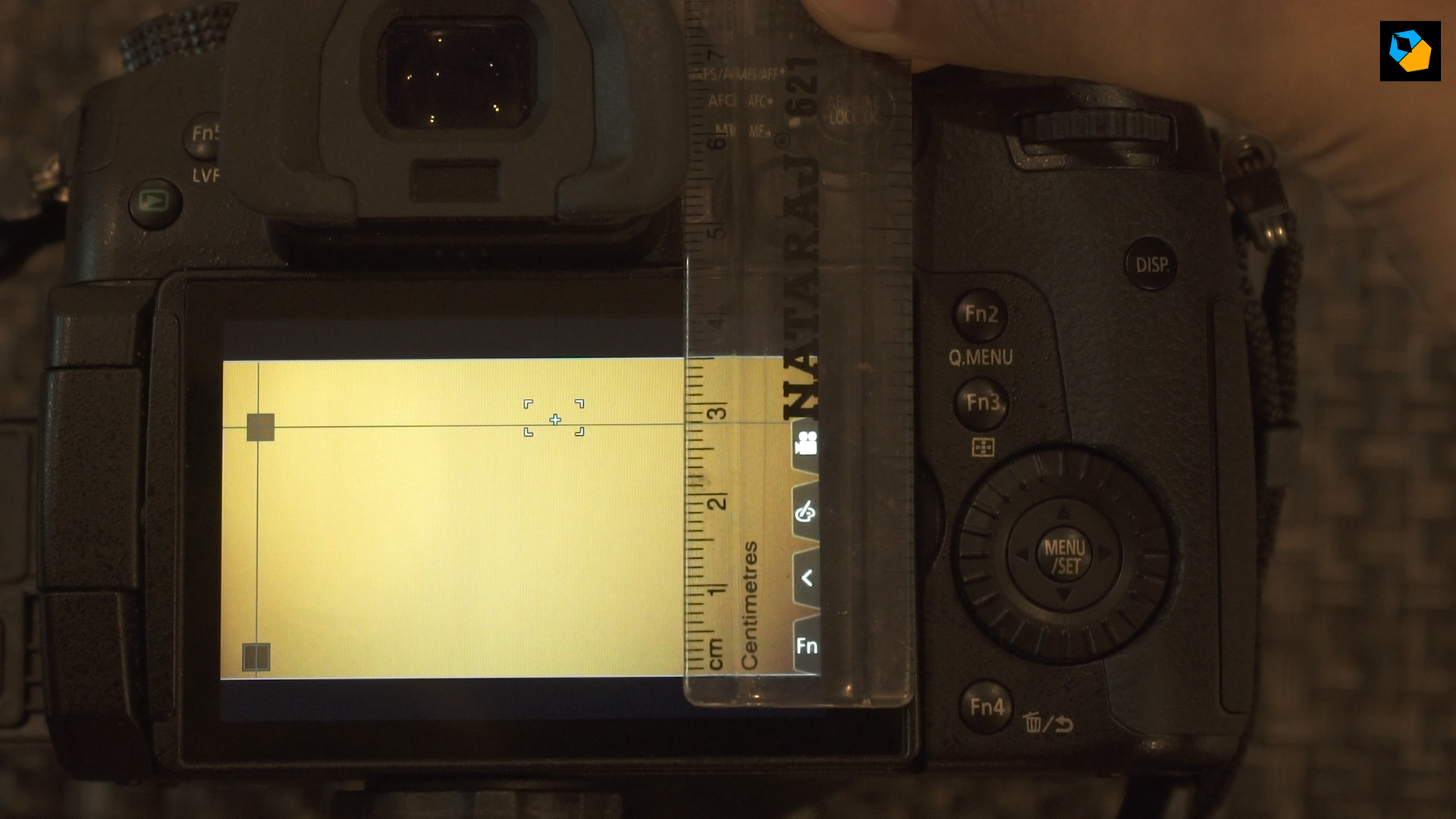
1.66:1
Here you’re moving the vertical line to 59 mm.
1.85:1
Here you’re moving the vertical line to 65.6 mm.
2:1

I hope you found this useful.
