

The Sony FX3 (Amazon, B&H) is quite a promising video camera. If you add the following accessories it becomes even more powerful and useful.

1 Atomos Ninja V
The Atomos Ninja V (Amazon, B&H) is a highly affordable monitor and external recorder.
Why would you need an external recorder? The Sony FX3 (Amazon, B&H) has limited video exposure features. This is what you get extra with the Ninja V:
- Extra exposure tools like waveform, false color, vectorscope, blue-only noise, etc.
- The ability to upload 3D LUTs, so you can record S-log3, but use a S-log3 to Rec. 709 LUT to monitor footage.
- Record to Prores or DNxHR format for a simpler editing experience. You get to choose multiple data rates depending on the kind of project you’re doing.
- Extending the recording time of your device due to overheating.
- Get the option to shoot 12-bit Prores RAW in 4.2K up to 60 fps!
The Sony FX3 (Amazon, B&H) has a Type A HDMI port, so you’ll also need a Type A to Type A HDMI cable. BlueRigger is a decent brand (Amazon, B&H). A “high speed” or HDMI 2.0 cable will let you shoot 4K at up to 60p. I highly recommend it.
You can mount the Ninja V on the camera via simple ball mount (Amazon, B&H). One end goes into the cold shoe mount on the top of the camera and the ball mount allows you to swivel the monitor in any direction.

2 Media Cards
The Sony FX3 (Amazon, B&H) has two SD card slots that can also take CFexpress Type A cards.
For SD cards look no further than the Sony 64GB SF-G Tough Series UHS-II SDXC Memory Card (Amazon, B&H). It has a few advantages over other cards:
- It’s reliable!
- 299 MB/s write speeds – so is a great investment for other/future cameras as well.
- Sony Tough Series cards can withstand drops up to 16.4′ / 5m, immersion in up to 16.4′ / 5m of water for up to 72 hours, and are bend, dust, X-ray, magnet, and anti-static proof, and resistant to UV light and temperature extremes from -13 to 185°F.
- It has a one-piece molded construction that is ribless with no write protect switch, so there’s minimal chance of the enclosure getting broken.
- Should the card’s data become compromised, you can download File Rescue software for free to help recover deleted content.
As far as CFexpress is concerned, Sony sells a 160GB CFexpress Type A card. It’s expensive, but I think the price will go down in a couple of years time. You also need a reader, which is an added expense:

You can still use SD cards with the a7S III, except for one major problem:
You can’t record 120 fps 4K using SD cards. You need the CFexpress Type A card.
A lot of people who need 120 fps sparingly can buy one card and use that occasionally. It’s risky, but the price of the card is too high. Shooting for a whole day or for a whole project is just not feasible for a majority of video shooters.
What size cards should you get for video?
As mentioned in the important video features of the Sony FX3, the data rate for ALL-I 4K is about 240 to 600 Mbps. At that rate you get about 14 to 31 minutes on a 64 GB SD card, depending on the frame rate.
For CFexpress you don’t have an option right now, but for SD cards I recommend 64GB or 128GB, minimum
I don’t recommend a larger size card because it’s easy to fall into bad habits by recording till the card is full. You always risk data loss (happens rarely, but it can happen), and it also takes longer for the cards to be offloaded to a laptop or PC.
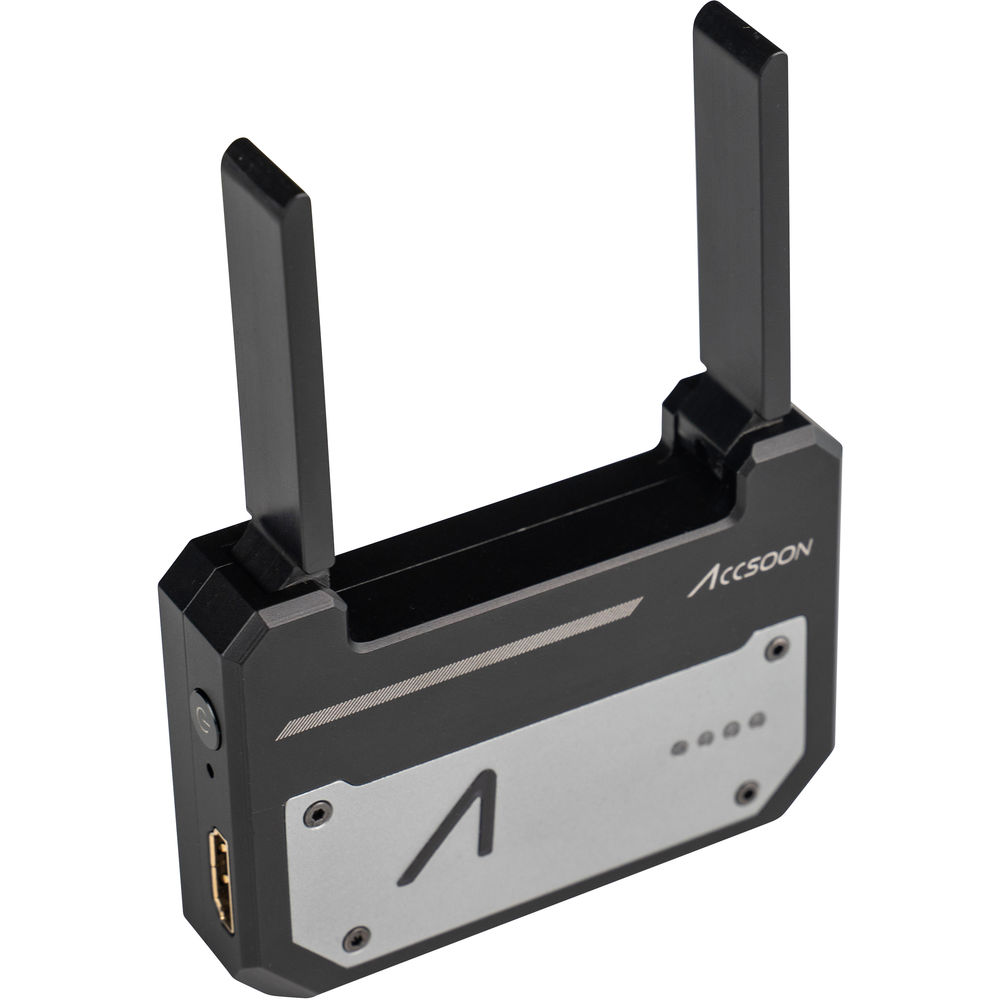
3 Accsoon CineEye Wireless Video Transmitter
The Accsoon CineEye Wireless video transmitter (Amazon, B&H) transmits an HDMI signal to phones and tablets, treating them as video receivers and allowing you to use them as real-time video monitors. Considering the Sony FX3 is a cinema camera, it might be wise to accompany it with wireless video transmitter.
The biggest advantage the Accsoon CineEye has over the other competitors is the pricing. CineEye accepts up to a 1080p60 HDMI signal via a full-size HDMI port, and then it can wirelessly transmit the signal to up to four separate iOS/Android mobile devices at the same time. The signal latency is as low as 60ms.
A companion CineEye iOS/Android app provides features such as false color, peaking, zebra, and histogram, as well as .cube format 3D LUT support, allowing your devices to function as professional video monitors.
About 3.5 x 2.5″ in size, CineEye has a compact, pocket-sized design. It offers a 1/4″-20 mounting thread on the bottom and can easily be mounted on your camera or other video device. Two integrated antennas fold in to the body maintain the small size.
CineEye runs on a built-in battery for approximately four hours and is rechargeable via a standard 5V/2A USB charger but that is not included.
4 VisibleDust EZ Sensor Cleaning Kit PLUS

I’m pretty sure you weren’t expecting this.
Mirrorless cameras have one disadvantage over DSLRs, and that is their sensors are too close to the opening for the lens. This means it’s very easy for dust to settle on the sensor.
When you stop down the lens, you will see dust spots in your photographs or videos. It’s easy to remove in photos, but very tough in videos, especially when there’s motion.
The best system I’ve found, and one I use on all my mirrorless cameras, is the VisibleDust EZ Sensor Cleaning Kit PLUS Orange (Amazon, B&H)
The Orange swab is better than the green one, because it is finer and easier on your sensor. The kit (Amazon, B&H) contains:
- VDust Plus liquid cleaner (1.15ml) – for oil and water stains, and provides a mild static barrier
- 5x orange 1.0x DHAP Vswabs and,
- 1x sensor brush
It goes without saying if you have stains you are unsure about, it’s better to get your camera serviced at an authorized service center. But sometimes in the field that’s not possible, and you have to keep shooting.
Once you get the hang of cleaning your sensor yourself, you’ll wonder what the fuss was all about. As long as you are careful and follow the instructions precisely (don’t mix and match liquids and products), you should be okay.
Here’s a video on how to use this:
That’s it! I hope you found my suggestions for the Sony FX3 (Amazon, B&H) useful.
If you know any additional important accessories specific to video, let me know in the comments below.

Sony Tough cards DO fail, check the latest product recalls at Sony! Just got mine replaced a few weeks ago. It worked fine in a7r II but not in the FX3.
Fx3 can record 4K 120 to SD cards, just not in XAVC S-I using S&Q. Need a CFexpress for that mode. Everything else is fine on SD.
Love reading your site, it’s been super helpful over the last year! Thanks
You’re welcome! Thank you for the tip.