
Ever saw a scene and wondered something is not normal?
Maybe the movement of the characters on screen is not as it should be. Or, there is a jitter (or stutter) in the movement. Maybe it distracts you, or maybe you think it’s cool.
What the filmmakers are typically doing is playing with either the shutter speed (or shutter angle), or the frame rate, or both. By changing these settings you can create different effects in film.

If you don’t know about shutter speeds and angles, I recommend you watch this first:
Now, we’re good to go.
Understanding cinematic motion blur
The Shutter Speed/Angle is a part of the Exposure Triangle:
It definitely affects exposure. We all know that.
We all know the rule of thumb that you should not mess with the shutter speed on video, because it also affects motion blur. The motion blur used in cinema over the decades is considered ‘cinematic’, and unless you had a good reason to, you don’t want to change that.
What is motion blur? Here’s a definition:
Motion blur is the apparent streaking of moving objects in a photograph or a sequence of frames, such as a film or animation. It results when the image being recorded changes during the recording of a single exposure, due to rapid movement or long exposure.
Wikipedia
Since the dawn of the Sound Era, films have been shot at 24 frames per second. The typical shutter angle used on a film camera was (and continues to be) 180 degrees.
This shutter angle gives a certain amount of motion blur, which is what most people are used to.
Therefore, 180 degrees became the norm for the shutter angle to produce the “acceptable” amount of motion blur.
The relationship between shutter speeds, shutter angles and the frame rate is explained by this formula:
S = A/(F*360)
Where:
S = Shutter Speed
A = Shutter Angle
F = Frame Rate
E.g., for 24 fps with a 180-degree shutter angle, we get 1/48 seconds as our shutter speed.
To help you remember this you can simplify the above formula to a relationship between shutter speeds and shutter angles (only for 180-degree cinematic motion blur):
S = 1/(2*F)
This is a rule of thumb followed by most cinematographers today. You are not advised to change it unless you have specific reason to.
Occasionally, many filmmakers do change it, because they want to create effects that are different from the standard cinematic motion blur. They feel these effects incite an emotional response that warrants the change.
On a typical mirrorless camera you can change the shutter speed from about 1/4 seconds to 1/8000 seconds. Some cameras allow you to go higher or lower. The point is you get a vast range.
Then there’s the other thing you can change:
Understanding Frame Rate
The Frame rate is the speed at which the sequence of images is recorded in the camera or displayed on a screen.
There are standard frame rates used, due to technological limitations and fixed standards. These are:
- 24 fps – the frame rate of cinema (DCI)
- 25 fps – the standard frame rate in television broadcast in places that use the PAL format. Most countries of Europe and Asia follow this.
- 30 fps – The standard frame rate for television broadcast in places that use the NTSC format. It is the official color-encoding system for TV in North America and most of South and Central America.
What do you do when you don’t want the standard frame rate?
In the days of older film cameras which were hand cranked, there were two ways to change the frame rate.
- Over cranking – When the frame rate was pushed above 24 fps, it was called over cranking the camera. It was used to slow down movements, or for slow motion.
- Under cranking – When the frame rate was pushed below 24, it was called under cranking the camera. It gave a choppier motion to the film and increased motion blur.
Anything over 30 fps is called High Frame Rate (HFR). These speeds are mostly used for slow motion. Footage recorded at a higher fps for playback at a lower fps will look slower.
HFR can also be used to project normally, like The Hobbit by Peter Jackson. It was shot and projected (in some cinemas) at 48 fps. Many YouTubers film and upload their videos in 60 fps, which is supported by YouTube and most displays.
You can also go to lower shutter speeds in order to speed up footage. You might have seen films from the silent era where it seems as if the footage is sped up. These films were shot at frame rates from 16 to 20 fps but are now displayed back to you at 24 fps (or 25/30 fps). This is why they appear sped up. Speeding up footage is useful in action scenes.
As you can see, you can manipulate both the shutter speed (angle) and the frame rate to achieve a myriad of effects.
We did extensive tests with different shutter speeds and frame rates so you can see for yourself.
The test
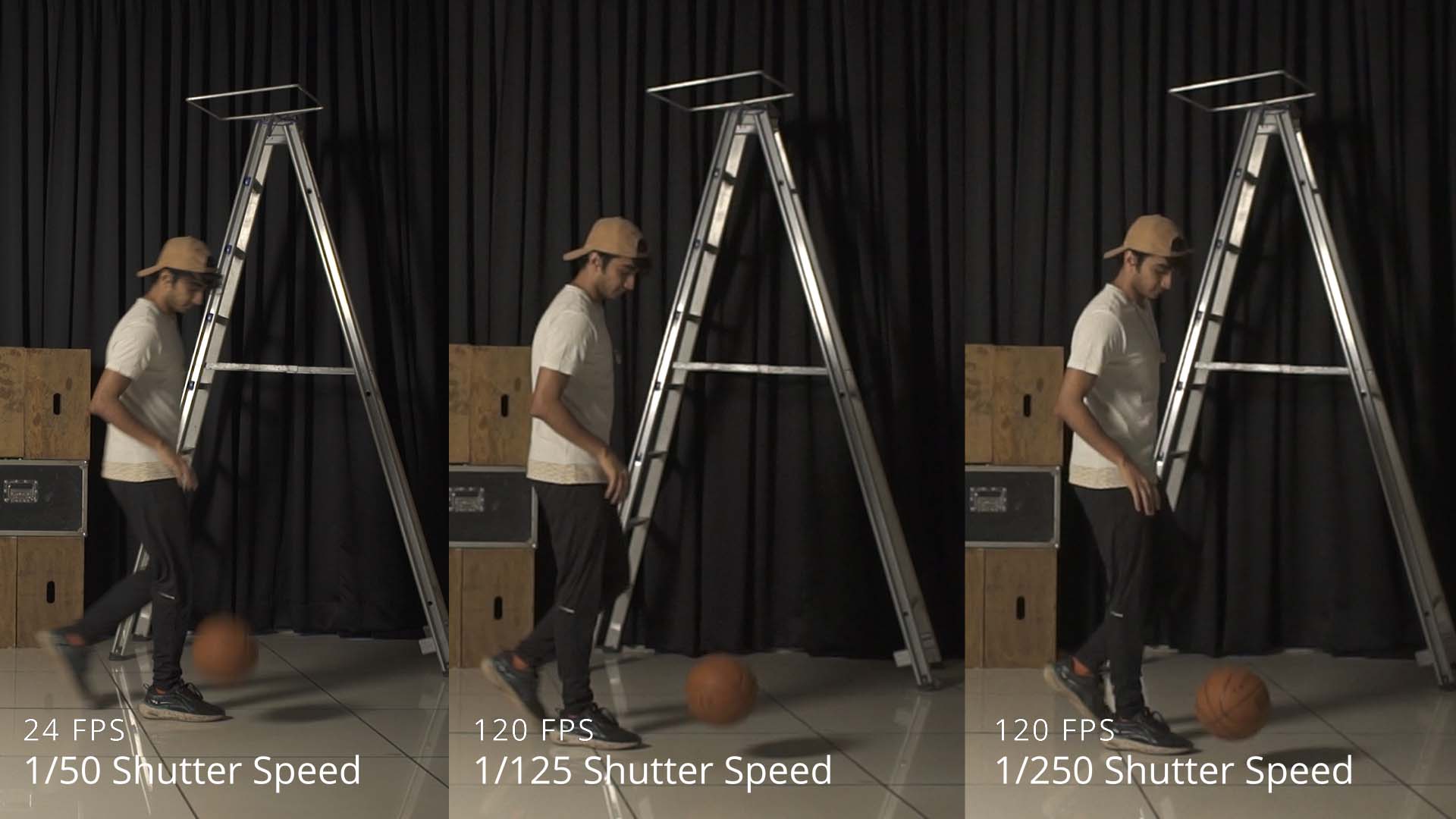
We shot a subject in motion with an object (a basketball) in all the frame rate and shutter speed combinations of a typical mirrorless camera. This camera only allowed 120 fps in 1080p so all the tests were done at that resolution.
We had the subject run, then throw a basketball into a make-shift basket. By replicating both slow and fast motion, we hoped to find the finer variations and effects noticeable by changing the shutter speed and frame rate.
Each video has one frame rate with different shutter speeds compared.
Here we go:
23.976 fps (To simulate 24 fps)
This video was shot in 23.976 fps and is on a 23.976 fps timeline:
Here’s a quick comparison of three shutter speeds on a 23.976 timeline, so you can see the effects side by side:
Inferences:
- Each shutter speed gives a distinct amount of motion blur.
- 1/400 speed (a 21.6 degree shutter angle) at 24 fps is the speed at which everything looks as sharp as necessary. Above this the sharpness doesn’t noticeably change, but on the contrary if you continue you will need more light for the same exposure.
29.97 fps
This video was shot in 29.97 fps and is on a 29.97 fps timeline:
Inferences:
- 1/500 is the shutter speed for maximum perceptible sharpness.
- 1/60 is the ideal shutter speed if you want normal cinematic motion.
59.94 fps (to simulate 60 fps)
A frame rate of 60 fps can have two purposes:
- It can be used to create slow motion footage, when played back at a lower frame rate.
- It can be used to create hyper-real looking footage (some call it the video look) when projected back at 60 fps.
We did the test both ways:
1. 59.94 fps footage on a 59.94 fps timeline:
2. 59.94 fps footage on a 23.976 fps timeline:
Inferences:
- 1/500 is the shutter speed for maximum perceptible sharpness.
- 1/15 is a good shutter speed to get streaks along with focus.
- If you want cinematic motion blur, then stick to 1/50s (for 50 fps) and 1/60s (for 60 fps).
- If you want hyper real video-like footage or slow motion, then stick to 1/125s (for 60 fps) and 1/100s (for 50 fps).
119.88 fps (to simulate 120 fps)
120 fps is mostly used for slow motion effects. Very few technologies exist for the end user to play back 120 fps.
Shooting at such high rates gives clearer, crisper and smoother shots with a lot of details in it, particularly when depicting fast movements. Whether you like it or not is a matter of personal taste.
This video was shot in 119.88 fps and is on a 23.976 fps timeline:
This was shot in 119.88 fps.
Inferences:
- 1/500 is the ideal shutter speed for capturing maximum sharpness.
- As of this writing there’s no system for playing back 120 fps for the regular audience, but if you want cinematic motion blur, then you need to stick to a shutter speed of 1/125s.
- If your intent is slow motion, then use 1/250s as your shutter speed.
Motion Blur and Frame Rate
We observed that motion blur is not actually dependent on frame rates. It solely depends on the shutter speed.
Here are some collages for you to see –


Our camera did not allow us to shoot at shutter speed denominator values lower than the frame rate at 120 FPS.
Rules of thumb to follow
When in doubt, keep it simple:
| Frame Rate | Purpose | Shutter Speed* |
|---|---|---|
| 23.976/24 | Cinematic | 1/48 or 1/50s |
| 25 | Cinematic | 1/50s |
| 29.97/30 | Cinematic | 1/60s |
| 50 | Cinematic | 1/50s |
| 50 | Hyper-real (Video) | 1/100s |
| 50 | Slow motion | 1/100s |
| 60 | Cinematic | 1/60s |
| 60 | Hyper-real (Video) | 1/125s |
| 60 | Slow motion | 1/125s |
| 120 | Slow motion | 1/250s |
| 120 | Sharpest slow motion | 1/500s |
If you ever forget, just stick to a shutter speed that’s double the frame rate (pick the closest one in camera).
You can do a lot with shutter speeds. Check out this video (WLA only):
Hope you learnt something from this and will now not shy away from changing the shutter speed or angle when the shot calls for it.
What do you think? Let me know in the comments below.

“If you see flickering ensure the shutter speed is a direct multiple of your frame rate.”
*No*.
For lighting flicker related to the mains utility frequency, use a shutter speed which divides twice the mains utility frequency. Preferably, a shutter speed which divides the mains utility frequency.
This will minimise both intra-frame (banding) and inter-frame (flicker) exposure variations caused by mains-related lighting flicker.
This has been understood in the movie business since the standardisation of a 24.00fps frame rate to support “talkies”. For example, Mitchell BNC cameras had shutter calibration marks at 144° (1/60.0 s) and 172.8° (1/50.0 s). Many, if not most, movies of the classic era were shot at these shutter angles.
The reason for this is sinc(x)-like temporal frequency response of the temporal moving-average filter created by the shutter.
Awesome teaching.
I have learnt a lot about S A F. I will practice on my videos.
Thanks.
Thank you.
You’re welcome!