

At first glance, the newly launched Canon C400 seems like a replacement to the Canon C500 Mark II at half the price; and maybe even the Canon C300 Mark III. Is that an accurate assessment?
In this comparison we’ll look at all the important specifications and see which camera is the better investment for the next 2-3 years for the owner operator.

The basics
| Camera | Price of Camera | Lens Mount |
| Canon C400 | $7,999 | RF |
| Canon C300 Mark III | $7,999 | EF |
| Canon C500 Mark II | $9,999 | EF |
The Canon C500 Mark II is more expensive. The higher the number after “C” the higher the camera sits in the cinema echelon.
However, the C300 Mark III should be priced lower, but currently it’s at the same price as the C400. That should tell us something. Canon won’t, so we’ll just have to dig out that information ourselves.
The standard EF mount is non-locking. You need to pay extra for a locking EF mount from Canon. You can also buy adapters for the PL mount and B4 mount.
Canon also sells a PL mount adapter for the C400.

Will different lenses make a difference?
In terms of lenses, generally speaking, full frame lenses cost more than Super35mm lenses. This is true of photo lenses and cine lenses, broadly.
So, with the C400 and C500 Mark II, you are looking to purchase heavier, more expensive lenses to cover the full frame sensor that also resolve 6K and higher. Don’t forget to take that into account.
On the other hand, the full frame sensors of the Canon oC400 and Canon C500 Mark II does offer two tremendous advantages due to the larger sensor:
- You can still use Super35mm lenses in cropped more for 4K
- You can use anamorphic lenses that take advantage of the true anamorphic frame.
If you’re interested in learning about lenses and how that would impact your purchase, check out these two articles:
Usability and Workflow
For a lot of professionals, usability is as critical as image quality. Both the Canon C500 Mark II and C300 Mark III have the exact same ergonomics in terms of buttons and dials:


Here’s how the Canon C400 is different:

Those who are purchasing these cameras are probably into documentaries, corporate videos, commercials, high-end weddings and maybe the occasional short or feature work.
These are money-making tools. The key difference, and not an insignificant one, is that the C400 has dual mini-XLR inputs. The other two cameras have full XLR inputs.
I don’t know about you, but I hate adding another adapter in the audio chain, especially when it’s easy to get audio artifacts. I do own these adapters and I cannot really understand the shift away from full XLR inputs. Maybe I’ll be proven wrong.
Also, the manual audio controls on the C400 are on the left (operator side) of the camera. On the right are just the XLR Power options:

I don’t understand this placement. Room has been made for Ethernet, Wi-Fi and Return Input. What is Return Input? According to Canon:
(The Return Input) notifies operators which camera is currently being broadcast live.
The return output destination can be selected from the VIDEO, EVF-V50, MON./HDMI and SDI OUT terminal.
Canon USA
For the C300 Mark III and C500 Mark II, for the most versatile functionality you need to purchase the Canon EU-V2 Expansion Unit:

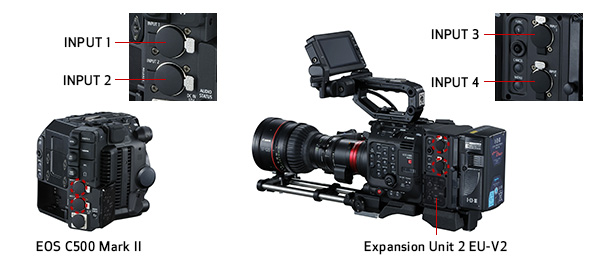
This gives you two audio controls on the operator’s side as well as two additional channels to record audio.
For just Genlock, you can purchase the cheaper Canon EU-V1:

These modules give you:
- Genlock
- Additional XLR inputs (only V2)
- Remote control
- Ethernet control
- V-mount plate with P-tap output (only V2)
- DC output to other devices (only V2)
- Lens control for certain supported lenses (only V2)
It is clear if you need the C300 Mark III or C500 Mark II for any sort of regular broadcast work you will have to purchase the EU-V2 expansion unit. Also, if you have multiple accessories it’s a good way to power them as well.
However, Genlock and Ethernet are built into the C400, making it ready for broadcast and live streaming work without any additional purchases.
All cameras have an 12G-SDI port for output, a 3D-SDI port for monitoring, and the obligatory HDMI A port. You only output 4K 60 fps via 12G-SDI. No 6K.
As far as other ergonomics is concerned, the C400 has a new LCD touch-screen monitor, camera grip and battery pack. All of which ships with the camera body.
The new LCD attachment allows the operator to adjust the angle and distance of the LCD monitor. It connects via a USB-C cable to the body.
In addition to that the C400 also has a new camera grip with three additional assignable buttons. The grip can be articulated to achieve a range of shooting angles.
Even though the body of the C400 is slightly different I don’t see any major differences in usability other than what we’ve discussed above.
One last feature that needs to be highlighted is the Auto Clear Scan setting. It is an automatic shutter mode that can detect the frequency of light sources between 50 Hz to 2011.2 Hz to help reduce or virtually eliminate the flickering in some LED walls. I can tell you that’s really helpful – assuming you can see the flicker on the small LCD.
On the whole, the C400 clearly is a camera that offers better usability across the board, except for the mini-XLR inputs and the controls on the left. I think a lot of people can live with that.

Autofocus
All cameras have Dual Pixel Autofocus with support for Touch AF and Face Detection AF.
What is dual pixel AF? According to Canon:
For DAF, each pixel in the camera’s CMOS sensor is configured with two photodiodes. Two independent image signals can then be detected at each photosite and compared using phase-difference to provide autofocus with compatible lenses. DAF can survey the scene and recognizes not only whether the subject is in focus or not, but in which direction (near or far), and by how much.
Canon USA
The C400, though, has an updated Dual Pixel AF II version:
The back-illuminated stacked sensor provides better light-capturing efficiency, widening the area of the sensor that can be used for AF.
Canon USA
The improved EOS Intelligent Tracking and Recognition (iTR AF X) algorithm delivers better subject detection. In addition to human eyes, face, and head, the camera can now detect the body of a person and follow them with high accuracy.? It also improves tracking the eye, face and bodies of some animals.
I’ll have to give this one to the Canon C400.
Image Stabilization
According to Canon:
The EOS C500 Mark II is the first Canon Cinema EOS camera to feature built-in five-axis electronic IS that works with almost any lens including anamorphic.
The EOS C300 Mark III includes the same built-in five-axis electronic IS introduced with the EOS C500 Mark II that works with almost any lens, including anamorphic.
Canon USA
What about the C400? On the Canon USA website on the product page there is no mention of image stabilization.
The official press release mentions 5-axis image stabilization, however, it is digital IS only without RF lenses:
5-Axis Combination IS (Optical and Digital) with supported lenses
Canon Europe
Digital 5-Axis IS for non IS lenses.
Due to the better IS characteristics of Canon EOS RF lenses, the overall stabilization of the C400 should be marginally better than the other two cameras.
Now let’s talk about video features.
Comparison of video features
Let’s start with the sensor.

Sensor
| Camera | Sensor Size | Dynamic Range | Native ISO* |
| Canon C400 | 38.4 x 20.2 mm | 16 stops | 800, 3200, and 12,800^ |
| Canon C300 Mark III | 26.2 x 13.8 mm | 16+ stops | 800^ |
| Canon C500 Mark II | 38.1 x 20.1 mm | 15+ stops | 800^ |
*ISO range is from 160-25,600.
^In Log and RAW modes. C-Log 2 has the highest dynamic range. With C-Log 3 you get 14 stops.
It is pretty clear, according to Canon’s own estimation, the Canon C300 Mark III is clearly better in terms of dynamic range. The C400 is next, and the C500 Mark II last.
The sensor is different on the C400. It’s slightly bigger than the C500 Mark II.
In RAW
| Camera | Max. Resolution | Bit Depth |
| Canon C400 | 6000 x 3164 | 12-bit^ |
| Canon C300 Mark III | 4096 x 2160 | 10/12-bit^ |
| Canon C500 Mark II | 5952 x 3140 | 10/12-bit^ |
^Canon RAW is actually Canon RAW Lite, written internally, at about 1/3 to 1/5th data rates.
The data rates are manageable for all cameras, all things considering. Here are the data rates for the C400:
- Cinema RAW Light LT: 576 Mbps (72 MB/s)
- Cinema RAW Light ST: 886 Mbps (111 MB/s)
- Cinema RAW Light HQ: 1,800 Mbps (225 MB/s)
In 10-bit 4:2:2 internally
| Camera | Max. Resolution | Data Rate | Format |
| Canon C400 | 4096 x 2160 | 500 Mbps | XF-AVC |
| Canon C300 Mark III | 4096 x 2160 | 160-810 Mbps | XF-AVC |
| Canon C500 Mark II | 4096 x 2160 | 160-810 Mbps | XF-AVC |
This is pretty similar. All cameras can record HD proxies simultaneously.
What about frame rates?
| Camera | Max fps at 6K | Max fps at 4K | Max fps at 1080p |
| Canon C400 | 60 fps | 120 fps | 180 fps |
| Canon C300 Mark III | N/A | 120 fps | 180 fps |
| Canon C500 Mark II | 60 fps | 60 fps | 120 fps |
Clearly the Canon C400 combines the advantages of both the other cameras in terms of frame rates.

Super 35mm and anamorphic modes
The Canon C500 Mark II and the Canon C400 can shoot 4K in Super35mm, at up to 60p.
Both cameras can also record anamorphic internally. You can desqueeze the image internally instead of having to use an external monitor.
For true anamorphic, the sensor needs to span at least 21.95mm x 18.6mm. Even ‘chopped off’ anamorphic will deliver true 4K.
The Canon C300 Mark III cannot do true anamorphic due to the smaller sensor height.
Media Cards
Media card costs are an important percentage of ownership:
| Camera | Media Cards | Data rate for RAW | Price per GB^ |
| Canon C400 | 1x CFexpress 2.0 Type-B 1x SD UHS-II | 225 MB/s | $0.27 |
| Canon C300 Mark III | 2x CFexpress 2.0 Type-B 1x SD UHS-II | 125 MB/s | $0.27 |
| Canon C500 Mark II | 2x CFexpress 2.0 Type-B 1x SD UHS-II | 250 MB/s | $0.27 |
^Sandisk CFexpress Type B 512 GB.
This is where the C400 falls behind a bit. You only get one CFexpress slot. It’s not a deal breaker, but once you’ve offered something and then take it away…ouch.
Battery life and Power
Here are the official numbers for RAW:
| Camera | Power Draw | Battery life | Battery Voltage |
| Canon C400 | 32.5 W | 155 minutes | 14.4V |
| Canon C300 Mark III | 31 W | 130 minutes | 14.4V |
| Canon C500 Mark II | 34 W | 115 minutes | 14.4V |
| Camera | Battery | Cost* | Cost of 4 hours of operation |
| Canon C400 | BP-A60N Unknown | $499 | $774 |
| Canon C300 Mark III | BP-A60 90Wh | $399 | $739 |
| Canon C500 Mark II | BP-A60 90Wh | $399 | $831 |
*As of this writing. Original batteries only, from B&H. You can always buy cheaper batteries, but the same applies to all cameras.
On the whole, I’d say the newer batteries give slightly more juice to the C400, though it will be easier to buy older batteries. And you can use the older A60 batteries on the C400 as well.
Cost of ownership
The C500 Mark II is the more expensive camera. You will also be paying extra for 6K.
The question is: Does the extra cost translate into a lot more features?

Which is the better camera for video?
Here’s a summary of each round, and the “winner”:
| Feature | Winner – Solo Shooter | Winner – Cinema |
| Ergonomics | Canon C400 | Tie |
| Lenses | Canon C400 | Canon C400 |
| Third-party lenses | Canon C400 | Canon C400 |
| Video features | Canon C300 Mark III | Canon C400* |
| Image quality | Need to test | Need to test |
| AF for video | Canon C400 | N/A |
| Image stabilization | Canon C400 | N/A |
| Media cards | Canon C300 Mark III and C500 Mark II | Canon C300 Mark III and C500 Mark II |
| Battery life | Tie | Tie |
It should be blatantly obvious by now which camera is suited for what.
Which camera wins?
The Canon C400 is really the winner in this comparison.
If you need the best dynamic range for some reason, and only then, the Canon C300 Mark III wins. The dual-gain sensor definitely gives it an edge.
However, you won’t be getting all the additional features the C400 gives:
- Full frame and 6K
- Anamorphic modes
- Triple Base ISOs
- Better Autofocus
- Better compatibility for lenses with the RF mount
- Support for Cooke /i metadata with the PL mount
- New LCD and Grip
I believe these are the features that contribute to food on the table. If you can’t make 16 stops look good you can’t make 16+ do much better, in my humble opinion.
I have no doubt. The Canon C400 wins.
What do you think?

I planning to buy C400 for my videography. This comparison help me a lot. Nice to have sony models compare for C400.
Thanks
You’re welcome!
Great Post!
Thank you!
Super helpful! Thanks for your effort with putting this together.
You’re welcome!
Me personally I would still use the c70 over the c400 just like I use it over the c300mk3 which I also own. Max dynamic range w dgo and also have the lens adapter to give full frame FOV or cropped s35 FOV as I wish so I have two focal lengths for each lens I carry and way more portable. I wish this was a full frame dgo sensor. The ease of workflow with ultra low noise on the dgo is amazing. That’s a good thing the dgo cams arent replaced theyre still the best for me. Dream camera would be a medium format dgo in a c70 type body.
Thanks for sharing! I wonder what they’ll bring with the C70 Mark II.
The ONE thing the C400 fails on for me is the lack of an EVF. The C300 III and C500 II can be used with the optional rear OLED EVF module in addition to the on-camera LCD. Both are powered by the camera. This is an extremely useful feature to me and I wish Canon did not abandon that on the C400. Canon’s LCDs are not viewable in direct, mid-day sun. The rear EVF was an excellent supplement and something that few other camera brands offered (Sony requires a cheap, plastic loupe attached to the LCD).
I think the price decrease somewhat allows one to buy an EVF or loupe. Maybe Canon will allow support with their EVFs in an update.
Yes, but my experience is that using 3rd party EVFs can be a pain. You have to be conscious of turning them off, you have to supply them with separate power or run a cable to a V-Mount, you have to rig them up before you shoot, they are often very large, etc. The rear EVF on the C300 III/C500 II is powered by the body, it is ready to be used at anytime, it auto shuts off when you’re not looking in it, and it’s incredibly small. I only need to use EVFs in bright sun so I don’t want some monster cinema camera EVF. I just want a compact tool to support the monitor in bright conditions. I have tried numerous 3rd party EVFs before I got the C300 III, and I’ve yet to find one that’s as low profile, power efficient, and requires basically no setup.
Great comparison, thanks for taking the time to do it. Very helpful.
You’re welcome!