

When you decide to make a film one of the choices staring you in the face is your choice of format. What is a film format?
What is a film format?
A film format is essentially the “recipe” or technical blueprint for how a movie is recorded and displayed. Today, we could use the word “film” for formats shot on film stock or digital cameras. That’s because at the end of the day, except for a few rare exceptions, most films are projected or displayed digitally.
A film format defines these physical characteristics of the frame:
- The width (horizontal size). For film stock it’s the actual size of the camera aperture in mm, and for digital formats it’s typically the horizontal resolution of the frame.
- The height (vertical size), also measured like the width.
- The aspect ratio. (such as 1.85:1 or 2.39:1). To know more about aspect ratios, read this article.
Think of film formats as choosing the size and shape of your canvas before you start painting. The format you choose will influence both the look and the feel of your final film. I have published a great video about this very subject here:
Today, in the age of digital filmmaking and streaming, you can really pick almost any aspect ratio (within reason). The film format you choose impacts the technical quality, the aesthetic of your film, and even your budget.
I wanted to impress on you the idea you don’t have to be married to one specific format. That’s why this article exists.
In this article we explore the early analog film formats and today’s digital cinema standards. We also examine key aspect ratios that have defined cinematic style. Most importantly, I’ll give you guidelines on how you can adapt analog film formats to the digital camera.
So it’s important to understand my goal is not to provide a history lesson or really precise information that is not relevant for practical cinematography today. You can find this kind of information on Wikipedia. My interest in formats is strictly restricted to its utility in a modern filmmaking setting.
Also, some of the formats irrelevant to this article are film perforations, vertical videos, VR 360 or other esoteric formats not relevant to cinema at this time.
Let’s get started!

Analog Film Formats
a. 35mm
Since its introduction in the late 19th century, 35mm film has set the standard for motion picture photography. Its flexibility and the balance between image quality and cost have made it a long-lasting format in the industry.
However, it is also confusing, because the same film size can contain multiple formats.
The width of the 35mm film strip is fixed:
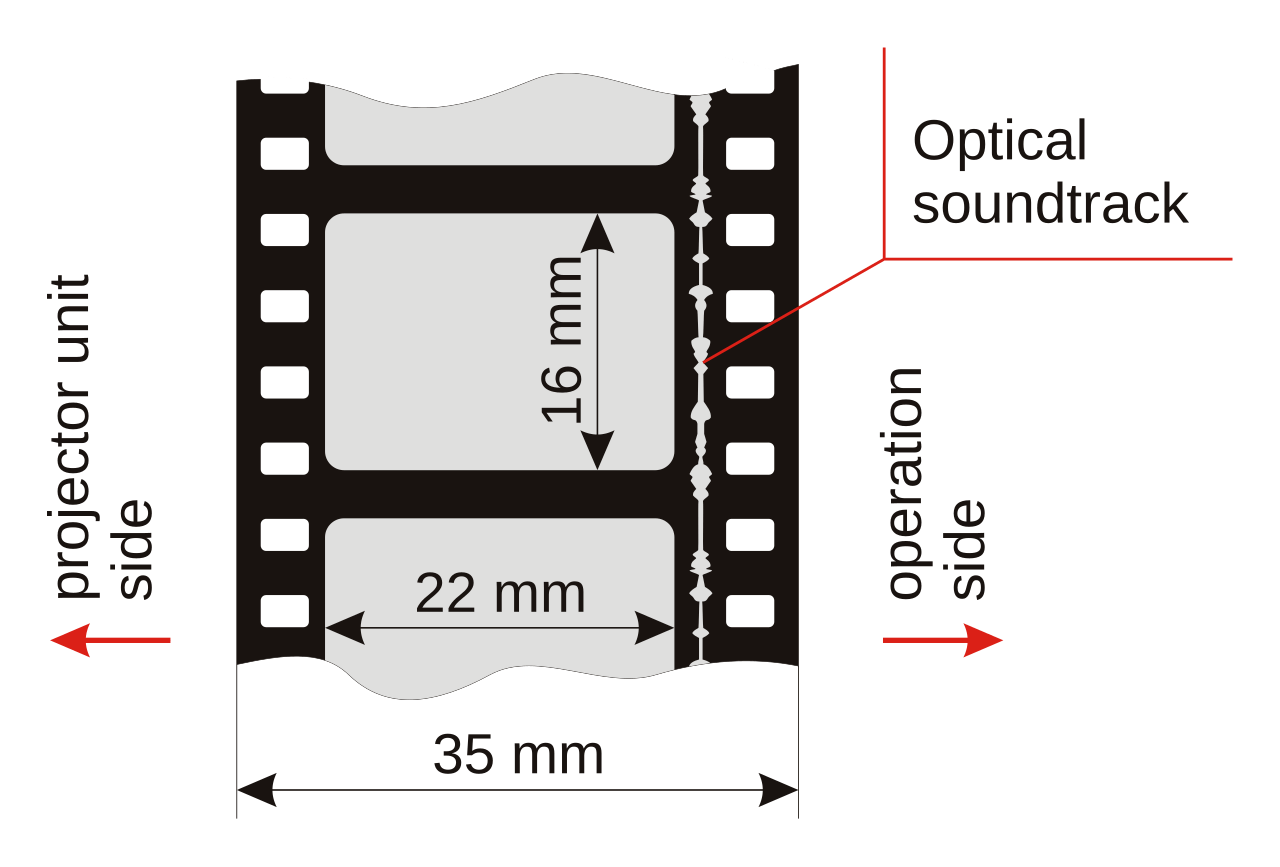
As you can see, there are perforations on both sides so the width is bound to about 22mm (assuming there is an optical soundtrack). However, the height can be changed to whatever you want.
You can also move the film strip horizontally. Then the height will be fixed at 22mm and the width can be be whatever you want. All these variations have been used in cinema, but the first is the Edison size – standardized in 1909.
Edison MPCC Format (Silent)
This format uses nearly the entire 35mm negative with a size of about 24.89?mm × 18.66?mm. The aspect ratio is 4:3 or 1.33:1.
You’ll notice the absence of the optical track gives us more space horizontally.
Academy (Sound)
This format has a size of 21.95?mm × 16.00?mm with an aspect ratio of 1.37:1.

Before we go ahead, you need to know that with most film formats, you have a camera aperture and projector aperture. This is actually one of the reasons for modern confusion about the actual sizes of film formats.
Camera Aperture vs. Projector Aperture
The camera aperture refers to the dimensions of the frame exposed on the film negative during shooting.
The projector aperture is the opening in the projector through which light passes to display the film onto the cinema screen. It’s the portion of the film frame that audiences will actually see during projection.
Shouldn’t these two be the same? It should in theory, but it wasn’t so in practice. Theaters had their own aperture plates and could “matte” the image in any way they saw fit.
A concrete example of this can be observed in the Academy format:
| Aperture | Width | Height | Aspect Ratio |
|---|---|---|---|
| Camera Aperture | 0.868″ (22.05 mm) | 0.631″ (16.03 mm) | 1.375:1 |
| Projector Aperture | 0.825″ (20.96 mm) | 0.600″ (15.24 mm) | 1.375:1 |
The camera aperture is designed to be marginally larger than the intended final image. This ensures that the entire scene is captured, allowing for minor adjustments during post-production. The projector aperture is usually slightly smaller than the camera aperture. This design choice serves to mask any unintended edges or artifacts that might have been captured during filming.
From a practical standpoint, if you want to film in “Academy”, you can shoot for 4:3 or 1.375:1. It’s just a personal preference. Many opt for 4:3 because it makes mathematical sense.
How do you film in Academy with modern digital cameras?
E.g., if you’re filming with a camera with a sensor size of 36.70 mm x 25.54 mm, like the Open Gate mode of the Arri Alexa LF, with a resolution of 4448 x 3096, the aspect ratio is 1.44:1.
To get 4:3 (or 1.375:1), you could use two strategies, assuming a 4K DCI finish:
You could use the entire height of the sensor but crop off the sides. This would give you an effective size of 34mm x 25.54mm. The resolution is 4128 x 3096. In post production, you can fit this into a DCI container which could be 4096×2160 (full 4K), 3996×2160 (Flat) or 4096×1716 (Scope).
In our example, it would be foolish to use Scope, though some distributors might ask for it because the cinema screens are fixed to that size. Even with all these standardizations, modern distribution is still somewhat of a mess – especially with worldwide distribution.
Some distributors and systems still don’t accept full 4K, so let’s assume you decide on the safest one, DCI Flat. This has an aspect ratio of 1.85:1.
You’ll have to resize your image in editing or color grading to fit the 2160 vertical height. This means the horizontal resolution will change to 2880. The sides of the screen will be black of course. You’ll have cropped it off already in post production so theaters can’t mess up your vision with improper framing. They’ll project the full Flat container and the sides will just be black automatically.
You might have noticed one glaring issue. Your 4K film is now a sort of 3K film! If they had forced you to cram in your 4:3 or 1.375:1 frame into the DCI Scope format, it’ll be a whole lot smaller. I told you it was messed up.
Anyway, let’s move on.
b. Super 35
Super 35 was and continues to be a popular format because it allows you to use the entire width of the 35mm Edison film frame:

The size used by Super 35mm is the entire Edison film frame of 24.89 x 18.66mm. But, it’s not intended to be projected like that. Theaters don’t project Super 35.
You could practically film Super 35 in a few different ways, but the most relevant to our discussion are:
- Super 35 4-perf. You’ll notice the entire 18.66mm height contains four perforations (holes) on the film strip.
- Super 35 3-perf. This will use a height of 13.9mm, which contains three perforations on the film strip.
The majority of 35 mm film cameras, telecine equipment and projectors are designed for the 4-perf system. But, the most popular choice for Super 35 filming is the 3-perf system for one simple reason: It saves on film stock cost.
How? If you’re filming for a project destined to finish in 1.85:1 or 2.39:1, you’ll be wasting space on top and bottom. In fact, if you calculate the percentage, that’s a 25% wasted space per frame – or 25% more in film stock cost, which is a lot.
How do you film in Super 35 on modern cameras?
This is simple, because most modern cinema cameras already have a Super 35 mode built in. In order for it to match true Super 35, the horizontal sensor size should be about 24.89mm. E.g., the Arri Alexa 35 has a sensor size of 27.99mm x 19.22mm. The older Alexa had a sensor size of 28.25mm x 18.17mm. Both are classified as “Super 35” cameras.
The most common aspect ratios for Super 35 are:
- 1.85:1 (Flat)
- 2.39:1 (Scope)
Many films have been shot in both formats. Super 35 is definitely the most popular analog film format.
c. Widescreen
Super 35 isn’t the only way to get a wider frame. You can also film in Widescreen, which only uses 22mm of the width (the green box in the above image).
Just like with Super 35m, you can crop the vertical height to get any aspect ratio you want. In many ways this is closer to an APS-C size stills camera sensor, and there are a few companies selling Super 35 cameras but with sensors closer to Widescreen 35mm.
One popular format that could be clubbed with this is Techniscope, which used 2 perforations per frame in 35mm film to economize film usage. The aspect ratio was typically 2.35:1, with a horizontal width of 22mm. Although the smaller exposed area resulted in slightly higher grain, the cost savings made it popular for low-budget productions.
Two popular aspect ratios that could belong to under Widescreen or Super 35 (today, as far as digital cameras are concerned), are European Widescreen (aspect ratio 1.66:1) and Univisum (aspect ratio 2:1)
Technically, as far as adapting the Widescreen or Techniscope formats for digital cinema, the same principles apply. Many films have been shot in the Widescreen 35mm format, too, but we don’t need to get into the details of why and how as far as this article is concerned. All you have to do is crop the height to get the aspect ratio you need.
d. Anamorphic
Anamorphic lenses squeeze the image horizontally – traditionally by a factor of 2 in film – so that the same 35mm negative produces an ultra-widescreen image upon desqueezing at projection.
The anamorphic frame uses a 21.95mm horizontal width and the full height of the film frame. You’re filming with an aspect ratio of about 1.2:1. However the image will look squeezed thin:

In the projection system, the image is desqueezed with a special lens to get an aspect ratio of 2.39:1:

To know more about the anamorphic format, check out these articles:
In digital cameras though, you can have different anamorphic squeeze factors like 2x, 1.8x, 1.3x and so on. You can pick the frame size you want and apply the desqueeze factor appropriate to the lens you’re using.
In this way you can get different aspect ratios too. E.g., a 4:3 frame with a 2x desqueeze will give you an aspect ratio of 2.66:1:

However, if you use an anamorphic lens with a squeeze factor of 1.8x, the same 4:3 frame will give you an aspect ratio of 2.40:1.
Modern cinema cameras do come with their own anamorphic modes to make it easier and you might need to crop or apply mattes to get the aspect ratio you need. Check out this article for a case study on a project I shot with anamorphic lenses:
e. VistaVision
Developed by Paramount Pictures in 1954, VistaVision cameras make the same 35mm film run horizontally, using 8 perforations per frame instead of 4. This method significantly increases the negative area, resulting in finer grain and a higher resolution:

The typical VistaVision frame has a horizontal size of about 36mm, which is the same as full frame photography 35mm. The vertical height was about 18.3mm, to get an aspect ratio of 1.85:1.
With modern digital cameras, if you have a full frame sensor, you’re practically filming in VistaVision. E.g., the Sony Venice 2 has a full frame sensor size of 36mm x 24mm and can capture up to a maximum resolution of 8640 x 5760 (8K).
Again, with modern digital cameras, you can crop the vertical axis to get any aspect ratio you need.
f. 65mm / 70mm Format
For epic spectacle and unparalleled image clarity, Hollywood has also used 65mm (during production) and its projection companion 70mm for tentpole films. Obviously the cost of 65mm film is much higher than 35mm. Here’s a comparison image:

The typical projection aperture measures roughly 48.5?mm × 22.1?mm for an aspect ratio of about 2.20:1.
You have to remember, the projection film size was 70mm. Here’s a comparison:

As you can see, the camera aperture was much larger, with a different aspect ratio. You needed to crop when making the print to get 2.20:1.
There have been different versions of 65mm, the most popular one being Super Panavision 70. There was even a format called Ultra Panavision that used anamorphic in addition to 65mm. The most notable film to have used Ultra Panavision was Ben-Hur:

To know more about the 65mm format, read this comprehensive article:
Today, to get the 65mm look, you need to shoot 65mm film or use a digital cinema camera with a sensor comparable to 65mm, like the Arri Alexa 65 and so on.
g. Cinerama
Cinerama was one of the first immersive widescreen processes, introduced in 1952. It employed three synchronized 35mm cameras and projectors to create a panoramic image on a deeply curved screen. The aspect ratio was about 2.59:1 to 2.65:1.
This has no corresponding equivalent in digital cinema, at least not popular cinema.
h. IMAX
The grand daddy of them all. IMAX represents the pinnacle of large-format, high-resolution cinema. Using 70mm film in a unique 15-perforation (15/70) horizontal format, IMAX cameras capture an image area far larger than conventional formats.
There’s nothing bigger than true IMAX film:

The IMAX film frame is about 70mm x 48.5mm, with an aspect ratio of 1.43:1. They do this by using 65mm film, but running it horizontally.
Although digital IMAX presentations often adopt a 1.90:1 ratio to better match modern projection systems, the full-size IMAX film experience remains a benchmark for cinematic spectacle. There is no digital equivalent at the time of this writing.
But, if you have the budget, nothing beats true IMAX 15/70.
Digital Cinema Formats
Modern formats now adhere to standards set by the Digital Cinema Initiatives (DCI) and Ultra High Definition (UHD) protocols.
a. Digital Cinema Package (DCP)
The DCP is the digital standard for theatrical exhibition, encapsulating the final mastered film file in a standardized format.
The resolution could be 2K (2048 horizontally) and 4K (4096 horizontally), but there are slight variations. The two most common aspect ratios are 1.85:1 (called Flat) and 2.39:1 (called Scope). You could also use the full container, with an aspect ratio of 1.9:1, but many projection systems don’t support this format.
Films are encoded in JPEG 2000, as an image sequence, with a color space called DCI XYZ. Projectors have their own color space called DCI P3 (not to be confused with the Apple P3 color space).
The primary DCP formats, along with their corresponding resolutions and aspect ratios, are as follows:
| Format | Resolution | Aspect Ratio |
|---|---|---|
| 2K Flat | 1998 × 1080 | 1.85:1 |
| 2K Scope | 2048 × 858 | 2.39:1 |
| 2K Full Container | 2048 × 1080 | 1.90:1 |
| 4K Flat | 3996 × 2160 | 1.85:1 |
| 4K Scope | 4096 × 1716 | 2.39:1 |
| 4K Full Container | 4096 × 2160 | 1.90:1 |
These formats are standardized to ensure compatibility across digital cinema projection systems.
Understanding these formats is crucial for filmmakers and distributors to ensure that content is displayed correctly in theaters without unintended cropping or letterboxing. E.g., my film Gin Ke Dus was finished in 4096 x 2160, but I had to fit it into a 2K Flat container (1998 x 1080) for domestic theatrical distribution.
b. Ultra High Definition (UHD) & Streaming
What we typically see with home TV screens is UHD. The resolution for 4K is 3840 x 2160 and for 8K UHD is 7680 x 4320, with an aspect ratio of 16:9. This is also the standard used in YouTube videos.
Films that are shot in different aspect ratios will have black bars (letter boxing), which is what you would get with filming for one aspect ratio and delivering to another.
Most modern cameras have in-built presets to capture footage in HD (1080p), UHD and sometimes 8K UHD.
C. Acquisition or Digital Intermediate Formats
The acquisition format is basically the format you film in. If you film in 8K but need to deliver in 4K you could resize the image or crop the image. Two different workflows.
The DI format could be similar to the acquisition format to preserve the full image. Then for the final delivery specification, you could resize or crop as the case may be, but the film is stored in its full format and resolution for posterity.
You could use different methodologies to store your films in this way, but the most common is the DPX format. For low budget films you can also use intermediary codecs like Avid DNxHR or Apple ProRes. Even though other codecs and containers exist, they are not really preferred or accepted by major distribution services.
Conclusion
I know we’ve covered a lot, but I wanted to put down the complete gamut of formats available for the modern filmmaker.
Except for anamorphic, most of the workflows involve resizing and/or cropping, to get letter boxed images based on the delivery specifications. You typically work backwards and go by how your film is intended to be seen, then figure out the best camera and lens formats to film in.
By understanding the detailed specifications of each format – such as horizontal and vertical image dimensions, and inherent aspect ratios – you can make informed decisions that best serve both your artistic and practical goals.
I hope you found this useful!

Numbers are off in some of the graphics such as the blue and green lines in the 35mm frame graphic
Can you give me a specific example? Which number is off and what should it be instead?
This is really timely for me for a project I am currently working on. Thanks!
You’re welcome!