

Both the Blackmagic URSA Mini Pro 12K and Canon C300 Mark III fall in similar price brackets. Many professional shooters will be confused as to which offers the better value proposition.
Does 12K RAW matter? Does AF matter? Does low light performance matter? These considerations have to be made in a logical manner, and tempered by real world utility.
In this article we’ll look at all the important specifications and see which camera is the better investment for the next 2-3 years for the owner operator.
If you’re interested in comparing the Sony FX9, check out this article:

The basics
| Camera | Price of Camera | Lens Mount |
| Canon C300 Mark III | $10,999 | EF |
| Blackmagic URSA Mini Pro 12K | $9,995 | PL, EF, F* |
The Canon C300 Mark III is more expensive, body only. Here’s what you get for your money:
| Camera | Included in Price | Software |
| Canon C300 Mark III | Canon GR-V1 Camera Grip Canon LM-V2 4.3″ LCD Monitor Canon LA-V2 LCD Attachment Unit Canon Single Battery Charger Canon BP-A60 Battery Pack Canon UN-5 Unit Cable (20″‘) Handle Unit Extension Unit Attachment Bracket SS-1200 Shoulder Strap AC Power Cable Power Cord US Thumb Rest Microphone Holder Unit M4 Screw for Microphone Holder 1/4″, M3, M4 Wrenches 1/4″, M3 Head Bolts Bolt Stopper Limited 1-Year Warranty | N/A |
| Blackmagic URSA Mini Pro 12K | PL Lens Mount Port Cap Power Supply Limited 1-Year Warranty | Davinci Resolve Studio |
The fact that the Blackmagic URSA Mini Pro 12K comes with a PL mount is important. Grant Petty also mentioned that high end DPs are the first users of the camera, so it is clear that’s the market Blackmagic Design are after.
With the Canon C300 Mark III the standard EF mount is non-locking. You need to pay $2,199 extra for a locking EF mount (called EF-C) from Canon. You can, of course, adapt PL lenses through an optional adapter.
Price-wise, the URSA Mini Pro 12K is cheaper. You need to add extra for a top handle, grip, etc. That balances out with the price of Resolve. However, by now, those who need Resolve would have already purchased Resolve, as as the years go by the value of Resolve gets lower and lower.
The best lenses for the Blackmagic URSA Mini Pro 12K and C300 Mark III
If you’re interested in learning about lenses and how that would impact your purchase, check out:
Both have Super35mm-sized lenses, so the two major differences are:
- Autofocus and its importance to your work.
- Resolution. If you’re shooting 12K, you need the best cinema lenses on the market.

Usability and Workflow
For a lot of professionals, in this price point, usability is as critical as image quality. The good news (or bad news, depending on how you look at it) is both cameras have proven usability. The bodies have been around for a long time.
It’s a matter of personal preference. I prefer the ergonomics of the Canon C300 Mark III, because I’m used to shooting with the C300 and C300 Mark II. I have almost zero experience with URSA bodies.
Those who are purchasing the C300 Mark III are probably mainly into documentaries, corporate videos, commercials, high-end weddings and maybe the occasional short or feature work. The ergonomics are designed to prioritize for that workflow.
These are money-making tools. With the URSA 12K, the body has many redundancy features built-in, and Blackmagic claims the body is tough enough to handle most conditions.

Genlock, power output and control
First let’s talk about the Canon C300 Mark III. For the most versatile functionality you need to purchase the Canon EU-V2 Expansion Unit:

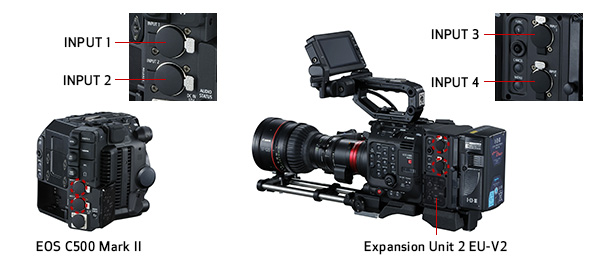
This gives you two audio controls on the operator’s side as well as two additional channels to record audio.
For just Genlock, you can purchase the cheaper Canon EU-V1:

These modules give you:
- Genlock
- Additional XLR inputs (only V2)
- Remote control
- Ethernet control
- V-mount plate with P-tap output (only V2)
- DC output to other devices (only V2)
- Lens control for certain supported lenses (only V2)
It is clear if you need the cameras for any sort of regular broadcast work you will have to purchase the EU-V2 expansion unit. Also, if you have multiple accessories it’s a good way to power them as well.
Now what about the Blackmagic URSA Mini Pro 12K?
It doesn’t have Genlock. It has reference inputs for Tri-Sync, Black Burst and Timecode. You do get LANC built-in, and don’t need an optional accessory.
What is clear though, is if you need to utilize this camera in a broadcast setup, and you need it to play well with other broadcast equipment, then the Canon C300 Mark III is the camera you want.

Autofocus
The Canon C300 Mark III has Dual Pixel AF with support for Touch AF and Face Detection AF. Canon is the class leader here, and with Canon’s range of cinema lenses there’s nothing left to say.
What is dual pixel AF? According to Canon:
For DAF, each pixel in the camera’s CMOS sensor is configured with two photodiodes. Two independent image signals can then be detected at each photosite and compared using phase-difference to provide autofocus with compatible lenses. DAF can survey the scene and recognizes not only whether the subject is in focus or not, but in which direction (near or far), and by how much.
Canon USA
Here’s the question: Do you need autofocus?
For those using the Blackmagic URSA Mini Pro 12K as a cinema camera with cinema lenses, autofocus isn’t a concern at all. But the same is true of Canon as well. The C300 Mark III has AF, when you need it.
Image Stabilization
According to Canon:
The EOS C300 Mark III includes the same built-in five-axis electronic IS introduced with the EOS C500 Mark II that works with almost any lens, including anamorphic.
Canon USA
Here again the C300 Mark III is designed to perform like a champ in situations the URSA 12K can’t.
Again, the question is: Do you need IBIS?
Built-in ND Filter
Both cameras have built-in ND filters, but they operate very differently.
| Camera | Module | Type |
| Canon C300 Mark III | 2, 4, 6, 8, 10 stops* | Manual filters |
| Blackmagic URSA Mini Pro 12K | 2, 4, 6 stops | Manual filters |
*8 and 10 through using two NDs at the same time (6+2) and (6+4). Canon calls this extended mode.
Both are okay, but the Canon C300 Mark III wins.
Top handle
The Canon C300 Mark III ships with a top handle and grip. The URSA 12K does not. They are added expenses.
Viewfinder and LCD
Both cameras ship with an LCD.
The C300 Mark III has a 4.3″ (1.23 million dot) touchscreen LCD. The lower resolution doesn’t really matter if it’s used like an LCD. The URSA 12K has a 4″ LCD capacitive touchscreen.
The C300 Mark III is for multiple kinds of filmmaking and videography, and you have to pick and choose what kind of viewfinder you need. You have three choices:
- Canon EVF-V50 OLED (1.77 million dots) – tiltable.
- Canon EVF-V70 OLED (2 million dots) – four buttons, false color and zebra, right position for shoulder mount, joystick and self-illuminating.
- Third-party viewfinders like a Zacuto Gratical (1.3 million dots) with an EVF mount.
I really don’t see the point of the V50. It’s ergonomically very limited, but it’s also cheap. I think most people would prefer the third-party viewfinder.
For the URSA 12K, you’re better off with the Blackmagic Design URSA Viewfinder:

Comparison of video features
Now let’s get into the camera video features:
Sensor
| Camera | Size | Dynamic Range | ISO Range |
| Canon C300 Mark III | 26.2 x 13.8 mm | 16+ stops | 160-25,600 |
| Blackmagic URSA Mini Pro 12K | 27.03 x 14.25 mm | 14 stops | 160-3200 |
The sensor sizes are similar. The C300 Mark III has a crop factor of 1.37 and the URSA 12K has a crop factor of 1.33. No difference in the real world.
It is pretty clear, the Canon C300 Mark III is clearly better in terms of dynamic range, and is a tremendous low light tool.
The Blackmagic URSA Mini Pro 12K has lower dynamic range than the URSA 4.6K camera, which is a step backwards. Blackmagic clearly preferred 12K over dynamic range here, and that affects low light ability as well. The sensor hasn’t been tested in the real world for fixed pattern noise and other artifacts that might occur.
The Canon C300 Mark III clearly has the advantage here.
In RAW
| Camera | Max. Resolution | Bit Depth |
| Canon C300 Mark III | 4096 x 2160 | 10/12-bit^ |
| Blackmagic URSA Mini Pro 12K | 12,288 x 6480 | 12-bit |
^Canon RAW is actually Canon RAW Lite.
The URSA 12K can downsample to 8K and 4K “in-sensor”, though how that impacts image quality is to be seen. Typically a sensor either downsamples from a higher resolution or skips lines. The latter introduces moire.
What about data rates?
| Camera | Resolution | Max Data Rate 5:1 Compression |
| Canon C300 Mark III | 4096 x 2160 | 125 MB/s |
| Blackmagic URSA Mini Pro 12K | 12,288 x 6480 | 578 MB/s |
| Blackmagic URSA Mini Pro 12K | 8192 x 4320 | 258 MB/s |
| Blackmagic URSA Mini Pro 12K | 6144 x 3240 | 145 MB/s |
| Blackmagic URSA Mini Pro 12K | 4096 x 2160 | 65 MB/s |
Canon RAW Lite has the singular advantage of being supported by almost all editing and finishing programs. But BRAW is catching up.
The Blackmagic URSA Mini Pro 12K has the clear advantage here. Not only can you do 12K, you can pick whatever resolution you want. At 4K, the data rate is lower than the C300 Mark III’s. And in Resolve, BRAW just sings. And, you can pick other compression settings as well, in constant or variable quality.
In 10-bit 4:2:2 internally
| Camera | Max. Resolution | Data Rate | Format |
| Canon C300 Mark III | 4096 x 2160 | 160-810 Mbps | XF-AVC |
| Blackmagic URSA Mini Pro 12K | N/A | N/A | N/A |
This, to me, is the most surprising statistic. The fact you can’t shoot Prores in the URSA 12K is going to force the issue for a lot of shooters. What if the production workflow denies BRAW? It’s not an industry standard yet.
What if all you need is 4K? That’s the $10,000 question.
Advantages of 12K
Nobody expects people to shoot 12K for a 12K finish. There are no consumer monitors or displays. Even 8K is still rare. 4K has made great strides, but the majority of people still use 1080p TVs. Even laptops and tablets are under 4K.
The advantages of shooting in 12K are:
- Visual effects plates, where you have the ability to crop or stabilize footage in post.
- Downsample 12K for 8K, for the best 8K possible. On the other hand, it remains to be seen how it compares to a similar camera like the Red Helium or Red Monstro.
- You can get close ups from a wide shot. This is useful but the effect looks very amateurish. Good enough for YouTube and cheap demonstration videos, but when you move the camera angle by 30 degrees or higher, you get cinematic results. But it is useful, period.
The question is: Who would want these features that would immediately make a difference to their bottom line?
I’ll be honest with you, I have no idea. The Olympics have been postponed, so 8K broadcast is a year away. Even then no great strides will have been made for 8K broadcast. It’s going to be a slow trot.
For visual effects, do people need 12K all the time? If yes, what have they been doing so far?
However, I can definitely see a market for 12K crops. For sports it’s a great idea, though I’m not sure how RAW workflows will work over optical fiber. The URSA 12K can only output a max of 4K 60 fps over SDI.
For documentaries it might definitely be useful, but the lower dynamic range and poor low light performance might drive people away. The C500 Mark II might be a great choice, or a Red Gemini or Monstro, which is already very popular in high end documentary filmmaking.
What about frame rates?
| Camera | Max fps at 12K | Max fps at 4K |
| Canon C300 Mark III | N/A | 120 fps |
| Blackmagic URSA Mini Pro 12K | 60 fps | 110 fps^ |
The URSA 12K could appeal to those looking to shoot at 220 fps in Super 16mm cropped mode. But if crop is not something you are keen on, then there’s hardly any difference in frame rates. In fact, the Canon C300 Mark III edges out the URSA 12K in 4K.
What I’ve seen in real life is most people are okay with 120 fps. If you really need more, you probably need a lot more, about 300 fps or more. Then neither camera is your camera.

Inputs and Outputs for Video
Both cameras have important 12G-SDI and 3G-SDI ports but the C300 Mark III has an HDMI A port as well. You only output 4K 60 fps via 12G-SDI.
Granted, HDMI isn’t a professional standard, but then again, neither is USB-C.
Media Cards
Media card costs are an important percentage of ownership:
| Camera | Card slots# | Price per GB |
| Canon C300 Mark III | 2x CFexpress + 1 x SD | $1.56^ |
| Blackmagic URSA Mini Pro 12K | 2x CFast 2.0 + 2x SD UHS-II + 1x USB-C 3.1 Gen 2 | $1.56/$0.11* |
#The SD card is useful to record proxies for faster editing. The proxies are 8-bit 4:2:0.
^Sandisk Extreme Pro CFexpress and CFast 2.0 256 GB.
*CFast 2.0 256 GB and 2TB SSD
The Blackmagic URSA Mini Pro 12K is clearly ahead here. CFast 2.0 is more readily available. CFexpress is still slow to ship in many places. However, the added USB-C port really gives it an edge if you want to reduce storage costs. You need to purchase the additional URSA Mini Pro 12K SSD Recorder for $395:
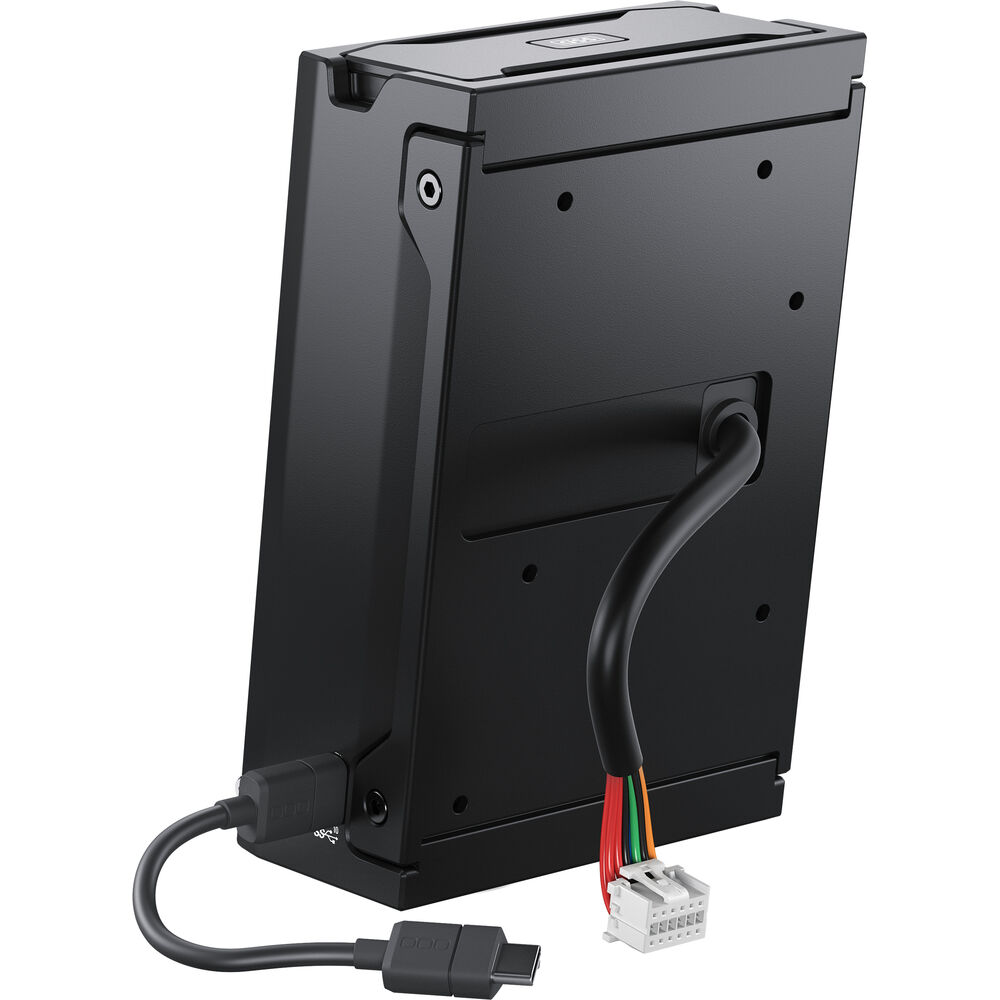
This gives you a solid USB-C connection to the back of the camera. The downside is, you only get a single slot.
Both cameras are equally good in professional environments with dual card slots. Overall, I’m giving this to the Blackmagic URSA Mini Pro 12K.
Battery life and Power
Here are the official numbers for RAW:
| Camera | Power Draw | Battery life | Battery Voltage |
| Canon C300 Mark III | 31 W | 130 minutes | 14.4V |
| Blackmagic URSA Mini Pro 12K | Unknown | Unknown | 14.4V |
| Camera | Battery | Cost* | Cost of 4 hours of operation |
| Canon C300 Mark III | BP-A60 90Wh | $429 | $792 |
| Blackmagic URSA Mini Pro 12K | V-mount batteries | $150^ | Unknown |
*You can always buy cheaper batteries, but the same applies to both cameras.
Here, I expect the C300 Mark III to have better battery life. Also, you can use lighter batteries. But until I have clear data, practically, both are equal.
Size and weight
| Camera | Volume | Weight |
| Canon C300 Mark III | 232 cubic inches | 1,730 grams |
| Blackmagic URSA Mini Pro 12K | 315 cubic inches | 3,000 grams* |
The Canon C300 Mark III wins the size and weight round. Both cameras can be stripped down to be lighter.

Which is the better camera for video?
Here’s a summary of each round, and the “winner”:
| Feature | Winner – Solo Shooter | Winner – Cinema |
| Ergonomics | Tie | Tie |
| Lenses | Canon C300 Mark III | Tie |
| Size and Weight | Canon C300 Mark III | Canon C300 Mark III |
| Third-party lenses | Canon C300 Mark III | Tie |
| Video features | Tie | Tie |
| Image quality | Canon C300 Mark III | Canon C300 Mark III |
| Low Light | Canon C300 Mark III | Canon C300 Mark III |
| AF for video | Canon C300 Mark III | Canon C300 Mark III |
| High Frame Rates | Blackmagic URSA Mini Pro 12K | Tie |
| Image stabilization | Canon C300 Mark III | Canon C300 Mark III |
| ND Filter | Canon C300 Mark III | Canon C300 Mark III |
| Media cards | Blackmagic URSA Mini Pro 12K | Blackmagic URSA Mini Pro 12K |
| Battery life | Tie | Tie |
| Broadcast Features | Canon C300 Mark III | N/A |
| Audio | Tie | Tie |
| Price | Tie | Tie |
It should be blatantly obvious by now which camera is suited for what. The URSA 12K has one major flaw for “serious” cinematography:
Why shouldn’t cinematographers just use the URSA 4.6K with 15 stops of DR?
With the money saved you could buy lenses, or other important gear.
All the salient points for it don’t really warrant the price, because 12K comes at the expense of lower dynamic range and poor low light performance. This is a step back. I would have preferred a 4.6K with higher frame rates and more DR. The world really doesn’t need 12K right now, but Blackmagic Design have to commended for innovation and this statement of intent.
Are you a solo shooter on a tight budget?
If yes, then the Canon C300 Mark III is the right investment for you. What you get:
- AF and IBIS
- Low light performance with stellar 16+ dynamic range and color
- 4K at 120 fps
- Lighter setup because you don’t need full frame lenses
- Simple post production and grading – either with 12-bit Canon RAW Lite or 10-bit 4:2:2 XF-AVC
- Better ND filters
- Probably better battery life
- Broadcast features
- Canon Service and Support!
I believe these are the features that contribute to food on the table. The C300 Mark III can handle more projects better, period.
Are you working on high-end videos and low budget films?
If yes, then the Canon C300 Mark III is the right investment for you.
Clients do pay extra for color grading or DI. Image quality and low light performance mean more than resolution in the cinema world. Any production that can’t afford an Arri Alexa or Red camera isn’t going to be satisfied with the 12K, they would probably be better off picking the 4.6K.
The C300 Mark III just has better support. The Blackmagic URSA Mini Pro 12K doesn’t have the same level of support.
What’s the one for me?
I pick the Canon C300 Mark III. It’s the camera that really has the most relevant features at a great price point.
What do you think?

Sareesh, are you still doing cinematographer video studies? The analysis you put into them was brilliant and very accurate.
Thank you. Stopped that a long time ago.
True but you can trade kinefinity in/upgrade them like you can with a Red.
It should be included in these lists, its a very relevant camera.
Canon seems to have some problems with overheating unless thats been corrected. Ursa 12k seems to be overcompensating for lower quality, smaller pixels with less dynamic range, I may be wrong but I noticed noise in the lower resolutions. Its not a problem with higher resolutions.
Neither, Kinefinity Mavo Edge 8K Full Frame will overtake both!
Every time a Kinefinity camera is ready to take over the world another one comes. It’s going to take a long time for people to trust them over established brands.
Canon has made a great 4K camera and BM 12K is clearly a VX camera… both are cutting edge, I’m waiting for the Kinefinity 8K Edge to come out and be tested in the real world. That camera company has made it’s ‘bones’ in production at this point. Buying equipment at this point does need to hit one’s bottom line for some time to come. It’s still a heavy investment and there is little stability on the work front at this point… hmm… big decision!