
In this lesson we’ll go over the ClearImage Zoom and Digital Zoom options, and whether they are a viable option for video.
What is ClearImage Zoom and Digital Zoom?
Under menu B3 > Zoom Setting, you have the following options:
- Optical Zoom
- ClearImage Zoom
- Digital Zoom
Optical zoom restricts your zoom to the lens you’re using. But it has to be a zoom lens. E.g., for this lesson I’m using a 28-70mm f/3.5-5.6 OSS lens, and my zoom range under optical zoom is restricted to between 28-70mm.
Digital Zoom has been around for ages, and it magnifies your image electronically, a process generically known as upscaling or uprezzing or interpolation. In the a7R II, you have a digital zoom that goes from 1.1x to 4x (up to four times) the magnification.
E.g., if I have my lens at 70mm, I can use digital zoom to further magnify my image to up to 4 times, or about 280mm. The question is, will it degrade image quality?
ClearImage Zoom is Sony’s unique algorithm where it does not just magnify the image but also uses clever interpolation techniques to achieve as less degradation as possible. ClearImage Zoom has a range from 1.1 to 2x (twice the magnification).
Why 2x? I’ve written an article a while ago on the limits of uprezzing, check it out.
Theoretically, the best image quality is achieved in this order, from best to worst:
- Optical zoom
- ClearImage Zoom
- Digital Zoom
For the a7S II, since you can’t record 4K in APS-C mode, it is of special interest to us to see if ClearImage can be used instead.
The limits of ClearImage Zoom
Unfortunately, accessing ClearImage Zoom has some drawbacks:
- You can’t record in 100/120p.
- You can shoot RAW stills, which is why I’m not considering it for stills.
- You are restricted to multi-metering (no spot meter).
- You can’t use Smile/Face Detect. or Lock-on AF, so no autofocus for video.
Important note: Digital Zoom operates from 1.1x to 4x, but 1.1x to 2x is ClearImage Zoom automatically. So technically, you can use Digital Zoom as long as you understand that going over 2x does not use the ClearImage Zoom algorithm.
The test
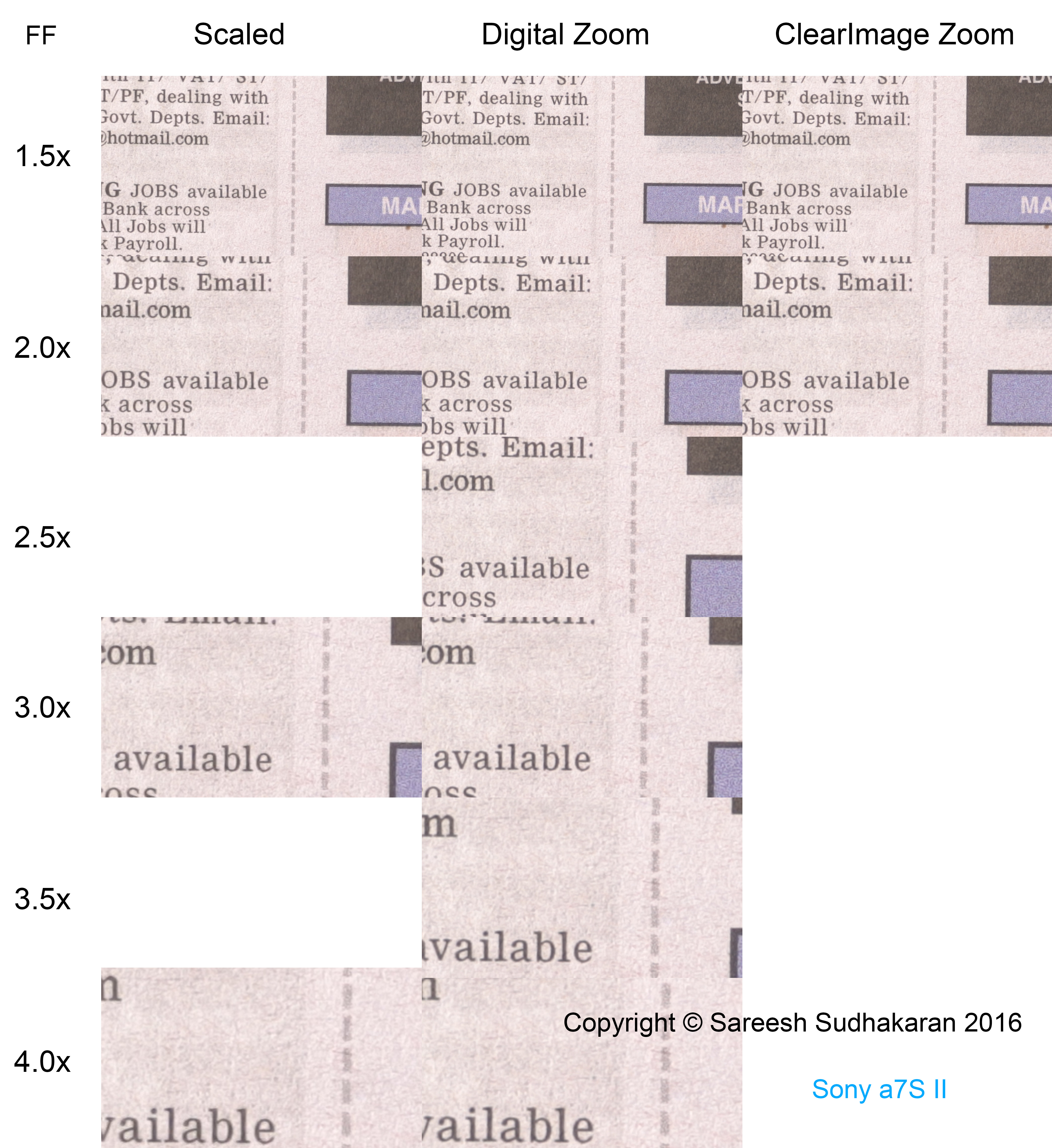
The test is just of newspaper, since we’re looking for a resolution disadvantage. I shot the scene in XAVC S 4K at 100 Mbps using the 28-70mm lens, at f/5.6, 1/50th of a shutter, 25 fps and ISO 100.
The native images were simply scaled in Premiere Pro, no special algorithm was used. The bicubic interpolation algorithm in After Effects and Photoshop would do a much better job.
Here’s the test in full frame (click to enlarge):
What do you see? Here’s what I see:
Very clearly, at all magnifications, ClearImage Zoom/Digital Zoom performs better than a simple interpolation.
Does ClearImage Zoom do better than your lens?
Can we trust ClearImage Zoom blindly, or can it replace a zoom lens? Here’s a comparison of a 35mm shot with 2x ClearImage Zoom vs a 50mm and 70mm scene shot optically, on the same lens (click to enlarge):

What do you see?
The digital zoom/ClearImage Zoom is sharper, because there most likely is some sharpening going on in the background. But there doesn’t seem to be any tangible loss in resolution.
Takeaway
First of all, something important: The ‘resolution’ advantage of ClearImage Zoom or Digital Zoom can be the result of sharpening applied, because after all, this is a test of resolution. You could get similar results in post production. You don’t gain actual resolution, but seemingly, you don’t lose noticeable resolution either.
The advantage of Digital Zoom is that you can do all of this in camera, in realtime, without wasting time in post.
Therefore, I can recommend you use ClearImage Zoom when in a pinch. It’s not all a bed or roses, because there are two gotchas:
- If you use an excellent lens like the Otus, say, and if you cut between shots with and without ClearZoom, the resolution difference might be noticeable.
- More importantly, for any lens, the difference in sharpness is noticeable. You will have to sharpen the footage that doesn’t use ClearImage Zoom so it will match the ones that do.
The cool thing is, you can get all this even at 4K, so if you have a:
- 35mm prime lens, it becomes a 35-70mm zoom, and
- If you have a 24-70mm zoom, it becomes a 24-140mm zoom.
Also, you can use ClearImage Zoom to replace the APS-C mode that doesn’t exist anymore for 4K. Any slight loss is negligible. Yahoo!
