
- For the Pocket 6K click here.
- For the Pocket 4K click here.
In this video I test the various media cards to see if they can record 4K 60p:
Important! Now that Blackmagic RAW has arrived the problems in the video don’t exist. But we have new ones.
Download Video (1080p) | Download Video (540p)
For the Pocket 6K
Data rate chart
The data rates for 6K at 3:1 are high, but manageable.
| Codec | Variant | Data rate at 30 fps 6K (6144 x 3456) |
| Blackmagic RAW | CB 3:1 | 323 MB/s |
| Blackmagic RAW | CB 5:1 | 194 MB/s |
| Blackmagic RAW | CB 8:1 | 121 MB/s |
| Blackmagic RAW | CB 12:1 | 81 MB/s |
| Blackmagic RAW | Q0 | 194 to 483 MB/s |
| Blackmagic RAW | Q5 | 49 to 139 MB/s |
The problem comes in the high-speed mode. The Pocket 6K can go up to 50 fps in full frame 6K and 60 fps in other variants. But, as you can see below, the data rates at 3:1 compression are too high for any current media card – SSD, CFast 2.0 or SD Card.
| Codec BRAW CB 3:1 | Data rate at 50/60 fps |
| 6K (6144 x 3456) @ 3:1 | 539 MB/s @ 50 fps |
| 6K (6144 x 3456) @ 5:1 | 322 MB/s @ 50 fps |
| 6144 x 2560 (6K 2.4:1) @ 3:1 | 480 MB/s @ 60 fps |
| 6144 x 2560 (6K 2.4:1) @ 5:1 | 288 MB/s @ 60 fps |
| 5744 x 3024 (5.7K 17:9) @ 3:1 | 528 MB/s @ 60 fps |
| 5744 x 3024 (5.7K 17:9) @ 5:1 | 318 MB/s @ 60 fps |
Prores rates are similar to the Pocket 4K, since you can’t shoot 6K in Prores:
| Codec | Variant | Data rate at 30 fps 4K DCI |
| Prores | HQ | 117.88 MB/s |
| Prores | 422 | 78.63 MB/s |
| Prores | LT | 54.63 MB/s |
| Prores | Proxy (PXY) | 24.25 |
Which media cards to use?
TLDR:
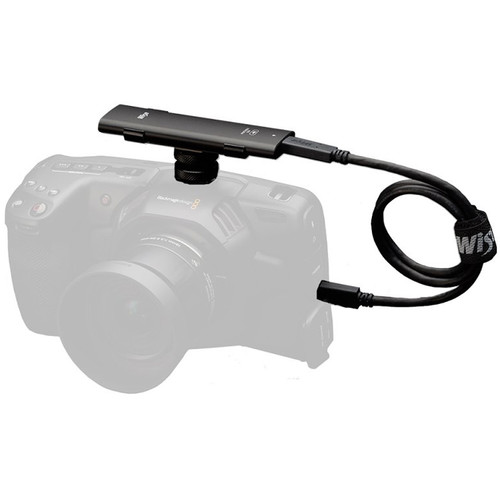
For 6K 50 fps in 5:1, the only currently recommended drive is the Wise 1 TB Portable SSD.
For everything else, I recommend Samsung T5 SSDs. Get the 2 TB drive. Buy here: Amazon, B&H.
With a 1 TB SSD you’ll get about 50 minutes of 3:1 CB BRAW at 30 fps.
Important! The maximum read/write speeds you see printed on the drives or media cards are not true sustained speeds.
Blackmagic Design have updated the list of media cards, and I advise you to follow it strictly. You’ll find it on the support page or click here directly (link might change). Select ‘Professional Cameras’ and look under ‘Latest Support Notes’. The last update as of this writing is 6th June 2019.
Here’s a price comparison:
| Media | Price per GB* |
| Samsung T5 | $0.16/GB |
| Wise 1 TB SSD | $0.27/GB |
| Sandisk Extreme Pro CFast 2.0 | $1.56/GB |
| Sandisk Extreme Pro UHS-II SD Card | $1.56/GB |
*CFast at 256 GB, SD Card at 128 GB, T5 at 1 TB
The Samsung T5 (Amazon, B&H) drive has a sustained write speed of 400 MB/s. This is well under the maximum data rates of the BMPCC 6K, but depending on card capacity you might have some issues. Use higher capacity drives for better performance.
The Sandisk CFast 2.0 card (Amazon, B&H) has a sustained write speed of 220 MB/s. This is well under the maximum data rates of the BMPCC 6K, but depending on card capacity you might have some issues. The problem is after a while the card will slow down. I don’t think CFast 2.0 is worth the trouble here.
The Sandisk Extreme Pro SD Card (UHS-II, 300 Mbps) (Amazon, B&H) is probably only useful if you’re into lower data rates and settings.
For the Pocket 4K
Data rate chart
Here’s the complete table of data rates and codecs:
| Codec | Variant | Data rate at 30 fps 4K DCI |
| Blackmagic RAW | CB 3:1 | 135 MB/s |
| Blackmagic RAW | CB 5:1 | 81 MB/s |
| Blackmagic RAW | CB 8:1 | 51 MB/s |
| Blackmagic RAW | CB 12:1 | 34 MB/s |
| Blackmagic RAW | Q0 | 81 to 203 MB/s |
| Blackmagic RAW | Q5 | 21 to 58 MB/s |
| Prores | HQ | 117.88 MB/s |
| Prores | 422 | 78.63 MB/s |
| Prores | LT | 54.63 MB/s |
| Prores | Proxy (PXY) | 24.25 |
- For Ultra Hight Definition 3840 x 2160, divide the data rate by 1.07. E.g., 3:1 CB in UHD will be 127 MB/s*.
- For 24 fps, divide the data rate by 1.25. E.g., 3:1 CB will be 108 MB/s*.
- For 25 fps, divide the data rate by 1.2.
Tip: First divide the resolution (if necessary), then divide the frame rate separately (if necessary).
*Rounded to the highest number
Which media cards to use?
TLDR:
Use Samsung T5 SSDs. Buy here: Amazon, B&H. With a 500 GB drive (you get about 480 GB) you get 1 hour of 3:1 CB RAW. However, it’s better to get the 1 TB drive because over the long term it will maintain better sustained speeds.
Important! The maximum read/write speeds you see printed on the drives or media cards are not true sustained speeds.
Blackmagic Design have updated the list of media cards, and I advise you to follow it strictly. You’ll find it on the support page or click here directly (link might change). Select ‘Professional Cameras’ and look under ‘Latest Support Notes’. The last update as of this writing is 6th June 2019.
Here’s a price comparison:
| Media | Price per GB* |
| Samsung T5 | $0.16/GB |
| Sandisk Extreme Pro CFast 2.0 | $1.56/GB |
| Sandisk Extreme Pro UHS-II SD Card | $1.56/GB |
*CFast at 256 GB, SD Card at 128 GB, T5 at 1 TB
The Samsung T5 (Amazon, B&H) drive has a sustained write speed of 400 MB/s. This is well over the maximum data rates of the BMPCC 4K.
The Sandisk CFast 2.0 card (Amazon, B&H) has a sustained write speed of 220 MB/s. This is too close to the maximum data rates of the BMPCC 4K, but depending on card capacity you might have some issues. The problem is after a while the card will slow down. I don’t think CFast 2.0 is worth the trouble here.
The Sandisk Extreme Pro SD Card (UHS-II, 300 Mbps) (Amazon, B&H) is useful for higher compression settings.
