

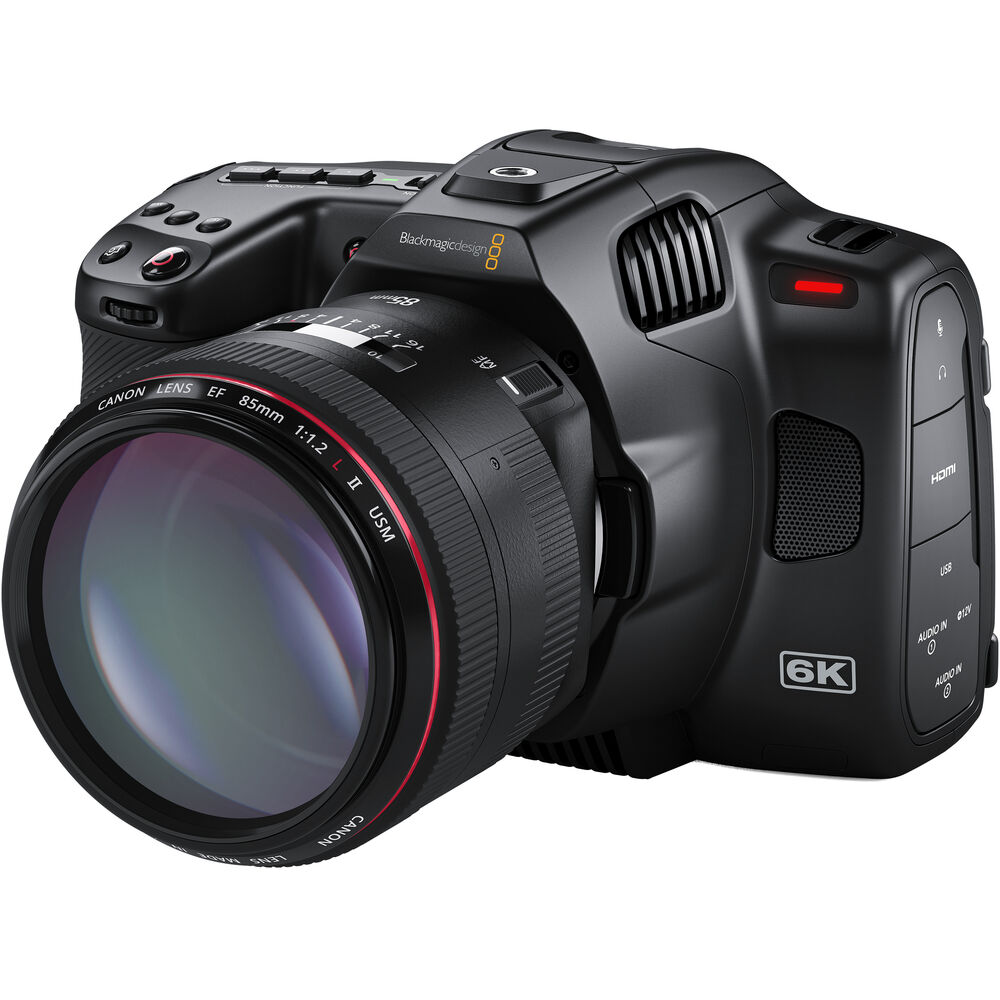
The Blackmagic Pocket Cinema Camera 6K Pro (Amazon, B&H) is a ground-breaking camera in many ways:
- 6K RAW up to 50 fps
- Internal ND filters
- Attachable EVF (sold separately)
- Blackmagic RAW and Prores.
- Super 35mm sensor with a dynamic range of 13 stops
- Free DaVinci Resolve Studio license
This article will look at some of the important quirks and features of the Blackmagic Pocket Cinema Camera 6K Pro you should be aware of.
Video Record Modes
Here’s the complete table:
Blackmagic RAW
| Resolution | Frame Rates^ | Data Rate 3:1* | Data Rate 12:1* |
| 6144 x 3456 (16:9) | 24 to 50 fps | 323 MB/s | 81 MB/s |
| 6144 x 2560 (2.4:1) | 24 to 60 fps | 240 MB/s | 60 MB/s |
| 5744 x 3024 (17:9) | 24 to 60 fps | 264 MB/s | 67 MB/s |
| 4096 x 2160 (4K DCI) | 24 to 60 fps | 136MB/s | 35MB/s |
| 3728 x 3104 (6:5 anamorphic) | 24 to 60 fps | 176 MB/s | 45 MB/s |
| 2868 x 1512 (17:9) | 24 to 120 fps | 67 MB/s | 17 MB/s |
^Frame rates are 23.98, 24, 25, 29.97, 30, 50, 59.94 and 60 fps.
Apple Prores
| Resolution | Frame Rates^ | HQ* | LT* |
| 4096 x 2160 (4K DCI) | 24 to 60 fps | 117.9 MB/s | 54.6 MB/s |
| 3840 x 2160 (UHD) | 24 to 60 fps | 110 MB/s | 51 MB/s |
| 1920 x 1080 | 24 to 120 fps | 27.5 MB/s | 12.75 MB/s |
^Frame rates are 23.98, 24, 25, 29.97, 30, 50, 59.94 and 60 fps.
Key takeaways
- 6K file sizes are going to be huge, unless you use a lower compression ratio.
- 4K DCI and UHD is available in Blackmagic RAW and Prores.
- The best Prores variant is HQ. That’s 10-bit 4:2:2.
- For zero color correction, Prores LT will be the best and fastest workflow for straight to web content.
- 2868 x 1512 (almost 3K) at 120 fps is a great feature.
Is it really Super 35mm?
The Blackmagic Pocket Cinema Camera 6K Pro (Amazon, B&H), much like its predecessor, has a sensor size of 23.10mm x 12.99mm. Super 35mm film has a size of 24.89mm x 18.66.
The BMPCC 6K Pro has a crop factor of 1.07 horizontally, when compared to Super 35mm. This isn’t a significant difference, except when you’re shooting in lower resolutions. Lower resolutions are cropped, so you get a smaller sensor.
With 6:5 anamorphic, you have a crop factor of 1.6 compared to true anamorphic, which is 21.95 mm x 18.6mm. That’s significant.
With 4K DCI and UHD, you have a crop factor of 1.5x compared to Super 35mm, so you really get slightly worse than a Blackmagic Pocket Cinema Camera 4K (Amazon, B&H)!
None of these things are deal breakers, but you need to be aware of what you’re getting.
Memory cards
The Blackmagic Pocket Cinema Camera 6K Pro (Amazon, B&H) supports three kinds of memory cards:
- SDXC
- CFast 2.0
- SSD via USB-C
There is no recording limit and the file format is exFAT for Windows/Mac and HFS+ for Mac. This needs to be formatted in a computer, and not on camera.

All cards cannot record Blackmagic RAW, especially at the higher data rates.
For a full list of cards supported, check out the Blackmagic Design Support page.
You cannot record to two kinds of media at the same time (a shame!), though it would be a great option to use SSDs and a UHS/U3 SD card as backup/proxy.
It might be a good idea to format all cards in exFAT, which is what I’ve been doing for many years – unless you are sure you’re going to be restricted to a Mac ecosystem entirely. There is no recording time limit on any media.
Important: At this time, you can’t copy data from SD/CFast to SSD via USB-C.

RAW or Prores?
I recommend shooting Blackmagic RAW, for the following reasons:
- Resolve can easily handle it. I’ve been able to get multiple streams of 4K BRAW in full resolution, no problem.
- You can tweak white balance and ISOs in Resolve, with no penalty in image quality.
- You can change the color space and gamma in Resolve, with no penalty in image quality.
Watch this for more information (this also applies to the BMPCC 6K Pro):
External monitor options
Notes:
- The Blackmagic Pocket Cinema Camera 6K has a full-sized HDMI A port.
- It supports 1080p 10-bit only. No RAW or 4K.
- The camera has time code. You can input timecode, but no timecode via HDMI. Need to test!
- There is no control from monitor to camera.
Which one to get? The Atomos Ninja V (Amazon, B&H) is the best bang for the buck. Ideally, it can be used to record 1080p proxies for editing if your machine isn’t powerful enough.
However, the Atoms Ninja V records in ProRes RAW, to record BRAW externally you will need Blackmagic’s Video Assist.
The Blackmagic Pocket Cinema Camera 6K Pro (Amazon, B&H) has a tiltable 5″ LCD touchscreen.

What is “Dynamic Range”?
Blackmagic design has its own definition of dynamic range as it pertains to their cameras. It’s basically gamma. In fact, DaVinci Resolve calls it gamma.
Here are your options:
- Film – This is a log profile, and is best if you are going to grade or use 3D LUTs
- Extended Video – I use this LUT to shoot, while the footage is being recorded in Film gamma.
- Video – I don’t recommend this. It doesn’t look good and is not Rec. 709 compliant either.
Which gamma to pick?
I shoot in Film dynamic range, in Blackmagic RAW at 3:1. If that’s not possible, then scoot down to 5:1. But I don’t use lower settings and I don’t use Q0 or Q5.
Many who shoot straight for YouTube might find baking in LUTs interesting. I prefer to do this in post, it’s a simple thing anyway to slap on a LUT in Resolve, and you have the added benefit of being able to tweak it in case something gets messed up.
The camera does give the ability to output different LUTs each to the LCD and via HDMI. You can load up to 10 custom LUTs. You don’t have to bake it in if you don’t want to. That’s excellent!

What format should I choose for the best image quality on the Blackmagic Pocket Cinema Camera 6K?
This is how I shoot:
- 6K 16:9
- Constant Bit Rate 3:1 or 5:1 Blackmagic RAW, as the media card allows.
- Film gamma, with Extended Video LUT for monitoring.
- Record to SSDs via USB-C, like the Samsung T5 (Amazon, B&H).
- Edit and grade in Davinci Resolve Studio.

EVF compatibility
The Blackmagic Pocket Cinema Camera 6K Pro (Amazon, B&H) has a special port for the EVF that they sell separately. This will include a separate, bolt-on Pocket Cinema Camera Pro EVF with a crystal-clear glass lens, adjustable diopter, and four eyecups, including a version for left-eye viewers.
You get an integrated high quality 1280 x 960 color OLED display with built in proximity sensor, 4 element glass diopter for incredible accuracy with a wide -4 to +4 focus adjustment.
You also get a built in digital focus chart that they claim will ensure you get perfect viewfinder focus setup. You can also view critical status information such as frame guides.
The Pocket Cinema Camera Pro EVF connects quickly to the Blackmagic Pocket Cinema Camera 6K Pro via a single connector. The viewfinder has a 70 degree swivel range and comes with 4 different types of eyecups for both left and right eyes. This is great as it will provide for a better handling on the field.
Generation 5 Color Science
Blackmagic claims that the BMPCC 6K Pro will share the same Generation 5 Color Science found in the URSA Mini Pro. They claim that this new camera will have 12 bit gamma curve to help capture colors and skin tones better.
Featuring the same generation 5 color science as the high end URSA Mini Pro 12K, the new Pocket Cinema Camera 6K Pro delivers an even greater advancement in image quality with stunning, accurate skin tones and faithful color in every shot. You get a new dynamic 12-bit gamma curve designed to capture more color data in the highlights and shadows, for better looking images. The color science also handles some of the complex Blackmagic RAW image processing, so color and dynamic range data from the sensor is preserved via metadata which you can use in post production. That means you get images that have a natural, film like response to color adjustments in post with DaVinci Resolve Studio.
Blackmagic Design
You can also upload 3D LUTs on to the camera for monitoring.
Rolling Shutter
The Pocket Cinema Camera 6K Pro has a rolling shutter. Performance is okay, unless you’re stupid enough to shake the camera around like a maniac.
It might be a problem with helicopter blades and passing trains, but what are your options?
What’s this dual native ISO thing?
Traditionally, and on most cameras, when you bump up the ISO you get more noise. The “native” ISO is the ISO which gives the maximum dynamic range. Anything below or above this has reduced dynamic range.
A “dual-native” ISO is marketing speak under the promise that you get the best dynamic range at two ISOs instead of just one. This isn’t possible completely. Even the Panasonic Varicam (the first camera in modern times to introduce this) has differences in the two ISOs.
If the tests with the BMPCC 6K and 4K are any indication, I wouldn’t put too much trust into the dual native ability of the BMPCC 6K Pro. Just shoot normally, and you can bump up the ISO in Resolve up to 1000 ISO (when you shoot below it), and that is an acceptable look with low noise.
Note: Resolve does force you to pick your ISO beforehand. If you pick the lower range, you can’t go higher than a certain number. I’ll need to test what the limits of the 6K Pro are in this regard.
If you want to go higher, be prepared to use noise reduction.

ND Filters
The Blackmagic Pocket Cinema Camera 6K Pro (Amazon, B&H) has internal motorized ND filters from stops ranging from 2 up to 6 stops.
This is a major upgrade from the BMPCC 6K. You will save a ton of time (and money) by not having to change filters also while changing lenses.
Image Stabilization
There is no internal image stabilization. You’re restricted to what the lenses are capable of doing, if they are supplied the adequate power.
Lens information and metadata
The Blackmagic Pocket Cinema Camera 6K Pro (Amazon, B&H) has an active EF mount.
It’s “active” because you get f-stop and focal length information to the camera, and that is recorded in the metadata. You can also manually populate metadata with slate data such as project, scene number, take and special notes.
You can control the iris (aperture) and zoom if the lens is electronic. Click here to learn more about the best lenses for the BMPCC 6K.
Control via Gimbals
There’s no control port for gimbals. That’s a serious drawback. You can balance the camera on a gimbal. Here’s a video I made:
Can I autofocus?
Yes, but only single touch AF. There is no continuous AF, so forget about all the goodness of Canon’s dual pixel AF.
The camera does have a focus peaking function for manual focus.
Frame guides
Blackmagic OS has frame guides. These are the options available:
- 4:3
- 2.39:1
- 2.35:1
- 2.4:1
- 1.85:1
You can toggle the opacity as well. I wish they had custom frame guides.

Notes on the LCD display
The 5″ LCD is a Tiltable touchscreen, and it’s hard to use touchscreens in tough outdoor productions.
It’s about 1500 nits, which is a major upgrade.
The menu is the simplest possible, and you can save up to 12 custom presets for fast shooting. You can decide what parameters are displayed on the LCD and which ones are transmitted via HDMI.
The Blackmagic Pocket Cinema Camera 6K Pro (Amazon, B&H) has the best camera menu of any video camera in any class, period.
Audio
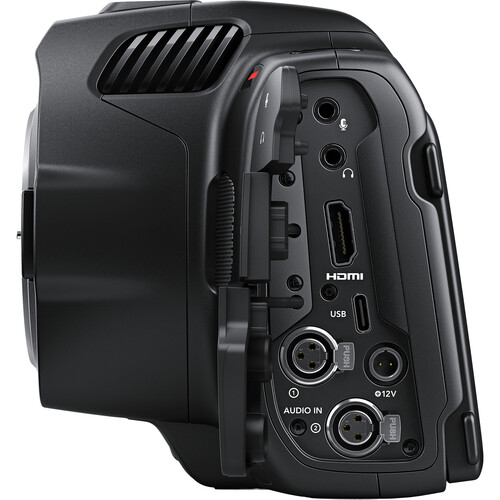
The camera has the following audio jacks:
- 2 x mini XLR analog switchable between mic with phantom power support and line level (up to +14dBu). 48V.
- 1 x 3.5mm stereo jack. Can also be used for Timecode input (LTC).
- 1 x 3.5mm headphone jack.
- The camera also has dual onboard microphones for scratch audio.
You can buy mini XLR to XLR adapters here.
You can switch between the two input options and monitor volume via the LCD. You can also record from both jacks to separate channels.
There are audio levels and you can adjust the volume. No other controls exist.

Battery and power
There is a 12V port for DC input and a 2-pin locking connector for AC power. That’s great, because the battery life sucks with the included battery. You only get about 45 minutes in the real world, if no USB-C device is connected.
The camera uses Sony NP-F570 compatible batteries, and you can get cheap ones that work fine as well. The downside is they don’t ship chargers with the camera!
You can use the Blackmagic Pocket Cinema Camera 6K Pro Battery Grip (Amazon, B&H). Blackmagic claims that this grip holds two NP-F570 batteries so you can shoot for up to 3 hours.
You can also power the camera (and charge a battery) with a power bank via USB-C. Typical power banks deliver up to 5V (around 5A). Don’t just buy without reading the specs – because the camera needs between 12-20V. There are power banks that give you the choice between 5/12/20V, etc., like these ones.
I use the LEMO connection and power it with large bricks. Otherwise it’s intolerable.
Finally, ergonomics
The camera has the following buttons for quick access:
- Iris
- Focus
- High Frame Rate
- Zoom
- Menu
- Playback
- Stills
- Record – top and front
- White Balance
- Shutter
- ISO
- Function buttons – I, II and III – three customizable buttons. Nice!
They all work great. Usability is simple and streamlined. I’ve had no issues whatsoever.
There are two 1/4″ threads – one on top and one at the bottom. That should provide a stable platform for cages, though I really don’t see the need for one with this camera.
If you need a cage, I would highly recommend a universal cage. This one (Amazon, B&H) is great:
To purchase the Blackmagic Pocket Cinema Camera 6K Pro please use these links – (Amazon, B&H). I hope you found this useful.
[recnative1]

Correction. Three quarter twenty holes. Two on the bottom, one on top.
As far as I can tell from the photos and specs mentioned, there are two threads. If you can cite the source, then that will be helpful.
Cool article! Something to add: the pocket 6k pro is very well able to format media in camera. Just touch the remaining time icon and you get the format menu :-)
What a fantastic review, thanks Vets for taking the time to do this and you answered quite a few of my questions. I was curious if the ninja five could record BRAW from your description above it doesn’t which is a shame. I’m going to try a Samsung 1 TB SSD and see how I go Connected via USB-C.
BRAW, being the property of Blackmagic, is not available to record on the Atomos Ninja V. If you want to record BRAW externally on a recorder, you will have to get the Blackmagic Video Assist. I do not think you will have a problem recording on the Samsung 1TB SSD.
I think have mistaken. It does shoot 4k dci braw but with a crop, sort of like how red does it. Now what is the exact crop factor when shooting 4k raw is what I’m tryna find out for myself. Can’t find that info anywhere.
Right, Thanks for the correction.