
Working in 4K and 8K, especially RAW or uncompressed, offers incredible image quality, but the costs can add up fast.
From massive storage needs to high-end workstations, working with uncompressed footage demands serious investment. You might want to consider the expenses of cameras, media, backups, and post-production hardware before committing.
In this guide, we’ll break down the real costs of handling ultra-high-resolution footage, and whether it’s worth it for your film.
How big are RAW and uncompressed files, really?
How to Calculate Size and Data Rate of RAW and Uncompressed Files
To calculate the uncompressed file size and data rate, use this simple formula:
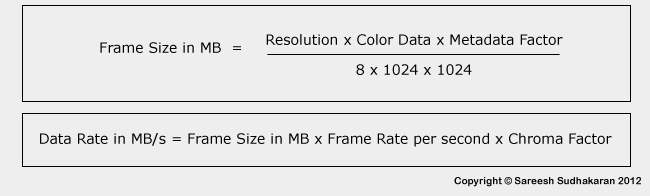
Where:
- Resolution = Horizontal Resolution x Vertical Resolution
- Color Data = Color Bit Depth per Channel x Total Number of Channels
- Metadata Factor = Overhead for metadata, usually 2-3% but you can add 5% for basic calculations.
- Chroma Factor = (Y’ + Cb + Cr)/12
Note: The chroma factor (something I cooked up) is added in the data rate formula because a full raster image file will reserve space for all three color components – R, G and B, regardless of how it has been sampled.
Note: Instead of ‘1024’, you can also use ‘1000’ instead for additional safety – we all know how a few hard drive manufacturers love to fudge their numbers!
If the formula is confusing, let me explain with an example.

Example calculation with uncompressed video
Let’s say our video signal is uncompressed 3840×2160 10-bit 4:2:2 at 24 fps.
- The Resolution is 3840 x 2160 bits = 8,294,400 bits
- The Color Data is 10-bit x 3 (In a Y’CbCr or RGB image, the channels are always three. If you add an alpha channel it’s four, and for formats like OpenEXR with multiple channels it can be whatever the channel size is). The Color Data is 10 x 3 = 30
- The Metadata factor is 1.05 (5%). This is an estimate.
- Chroma factor is (4+2+2)/12. = 0.67. This is an estimate based on my experiences.
Now that we have the basic information, we just plug it into the formula.
Frame Size = 8,294,400 x 30 x 1.05 / (8 x 1024 x 1024) = 31.15 MB approximately.
The Data Rate is 31.15 x 24 (fps) x 0.67 = 501 MB/s
To give you an idea of what this means, one hour of footage at this data rate will give you 1.72 TB of data.
Try it on uncompressed TIFF or DPX files and see for yourself. There is a logic to uncompressed video sizes, after all!
Example calculation with RAW video
Uncompressed RAW and uncompressed video have only two differences:
- The number of channels in RAW is just one.
- The Chroma Factor is always one.
This means:
Uncompressed RAW will always be one third the data rate of uncompressed 4:4:4 video.
Let’s calculate using the same example as above, except the video is RAW now.
The frame size is one-third the size of uncompressed video, so 10.38 MB.
The data rate is 10.38 x 24 x 1 = 250 MB/s
Important: The example is instructive, because the data rate for RAW is half of uncompressed video, because the video was 10-bit 4:2:2. If it was 10-bit 4:4:4, the data rate for RAW would have been one third.
Now that we know how to calculate uncompressed file sizes we are in a better position to estimate how much data we are going to use on a particular project.
Before we get into that, it might be a good idea to estimate the cost per GB and cost per TB of footage.
Finding the Cost per TB
The days of GB are over for high-end video. You can fill up tens to hundreds of Terabytes if you are an active filmmaker or production company.
As of this writing, here are prices of hard drives:
- A typical 12 TB spinning drive costs about $220 (Amazon, B&H)
- A typical 16 TB spinning drive costs about $330 (Amazon, B&H)
- A typical 20 TB spinning drive costs about $360 (Amazon, B&H)
I chose the same vendor and drive family. In this case Seagate Ironwolf NAS drives.
The prices are always falling. The higher the drive capacity, the better it is for storage long term. I’m not using SSDs here because for large storage it still doesn’t make sense financially for most independent and low-budget filmmakers.
So what does this mean for our examples above? Here’s a table:
| Video Type | One Hour (12 TB Drive) | One Hour (20 TB Drive) |
|---|---|---|
| Uncompressed Video | $31 | $31 |
| RAW | $16 | $15 |
| Compressed RAW 3:1 | $5 | $5 |
In the above table, you can see the difference in price per hour is negligible nowadays (it wasn’t always the case). The table boils down to about $18.33/TB or $0.018/GB.
Over a decade ago the cost per GB was $0.10, so prices have fallen dramatically, and it’s no longer a mountain to climb.
Now that we have a limit to how much a TB costs, we can figure out the expenses involved in working with uncompressed footage.
The Cost per Project
One video feed does not a film make. A film has multiple hours of footage, and many copies or backups, and many work files, cache files, etc.
There are factors you need to consider before you can estimate storage costs:
- Length of final product (30 sec commercial vs 2 hour feature film vs 8 episode series vs feature documentary)
- Shooting ratio (low for fiction, really high for documentaries)
- Single camera or multi-camera
- Visual effects plates or shots
Let’s take four real-world camera data rates:
| Format (24 fps) | Data Rate | Cost per hour |
|---|---|---|
| 4.5K Open Gate Arriraw | 501 MB/s | $31 |
| 8K 2:1 5:1 R3D | 246 MB/s | $16 |
| 4K 10-bit 4:2:2 XF-AVC | 50 MB/s | $3 |
| 4K 8-bit 4:2:0 H.264 | 12.5 MB/s | $1 |
Now, one has to factor in costs associated with storage, like enclosures, cables, maintenance, replacement drives, RAID controllers, etc. This depends on the company or product you opt for.
For the purposes of our calculation, let’s assume we are shooting a 2-hour feature film with a shooting ratio of 10:1.
That means we’ll be shooting 20 hours of footage. So, each copy of our data will be:
| Camera | Cost per hour | Cost per copy | Cost of 3 copies^ |
|---|---|---|---|
| 4.5K Open Gate Arriraw | $31 | $620 | $1,860 |
| 8K 2:1 5:1 R3D | $16 | $320 | $960 |
| 4K 10-bit 4:2:2 XF-AVC | $3 | $60* | $180 |
| 4K 8-bit 4:2:0 H.264 | $1 | $20* | $60 |
^This isn’t the actual cost. There’s a ‘gotcha’, see below.
The last two are highly compressed video, which works great for a lot of shooting needs. Even high end cinema cameras offer Prores HQ or 444 or similar, with lower data rates.
But this article is about uncompressed video or RAW, so we must live with the upper tier numbers. You can see how you might be spending a good amount of money on just three copies on normal, slow drives.
But what if you want to edit on RAW footage. With those data rates, you’ll need RAID over SSD or M.2 drives, and this adds to the cost as well. You might be spending up to $5,000-10,000 depending on the turnaround and additional shots and clips for visual effects.
Let’s just take the case of the Arri Alexa LF:
- Total size of one copy: 34.4 TB
- Size of three copies: 103.2 TB
- You’ll be using two enclosures. One copy is stored in a separate location. So the spaces are 68.8 + 34.4 TB.
- With 16 TB drives, we’ll need 5 + 3 drives, or 8 drives. Cost of 8 drives is about $2,500. Gotcha!
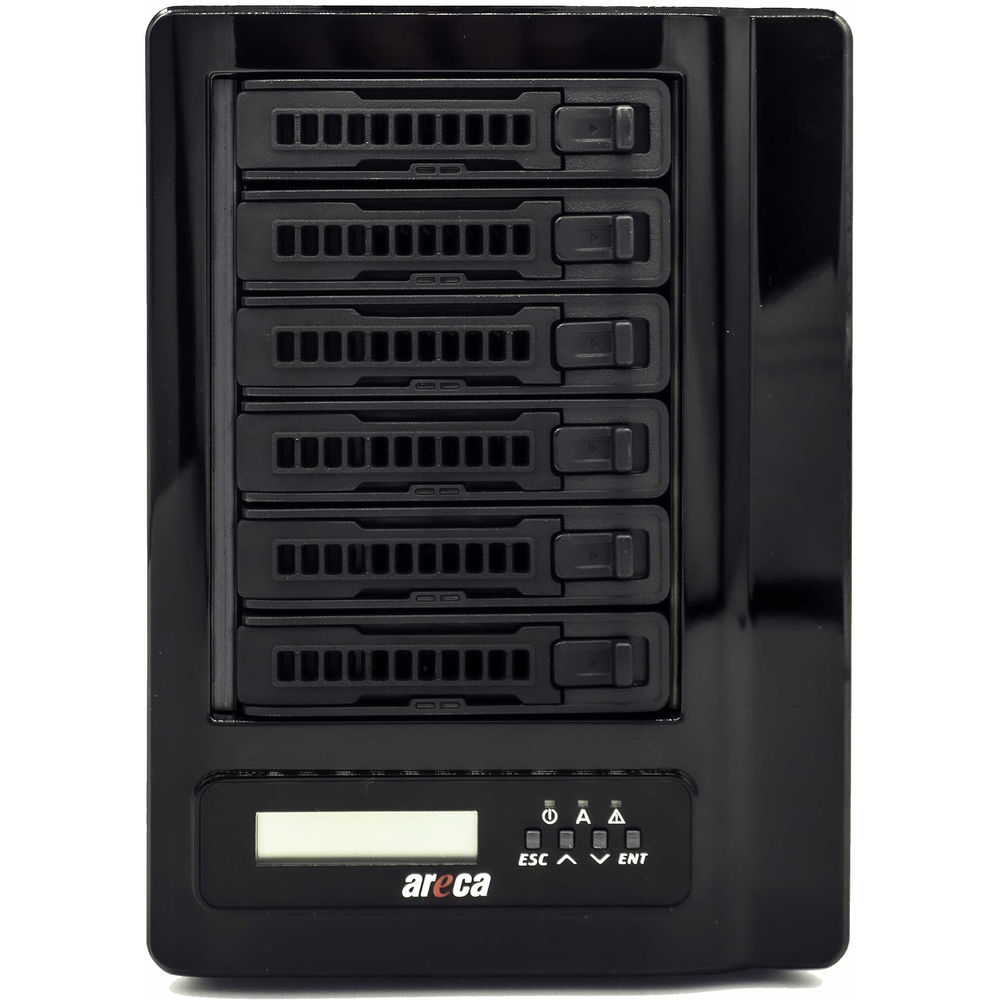
- You’ll be looking to buy a 6-bay enclosure and a 4-bay enclosure to house these drives.
- Cost of 6-bay editing enclosure in RAID 0 (Amazon, B&H): $2,300
- Cost of 4-bay enclosure (Amazon, B&H): $400
- Total cost of storage: $5,000+
Going by the above example, the price to buy and maintain hard drives is about twice what just the hard drives cost!
Now you know why this article exists.
There are a lot of hidden variables in storage, editing and backups. The above example is just a basic low budget example. We haven’t even considered creating deliverables, DCPs, sending drives to festivals, the press, and so on.
Also, typically one wouldn’t use spinning drives in RAID for high-end grading work. You could edit in proxies, or edit online with full data. If you need an SSD array you’ll be looking at a lot more expenditure.
As you can see, the costs of storing uncompressed and RAW 4K and 8K footage goes out of hand quite quickly. With larger shooting ratios and months of shooting, you can see how storage costs can easily go beyond $100,000 or higher! Imagine filming hours of documentary or reality show TV on this kind of data. Some people do!
I hope by now you have a clear idea of the storage costs involved in working with uncompressed or RAW 4K and 8K data.
Plan wisely!

krnivoro The explanation is found elsewhere in the Learning Center.
Chroma Factor explanation is little bit confusing. In the example, the frame size (in MB) is calculated using a 4:4:4 chroma sampling (even if the real sampling is different). That’s why there is not any “Chroma Factor” on that formula. IMO there should be even if the value es 1. However in the “Data Rate” formula, there is a “chroma sub-sampling” process to 4:2:2.
Actually that’s the part where still images are different to moving pictures. Sub-sampling from 4:4:4 to 4:2:2 is kind of “compression” because the eye is less sensitive to colors than (white) light, even less in moving pictures, so some color information is remove for the sake of data rate.