

Let’s start from the beginning.
What is SDI?
SDI stands for Serial Digital Interface.
On set, its purpose is to help you move uncompressed data around between devices without sacrificing quality.
There are three parts to SDI that you should know about as a filmmaker:
- The connector
- The cable
- HDMI to SDI, or SDI to HDMI convertors

The BNC connector
The BNC connector stands for Bayonet Neill–Concelman after its bayonet mount locking mechanism and its inventors.
The BNC connector is a crucial component in SDI systems. They’re known for reliability and providing a secure connection.
It is designed for coaxial cable, and its sturdy locking mechanism prevents accidental disconnection. Typically, what they use in video SDI is the 75 ohm variety.
The Cable
The cool thing about the SDI standard is you can have two types of cables:
- Coaxial – 300 meters (980 feet). SDI goes to 100 meters (330 feet).
- Fiber – not limited
As the signal payload reaches 3 Gbps (in 3G-SDI), the strength of the signal drops by 40%! Fiber performs better than copper cables here, but are more expensive.
Still, the long runs possible with SDI is what makes it different from the HDMI standard. The quality of the signal via HDMI can degrade anywhere between 15-50 feet.
The maximum HDMI can run is about 15 meters, which is 50 feet.
SDI can transport your video feed farther, with integrity, in a more secure connection. That’s why they’re still around. Here are the main advantages in a nutshell:
- Long cable length
- Robust BNC connector
- Uncompressed video and audio
Where do you find SDI connectors?
You’ll find SDI connectors, BNC usually, on the following devices specific to filmmaking:
- High-end cameras and cinema cameras
- External monitors, viewfinders and recorders
- Broadcast and grading displays
What are the different types of SDI?
As technology progressed, SDI got better and better, while retaining the same connector. However, it is not backward compatible.
Here are the important differences:
| Standard | Name | Single or Dual | Max. Bitrate (Mbps) | Max. Resolution and FPS | Color Information* |
|---|---|---|---|---|---|
| SMPTE 259M | SD-SDI | Single | 360 | 480p, 576p | 10-bit 4:2:2 |
| SMPTE 292M | HD-SDI | Single | 1,485 | 720p, 1080i | 10-bit 4:2:2 |
| SMPTE 372M | Dual Link HD-SDI | Dual | 2,970 | 1080p60 | 10-bit 4:2:2 |
| SMPTE 424M | 3G-SDI | Single | 2,970 | 1080p60 | 10-bit 4:2:2 |
| SMPTE ST 2081 | 6G-SDI | Single | 6,000 | 2160p30 | 10-bit 4:2:2 |
| SMPTE ST 2082 | 12G-SDI | Single | 12,000 | 2160p60 | 12-bit 4:2:2 |
| SMPTE ST 2083 | 24G-SDI | Single | 24,000 | 2160p120, 4320p30 | 12-bit 4:4:4 |
Today, it is not useful to think of anything below 3G-SDI.
You could still use 3G-SDI if all you want to monitor is 1080p. It’s a perfectly acceptable resolution to monitor in.
However, if you’re investing in a monitor, camera or recorder, I highly recommend looking for 12G-SDI and better. The main reason, in addition to future proofing, is color.
Here’s how the color information and data is distributed:
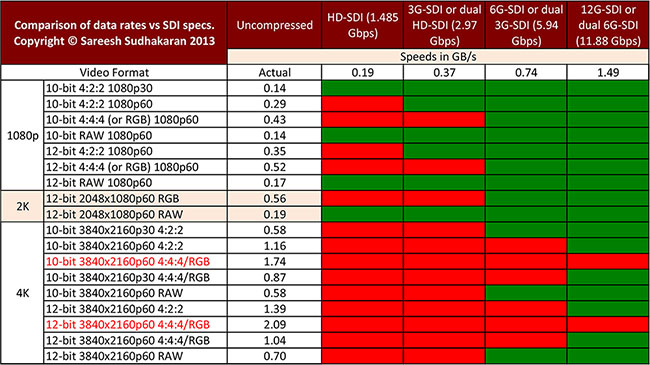
Correction: The second last one should be p30, not p60.
If you haven’t noticed yet, the number before the “G” represents the maximum bit rate of the system. E.g., 2,970 is close to 3, so 3G-SDI. 6000 is 6G, 12,000 is 12G, 24,000 is 24G.
The more data can be transported through the system, the higher the resolution and frame rate. You can be sure there’ll be a 48G at some point to accommodate 8k UHD up to 60 fps.
RAW is a special case, but it has only one-third the data of uncompressed Y’CbCr or RGB. Companies can force RAW out an SDI connector but this isn’t within the official specification. This means, you’ll need a proprietary solution to read a RAW signal.
The beauty of the SDI protocol is you can use any device that complies with the standard. That’s not true of RAW.
The downside of SDI (which is sort of an upside, too!) is it takes time for a standard to be ratified and then take hold in the industry. The SMPTE takes its time.
The upside is that your investments will work for a longer time, giving you better ROI in a professional capacity.
Bottom line, to keep it simple, follow this rule:
Get 12G-SDI or better.

I have a 7 inch monitor which has a hdmi in out and sdi in out, never used sdi until recetly with my blackmagic ursa mini pro. It didn’t show anything at 24fps , 25 fps nor 50fps but when i switched it to 60fps it started working. Please help
I have a BlackMagic 4K Production Camera and a friend of mine gave me a Marshall V-LCD70P-3GSDI as you can probably tell im not super familiar with this monitor haha but my video keeps cutting in and out. One day the monitor will work and the another it will not. I dont know if this is because the camera outputs a different way, i dont know im confused if someone could please help me figure it out, it will be much appreciated!! thanks
PhilosoScience RAW video does not contain color per se, with the bayer filter on the sensor it appears as a monochrome image where the filter causes certain pixels to only be sensitive to certain wavelengths of light (red, green and blue), so the debayer process must be done externally at the SDI receiver device. When you output RGB or YUV from the camera, it’s performing the debayer process for you and basically tripling the data rate by converting the single channel raw bayered stream into 3 separate channels (R/G/B or Y/U/V). Hope this helps.
“SDI is all about 1080p uncompressed RGB data”? SDI has been a broadcast interface first and foremost, and broadcast has been YUV 4:2:2 for decades. Still, when someone says “SDI” without any other clarification, I assume they mean 1.5Gbps HD-SDI in YUV (YCbCr) 4:2:2.
Granted, it’s all changing now (and at an exponential rate) of course, and of course 3G-SDI, RGB, and 4:4:4 are extremely useful in acquisition and color-critical workflows. I’m just pointing out that at this point they’re a minority.
Rec. 2020 supports UHD in RGB and YCbCr, in 4:4:4 and 4:2:2, so it remains to be seen what would emerge to be the common choice.
ssclukey Looks like you’re right! The one in black should be 30p. Thank you for bringing it to my attention.
I think there is an error in the table. You have “12-bit 3840x2160p60 4:4:4/RGB” twice with different data rates. Was the second one supposed to be 30p perhaps?
DocentWeb Thanks for sharing! Looks like they’re just using it as a BNC connector, and not 3G-SDI.
Sareesh Sudhakaran, at up to 59.94 fps (see
http://pro.sony.com/bbsc/ssr/show-highend/resource.solutions.bbsccms-assets-show-highend-FS700.shtml?PID=I:35mm_NEXFS700:NEXFS700#/fs700t1_2).
DocentWeb At 60p?
Unless I’m mistaken, the Sony FS700 outputs 12-bit 4K raw over a single 3G-SDI.
PhilosoScience Check out my articles on RAW and uncompressed file sizes in the Learning Center.
I’m confused as to why RAW takes less bandwidth than 4:4:4 / RGB.