

There’s simply no good reason to use the histogram tool for video work. Start by watching the video:

The histogram is a tool often used in photography. It shows the brightness levels in an image, divided into shadows, midtones, and highlights.
Many people believe it’s a great way to judge exposure. But in video, the histogram falls short. It’s not just unhelpful—it can actually mislead you.
What Is a Histogram?
A histogram is a graph that represents the brightness of an image. Shadows appear on the left, midtones in the middle, and highlights on the right.
Here are histograms of the same image from two different software: Davinci Resolve and Adobe Camera Raw:
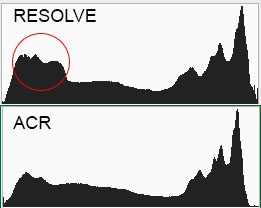
If you’ve ever seen a smooth “mountain shape” on a histogram, it’s showing a balanced image. This is useful for still photos, where you want to make sure your shot isn’t too dark or too bright.
However, this idea doesn’t translate well to video. Why?
Video is made up of many frames, not just one. Each frame has its own histogram. This means the histogram can only show information about a single moment in time. It cannot give you an overall picture of your video’s exposure.
In filmmaking, where lighting and tones change constantly, this makes the histogram a poor choice for judging your footage.
Let’s explore this further.
Why the Histogram Fails in Video
One of the biggest problems with the histogram is that it’s static. Video, on the other hand, is dynamic.
The histogram doesn’t account for movement, shifting light, or transitions between frames. A scene that starts bright and fades into darkness might look completely fine in motion. But if you judge it frame by frame using the histogram, it might seem “wrong” because the graph keeps changing.
Another issue is that the histogram pushes you toward technical perfection. While this might sound like a good thing, it’s not.
Cinematography is about storytelling, not just getting the “perfect” exposure. Sometimes you want shadows to be deep and mysterious. Other times, you might want highlights to be blown out for dramatic effect.
The histogram doesn’t understand this. It wants everything balanced, which can ruin the mood or style of your video.
The Histogram Ignores Color
The histogram only measures brightness. It doesn’t tell you anything about color. In cinema, color is critical.
Skin tones, vibrant skies, or the green of a forest all need to look natural. If you rely on the histogram, you might miss problems with color. For example, skin tones could look washed out or unnatural, but the histogram would still show a “good” exposure.
This can result in footage that looks wrong, color-wise.
Some Scenes Should Have Unbalanced Histograms
Not all scenes are supposed to have balanced tones!
A night scene might have a histogram that’s mostly shadows. A sunny beach might have a histogram that’s mostly highlights. That’s perfectly fine, too.
The histogram, however, will suggest these scenes are exposed incorrectly. If you are a slave to it, you might end up making everything look flat and boring. Great cinematography often involves pushing tones to their extremes, something the histogram can’t understand, or show.
There are Better Tools for Video and Cinematography
For cinematography, there are much better tools than the histogram.
These tools give you more accurate and useful information about your footage:
- Waveforms: Waveforms show the brightness of your entire frame but also include color information. This makes them great for ensuring consistent exposure and accurate tones across your video.
- Vectorscopes: These tools focus on color and saturation. They help you keep skin tones looking natural and make sure your colors are vibrant without being overdone.
- False Color: This tool overlays your image with colors that represent brightness levels. It’s an easy way to spot areas that are too bright or too dark. Many cinematographers rely on false color for precise exposure control.
Each of these tools is more suited to the needs of cinematography and video production. They give you the information you need to make creative and technical decisions, without limiting your artistic vision.
Why Creativity Matters More Than Technical Perfection
Cinematography is about using visuals to create an emotional impact. Shadows, highlights, and colors are tools you use to tell that story. A histogram doesn’t understand emotion or creativity. It’s just a graph.
If you rely on it too much, you risk creating footage that’s technically correct but visually boring.
Great filmmakers often break the rules. They embrace deep shadows, blown-out highlights, or intense colors to create a specific mood. The histogram would flag all of these choices as “wrong.” But in video, the story and the mood are more important than a balanced graph.
What about RAW video?
Many filmmakers use the histogram just to clip for overexposed highlights in RAW video.
But why bother? The tools I’ve mentioned above are way better, and conform better to the color spaces and gamuts you’re filming in.
And these tools offer a lot more at a glance. It’s all about saving time on set.
The Bottom Line
The histogram is a tool designed for still photography. While it’s helpful for judging the exposure of a single image, it’s not built for the complexities of video and cinematography.
It can’t handle the dynamic nature of moving pictures, it ignores color, and it discourages creativity. Instead of relying on the histogram, use tools like waveforms, vectorscopes, and false color. These will give you the information you need to create visually stunning and emotionally impactful videos.
In the end, filmmaking is about more than just technical accuracy. It’s about telling a story and making an impression.
Don’t let the histogram hold you back from creating something truly unique.
