

The Canon EOS R8 (Amazon, B&H) is quite a capable video camera. If you add the following accessories it becomes even more powerful and useful.
1. DJI RS 3 Gimbal
The Canon EOS R8 (Amazon, B&H) does not have IBIS (in-built image stabilization). For handheld work you either have to rely on the image stabilization option in lenses, if available; or use a gimbal.
A gimbal is useful even if you have a camera with IBIS and a lens with IS. It just offers far greater control and versatility in your shots than you can achieve otherwise.
While picking a gimbal you have to keep in mind the weight of the camera body (with card and battery), any lens and adapter weight, and any other accessories you might add, like microphones, etc.
In my opinion at this time the DJI RS 3 Gimbal Stabilizer (Amazon, B&H) is a great pick for the Canon EOS R8.
It weighs just shy of 1 kg and has a weight capacity of 3 kg.
The Canon EOS R8 (Amazon, B&H) weighs about 461 grams with card and battery.
A lightweight lens like the Canon RF 24-105mm f/4-7.1 IS STM takes the total weight to 856 grams and a heavy lens like Canon RF 28-70mm f/2 L USM takes the total weight to only 1.9 kg. There’s still lots of room left to add accessories, like the Canon DM-E1D stereo microphone (Amazon, B&H) which weighs around 136 grams.
You always want to make sure the load capacity of the gimbal is 30% higher than the maximum load you are going to subject it to. This ensures the motors work perfectly within their comfort zone.
The DJI RS 3 Gimbal Stabilizer (Amazon, B&H) has a run time of 12 hours when charged for 150 minutes (with the built-in 3000 mAh battery).
2. Media Cards
The Canon EOS R8 (Amazon, B&H) has one SDHC/SDXC UHS-II SD card slot.
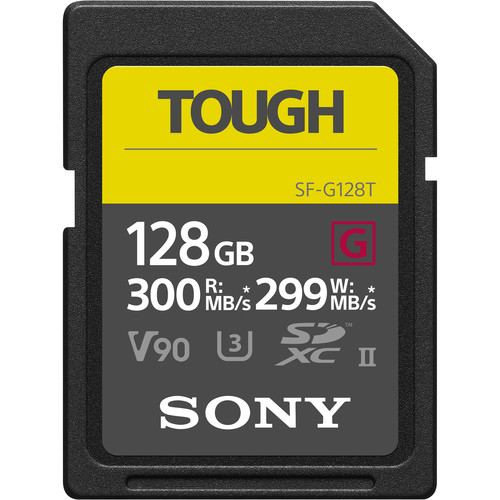
The Sony 64GB SF-G Tough Series UHS-II SDXC card (Amazon, B&H) has a few advantages over other cards:
- 299 MB/s write speeds – a great investment for other/future cameras as well.
- Sony Tough Series cards can withstand drops up to 16.4ft / 5m, immersion in up to 16.4ft / 5m of water for up to 72 hours, and are bend, dust, X-ray, magnet, and anti-static proof, and resistant to UV light and temperature extremes from -13 to 185°F.
- It has a one-piece molded construction that is ribless with no write protect switch, so there’s minimal chance of the enclosure getting broken.
- Should the card’s data become compromised, you can download File Rescue software for free to help recover deleted content.
What size cards should you get for video?
I don’t recommend a larger size card because it’s easy to fall into bad habits by recording till the card is full. You always risk data loss (happens rarely, but it can happen), and it also takes longer for the cards to be offloaded to a laptop or PC.
The final decision is up to you of course, but I’d rather have two Sony 64GB SF-G Tough Series UHS-II SDXC card (Amazon, B&H) cards than one 128 GB card.
3. The three EF-EOS R adapters
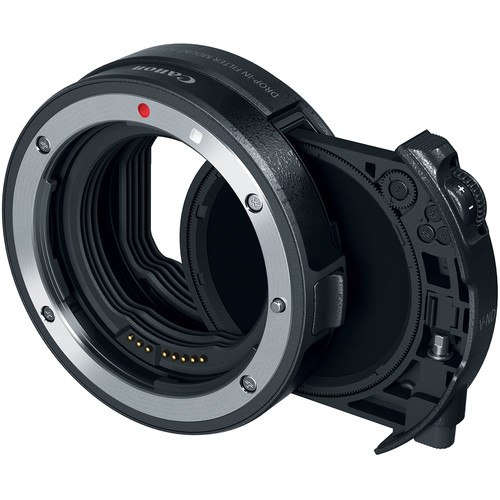
Canon has three EF-EOS R adapters (Amazon, B&H) so you can use Canon EF lenses with the Canon EOS R8.
All adapters offer full control over Canon EF lenses:
- All adapters retain Canon in-lens IS (image stabilization), autofocus control, sharpness, color rendition, and contrast.
- Each is weather sealed to prevent dust and moisture from entering (assuming the lens is also weather sealed)
- Full compatibility with Canon EF and EF-S lenses as well as most 3rd party lenses. Sigma offers full compatibility; Tamron limited compatibility (with no new updates as far as we could find).
Here’s the list of adapters:
| No. | Type | Key Info | Buy |
| 1 | “Basic” Adapter | Has full control, cheapest option | (Amazon, B&H) |
| 2 | Control Ring Adapter | Adds a control ring to control ISO, Aperture, Exposure Compensation, etc. | (Amazon, B&H) |
| 3 | Drop-in Filter Adapter with Variable ND filter | Has a slot in the adapter to use rear filters. In this case a variable ND filter. | (Amazon, B&H) |
| 4 | Drop-in Filter Adapter with Circular Polarizer filter | Has a slot in the adapter to use rear filters. In this case a circular polarizing filter. | (Amazon, B&H) |
Which is the best EF-EOS R adapter for video?
This is tricky, because it depends on what your needs are. And for video, there are hidden costs you should be aware of.
Let’s start with drop-in filters.
The hidden costs of drop-in filters
I would not pick the circular polarizer (though it is useful sometimes) because for video work the subject is always moving, and you’ll only be able to get the benefit of the polarizer at a particular angle in relation to the sun.
With the drop-in filter adapter, if you don’t want to use a variable ND, you don’t have to, but it’s a great option to have in your kit if and when the need arises. You get from 1.5 to 9 stops, which is an amazing range.
Can you use the drop-in filter without the variable ND filter? No, you can’t. You’ll leave a large gaping hole in your filter. You need to purchase the Drop-In Clear Filter A (Amazon, B&H), and that is an additional expense.
It’s basically about the money. Total expense for a drop-in filter:
| Drop-In Adapter with Variable ND A (1.5-9 stops) | $399 |
| Drop-In Clear Filter A | $129.95 |
| Circular Polarizer A (optional) | $249.95 |
| Total, with and without the polarizer | $529 ($779) |
What is the cost of a high quality Variable ND filter? A 77mm B+W XS-Pro Digital ND Vario MRC-Nano Filter costs about $185 at the time of this writing. You can buy cheap step down adapters for other filter sizes.
But here’s the thing: You only get 1-5 stops. The higher range you need, typically the more expensive it gets. If you buy cheaper filters there’s the serious risk of color shifts and IR pollution, not to mention other variable ND filter artifacts. Read more in my guide to lens filters:
So, seriously, even though it seems expensive, the Drop-in filter adapter is a great deal. No need to deal with step-down rings, and no need to worry about wasting time changing it in the field.
The hidden cost of the control ring adapter
Next we have the control ring adapter. There’s an important feature you need to know about video.
Control Ring clicks are audible and can be picked up when recording video. Canon offers a Control Ring Modification Service to make the rings adjust silently for an additional fee:
The control ring on RF lenses and the Control Ring Mount Adapter EF-EOS R includes a “clicking” action when used. While this can be helpful to confirm changing settings, it can also impede video recordings as the “clicking” sound may be captured as audio. EOS R series camera owners can choose to have this function removed, and even re-applied if needed later on, with Canon’s control ring modification service.*
Canon
RF Lenses $79.99
Control Ring Mount Adapter EF-EOS R $59.99
Tax and freight fee are NOT included. * All pricing is subject to change.
| Price of Control Ring Mount Adapter | $149.99 |
| Cost of Modification Service | $59.99 |
| Total | $210 |
This is a good option if you ride the aperture often. But in my opinion, the combination of EF lenses in cinema use is rare. Most times you don’t need to change the aperture or ISO, so you really don’t need the control ring adapter.
It’s only useful in run and gun situations, where you are using the camera in a handheld situation with one hand on the lens to ride the aperture or ISO. I would seriously consider investing in RF lenses for this feature, and not really consider it for EF lenses – specifically for video work.
The Canon EOS R8 (Amazon, B&H) is a smaller camera than say, the 5D Mark IV, so an EF lens with an adapter will be front-heavy. This kind of operation is not going to be easy.
If you need a de-clicked lens, you can get a cine-mod service done, or better yet, just use cine lenses.
And then there’s the risk of moving the control ring by mistake during operation. This is rare, but the issue is, unlike a aperture ring or focus ring on a cine lens, when you shift this, there’s no visual aid to tell you it has shifted.
Which leaves us with two options:
| Basic adapter | Get this if you don’t regularly use an ND filter, or don’t like the compromise of a variable ND filter. Better for short films, feature films and web-series. For maximum image quality. |
| Drop-in filter adapter with variable ND filter | Useful if most of the time you are using a variable ND filter, shooting outdoors, etc. E.g., weddings, corporate videos, events, news, documentaries, etc. |
4. Universal Cage
I’m not a fan of custom-designed cages, so I found an affordable cage that will last you a long time:
This is a no-name cage, but goes by the name of Camvate on Amazon and B&H.
A universal camera cage is a cage that can be fitted to any sort of DSLR or mirrorless camera. Some cameras are short, while others are tall. Some cameras like the Blackmagic Pocket Cinema Camera 4K are wide.
You can read more in my review here.
Even with cameras like the Canon EOS R8 (Amazon, B&H), the universal cage has enough room to let the articulating screen be open to the side.
If you can live with the pain of assembly, I think this universal cage (Amazon, B&H) is a solid investment for a small amount of money, and it will last you as long as you use cameras that fit in it – which is pretty much every DSLR or mirrorless camera out there.
5. VisibleDust EZ Sensor Cleaning Kit PLUS
I’m pretty sure you weren’t expecting this.
Mirrorless cameras have one disadvantage over DSLRs, and that is their sensors are too close to the opening for the lens. This means it’s very easy for dust to settle on the sensor.
When you stop down the lens, you will see dust spots in your photographs or videos. It’s easy to remove in photos, but very tough in videos, especially when there’s motion.
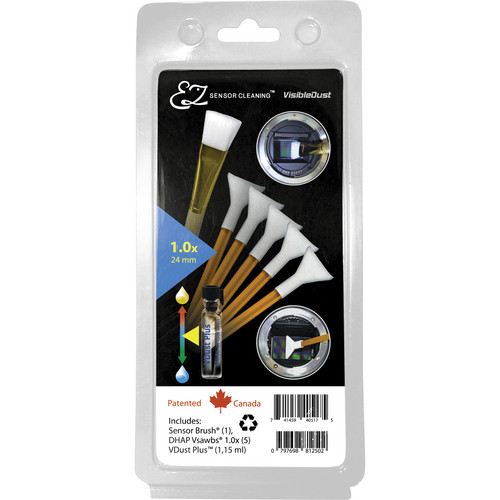
The best system I’ve found, and one I use on all my mirrorless cameras, is the VisibleDust EZ Sensor Cleaning Kit PLUS Orange (Amazon, B&H)
The Orange swab is better than the green one, because it is finer and easier on your sensor. The kit (Amazon, B&H) contains:
- VDust Plus liquid cleaner (1.15ml) – for oil and water stains, and provides a mild static barrier
- 5x orange 1.0x DHAP Vswabs and,
- 1x sensor brush
It goes without saying if you have stains you are unsure about, it’s better to get your camera serviced at an authorized service center. But sometimes in the field that’s not possible, and you have to keep shooting.
Once you get the hang of cleaning your sensor yourself, you’ll wonder what the fuss was all about. As long as you are careful and follow the instructions precisely (don’t mix and match liquids and products), you should be okay.
Here’s a video on how to use this:
That’s it! I hope you found my suggestions useful.
If you know any additional important accessories specific to video, let me know in the comments below.
