
Accuracy is important, but consistency is critical!
– from the Image Interchange Framework Presentation
If you’re a cinematographer, editor or colorist you’ll have heard of ACES (which stands for Academy Color Encoding System). This article explains what ACES is, and why it is important you start looking into it.
What is ACES?
ACES is an encoding system that tries to take in as much dynamic range and color information as possible, so you can never complain that your film is limited by technology. It standardizes workflows from acquisition to delivery, ensuring color accuracy and future-proofing films.
Imagine the ability to encode to possibly the best file format available for film (OpenEXR), with a color space so big that any future display technology can use it, with a color bit depth far greater than what is necessary, and which can hold more dynamic range than the human eye can see!
Some of the characteristics of ACES are:
- Image Container is OpenEXR, with support for many channels
- Color space greater than the gamut of the human eye
- 16-bit color bit depth (floating point)
- Ability to hold more than 25 stops of dynamic range
Most of today’s movies don’t have the luxury of being shot or preserved on film stock. Nor do they have the luxury of being preserved as pure digital RAW files, simply because RAW files cannot have effects, transitions and other important data.
The most common delivery or mastering formats (H.264, Prores or DNxHR, DCP, etc.) are based on current technology. When technology improves, we will be left holding a sub-par or unsupported version of our original movie.
What if you want to preserve your film and need to re-release it at some point many years from now? We can see an example of this problem when we watch badly scanned movies from the past. The ‘usual’ solution is a restoration and/or a complete rescan, with the best technology possible. But that’s beyond the scope of most films.
By adopting ACES, filmmakers can ensure their content is adaptable to any future display technology, eliminating the need for costly restorations or remastering.
What is the goal of ACES?
Preserving art is the goal.
In their own words:
ACES is the final movie with the full fidelity of the original source material
Traditionally, filmmakers master content based on the delivery format – DCP for theatrical releases, Rec. 709 for web videos, or HDR formats for modern displays.
Each of these formats has limitations:
- Fixed color spaces tied to current technology.
- Irreversible encoding that limits flexibility.
- Restricted dynamic range based on display capabilities.
ACES solves these problems by providing a universal color management framework that remains independent of display technologies and encoding formats.
The ACES Workflow
When you work with video files, they come in different formats depending on the camera or software used. The input format is the original format of the video when it is first recorded or created. The output format is what the video is converted into for final use, such as for streaming, uploading, or distribution.
For example, if a video is recorded in ProRes, but you need to upload it online, it might need to be converted to H.264, which is a format optimized for web playback. The software responsible for this conversion is called an encoder, and it must understand both the input (ProRes) and the output (H.264).
Every time a new video format or codec is introduced, developers have to update their software to handle it. This constant updating creates unnecessary complexity for filmmakers, editors, and colorists who just want their footage to work across different platforms.
What if, instead of constantly managing multiple codecs, we only had to work with one?
ACES simplifies this by acting as a universal format in between. Instead of constantly converting between different codecs, all footage is first standardized into ACES. From there, it can be exported into any format needed. This makes workflows more efficient and future-proof, ensuring that no matter what new formats come along, your footage will always be compatible.
Instead of X codec —> Y codec, we have X codec —> ACES.
Then, you can use ACES —> Y codec or Z codec or whatever.
You don’t need to worry about the ‘source’ codec, which will always be ACES, the best representation of your film.
The parts of ACES you have to understand
Some people have the idea that ACES is only about color, but that is only partially true. It’s a total rewrite of how workflows should be carried out. This is what it looks like:
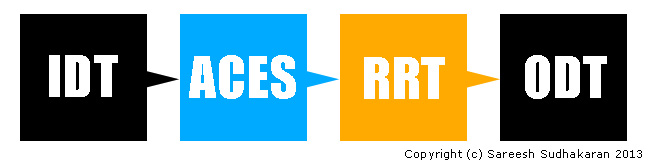
Once you’ve recorded, you will need to convert your files into the ACES format. To do this, you need what is generically called the Input Device Transform (or IDT). It is not a ‘thing’ or a device, but a set of math formulas that will convert whatever codec you’ve shot in into the ACES format.
Once you’re in, you’re home free. You can edit, add effects, grade, etc, all in the ACES specification. Imagine every NLE or app that just has to be designed for this one format! Whenever, there’s a new camera with a new codec, one just has to provide a new IDT that will be ‘plugged-in’ (plug-in?) to make the conversion possible.
Instead of applications or workflows needing to be rewritten or redesigned every time a new display technology comes along, one just provides another set of math formulas to convert ACES into whatever the display devices need. This set of formulas is called the Output Display Transform (ODT).
You can have as many ODTs as there are display devices, but you don’t have to change your workflow. Furthermore, when both IDT and ODT get redundant, new ones will replace it, but your master will remain in ACES, ready for the future.
The last piece of the puzzle is the Reference Render Transform (RRT). This is probably the most important piece in this workflow chain.
What is it? Simply put, it is a set of math formulas that ensure your intended ‘look’ is preserved. E.g., a camera shooting RAW is converted to ACES. A colorist works her magic and the end result is a ‘look’. If you’re coming from film you already know film stock has a certain look, depending on its chemical development.
In the future, camera RAW files will have the same ability, and the intention of the artist must be preserved (and not just the data).
We all know scenarios where we’ve tried to convert one file format to another, and somehow the colors have changed – it no longer looks like it did in the editing station. The RRT is supremely important to avoid that. Twenty years from now, when your movie is re-released into four thousand types of devices, all with their own codecs, gamuts and spaces, the RRT will preserve your intention, and ACES will preserve your data.
Imagine filmmakers, web video makers, videographers, etc., all using the same workflow. Simplification without compromise. Together, the Academy hopes ACES will make movies last forever.
That was the plan, and still is. Sadly, ACES has had slow traction in most parts of the world.
ACES as an Intermediary Color Space
One of the biggest advantages of ACES is its use as a working color space in high-end color grading.
E.g., in Davinci Resolve, you can use DaVinci Wide Gamut or ACES as a working color space. ACES lets you keep your film standard as per ACES guidelines, for:
- VFX and Compositing: ACES ensures seamless integration of live-action and CGI by maintaining consistent color handling across software like Nuke, Blender, and After Effects.
- Multi-Camera Workflows: Different cameras capture footage in various color spaces. ACES unifies them into a single, high-fidelity color space, eliminating mismatches.
- HDR and SDR Delivery: By working in ACES, content can be effortlessly delivered in both SDR and HDR without color discrepancies.
- Long-Term Archival: ACES-encoded masters ensure films can be remastered decades later without losing color fidelity, unlike older digital formats.
However, this is not mandatory. You don’t have to use ACES for grading. I’ve found I have better results with DaVinci Wide Gamut. You can always master to ACES after you’ve finished grading.
The question is: Do you want to archive or preserve the best version of your film in ACES, or not?
Some of the reasons why ACES hasn’t caught on so quickly
ACES adoption has been slower than expected for several key reasons:
1. Complexity in Setup and Workflow
ACES introduces a standardized color workflow, but setting it up correctly requires technical knowledge. ACES involves multiple steps, including selecting the right Input Device Transform (IDT), working in the proper ACES color space, and applying the correct Output Display Transform (ODT). For many, this added complexity is intimidating and not always necessary for their projects.
2. Compatibility Issues with Existing Tools
While major grading software like DaVinci Resolve, Baselight, and Nuke support ACES, some editing software and plug-ins don’t fully integrate with it. Many popular LUTs, effects, and compositing tools are still designed for Rec. 709 workflows, making it difficult for users to transition without breaking their existing workflow.
3. Learning Curve for Colorists and Editors
ACES requires a different approach to color management, and many colorists and editors are already comfortable with traditional color workflows. Since ACES changes how color and gamma behave, some professionals feel they have to relearn their grading techniques, which can slow down adoption.
4. Limited Benefit for Some Projects
For high-end feature films and VFX-heavy productions, ACES provides huge advantages in color consistency and future-proofing. However, for quick-turnaround projects or independent films, the benefits of ACES do not outweigh the extra steps required to use it properly.
Many smaller productions simply don’t need ACES because the film distribution landscape does not demand or require it. Unless major studios and OTT platforms mandate its use, many professionals see no urgent reason to switch.
I think the biggest letdown is that, even though ACES exists, DCPs are encoded still in the DCI XYZ color space, and not ACES.
5. Issues with Creative Intent and Look Management
Some colorists feel that ACES affects the way their grades look, particularly when using the Reference Render Transform (RRT). While ACES aims to preserve artistic intent, it sometimes changes the appearance of film-like color grading techniques. I mentioned earlier, I too, graded my film in Davinci Wide Gamut over ACES.
Some professionals might argue that new advancements in scene-referred color grading, HDR workflows, and AI-based color tools might offer similar benefits without requiring a full ACES workflow.
Technology is just moving too fast!
Will ACES Eventually Become the Standard?
Despite its slow adoption, ACES is gaining traction in high-end film production, VFX-heavy workflows, and major streaming platforms like Netflix and Disney+. As more tools integrate ACES support natively and workflows become easier to implement, its adoption will likely increase.
However, for smaller projects, traditional workflows will probably remain dominant for the foreseeable future.
I hope you’ve found this ACES primer useful!

ACESCentral.com, is a portal where you can find more information on ACES and post questions to the community, the ACES Product Partners and Academy staff. If you have questions about ACES or want to join the active conversations on using ACES in production, post, VFX, VR or archiving, I recommend checking it out.
StephanieShirley Hi Stephanie, sure – just contact me through the e-mail adress provided on my website. My thesis was pretty techy, but you might find some useful links and info.
Interesting you mention Film is on the way out and commented on restoration. I work for a major studio working on a pile of over 100 years of film, the most stable jobs in the industry is restoration.
What other media do we know that survived that long and new technology can arguably barely achieve the resolution and range.
New features are still shot on film. About 8 last year at our studio. It was discovered that it was not all that much cheaper shooting digitally after all.
Aces ripped off something we’ve been doing in film scanning for years by working in log space. ADX scanning levels for ACES is almost identical to what’s always been done, so provided you have a quality scan 4K or better, you ADX IDT should put you in a very good place for grading without the cost of rescanning old stuff.
I’m not completely a film kook, far from it. But long term storage without re occurring cost, incredible image quality and range, hard to beat. Heck new features are still digitally shot to YCM film separations on laser recorders (except one studio who has a bulletproof plan, Ha).
RaphKing HI Raph,
I’m also beginning a thesis on why ACES was developed and I’m wondering if you managed to find material to support your own thesis? If so, can you point me towards anything I might find useful about ACES? Books, journals, articles, anything really!
Sareesh Sudhakaran RaphKing Thank you. I know… but my company wants to try it and discuss pros and cons.
RaphKing Check out the Lift Gamma Gain forums, Light Illusion, etc. Not many use it outside the Hollywood system.
Hello Sareesh, I’m a student from Germany and I’m starting to dive into this topic. Thanks a lot for the easy workflow explanation. It verified that I already understood most of it. The original presentation from ACES is kind of mixxed up and not very clear. )
I’m starting to write my bachelor thesis on a comparison between regular post production (and more specifically color grading) workflows and ACES. I couldn’t really find a lot of stuff about ACES on the web or in libraries. Do you have a few recommendations for me? Magazines, books, e-papers or blogs… anything helps!
Thank you for the informative post!
Raph
I prefer to use the linear 32-bit linear workflow in AE myself, which I learned initially from Nuke.
However, the ACES 16-bit specification is for files, while 32-bit math is a different thing. I believe files don’t need to be better than 16-bit for post production work.
The basics of this system have been in use in the stills / print world as ICC (International Color Consortium) colour management since the mid-90s. Apple was the first major player to run with it. There has been no equivalent in the movie world until now.
The problem with the system is that it is only 16bit. Once you start to talk about ‘future proof’ and 25 stops of dynamic range, there becomes a point where 32 bit processing (present in Photoshop for many years) starts to become a necessity.
I think the basic concept is important, but ti needs to be opened up to a world beyond the movie studios to allow it to become a major standard for Colour management in the movie and broadcast space.
nickwb.com