
Both Color Correction and Color Grading is the process of changing the colors present in a video.
This could be a stark change, like turning a blue shirt into a red one; or a subtle change, like a small shift in white balance.
Color Correction vs. Color Grading
Typically, people use the terms in this way:
- Color Correction: Fixing color issues (e.g., exposure, white balance).
- Color Grading: Creating a mood or style through color adjustments.
The difference between the word correction and grading is a gray area (pun fully intended). If the colors are already perfect, there is no need to change them. If you do change the colors, you could either call it an artistic expression (grading) or just fixing something you didn’t like (correction).
The audience will only see the final version, no matter the herculean effort that went into changing red into blue, or any emotional turmoil you might have experienced while shifting the Curves tool.
I have been color grading for about two decades now. It’s a very rare project that doesn’t include some form of both.
So, for me, it’s always color grading. The person who does color grading is the Colorist.

The Art of Color Grading
Here’s a tribute to the art of color grading, and the importance of colorists:
I’ve personally graded in Adobe After Effects, Premiere Pro Lumetri and Davinci Resolve. I’ve
An idiot’s guide to appreciating the complexities behind it all
We know an image is a collection of many pixels. Selective color correction is the art of selecting only those pixels we need and changing their values.
There are four major groups of ‘problems’ involved in selective color correction. Take a look:

The four groups of challenges in color correction are:
- The problem of selecting one specific color
- The problem of selecting one specific pixel
- The problem of distinguishing between two close pixels
- The problem of human inadequacy
The problem of selecting one specific color
If we want to isolate just the orange pixel and change its value, we can do it – provided we know the exact color values of that pixel.
Since each pixel has an Red, Green and Blue component (RGB), we must know exactly what the values are for each component. This is not a problem of ‘human understanding’, it’s a problem for mathematics.
The problem of selecting one specific pixel
The second grid shows nine red pixels, all the same. How do you select one specific pixel from the bunch if you can’t isolate it with color information?
The solution? A bunch of techniques that include specifying the exact pixel location, masking, tracking and many others.
The problem of distinguishing between two close pixels
The third grid shows eight red pixels and one ‘not so red’. Now, if you knew the exact color values of this pixel, you can isolate it using the first method.
The unique challenge here is when the algorithm (and human) is not very sure how different the pixels are from one another. Smooth gradients sometimes confuse the hell out of an algorithm. The ‘type of math’ used matters here.
Dealing with pixels isn’t easy. A 4K frame is about 8 million pixels. A 4K film at 24 frames per second is about 200 million pixels per second. Computer power matters.
Human inadequacy.
Our eyes are not perfect. We don’t always see and experience color similarly, even on different days and different periods in our lives.
It’s a good idea for filmmakers to understand the complexities of what’s happening underneath the hood, not just from a program’s perspective, but also what’s happening inside the mind of a colorist.
When you appreciate the possibilities, you can do more with it, and achieve great results. If you are ignorant and disrespectful of the process, the full potential of your film will always remain unrealized.
What do you need to color grade?
Color grading is carried out on a computer. You don’t need any specialized boxes or tools, except maybe a PCI or USB-C monitoring adapter like the Blackmagic Design Declink series.
This allows you to watch the most accurate version of your footage on a color grading monitor or projection system. I use an FSI DM240 for grading. I don’t recommend monitors like EIZO, Dell, BenQ, etc., for film grading work.
Popular Color correction applications
Here are a few color grading applications and my thoughts on them in a nutshell:
1. Blackmagic Design DaVinci Resolve
Davinci Resolve is one of the industry standards for color grading, used in many Hollywood productions. It has a free version that’s already powerful, and the paid version isn’t that expensive.
The power of Resolve lies not only in its incredible set of color grading tools, but it’s also a great editing, VFX and audio application. A hero box.
I used Davinci Resolve for film editing, sound editing and color grading on my feature film, Gin Ke Dus. This is how it went:
Its free version is powerful, offering advanced tools for HDR, RAW footage, and ACES workflows. Resolve combines editing, color grading, VFX, and audio post-production, making it an all-in-one solution. Collaboration tools allow multiple users to work on the same project simultaneously.
2. Filmlight Baselight
Baselight used to be the de facto standard color grading application for major films and premium TV series. You’ll still find it in many markets, and many filmmakers as for it specifically.
Filmlight continuously updates Baselight with new features, so it has its pluses and minuses against Resolve. The only things you need to know about it as a beginner are:
- It is a layer-based color grading application, whereas Resolve is node-based. The working style is different.
- It is far more expensive than Resolve.
- You can’t (or don’t want to) built your own PC with it. Resolve works on Windows, Mac and Linux. Baselight doesn’t. You can’t buy Baselight except from an authorized vendor or directly.
- You have to work at a facility or training institute to learn Baselight correctly. Resolve can be self-taught due to easier and cheaper access to the software.
3. Filmworkz Nucoda
Nucoda is another ‘has-been’ industry standard, but is still useful and powerful enough for any kind of work today.
What they are primarily known for are a set of DVO tools (plugins) you can buy separately. These tools are great for film restoration work. The most popular tool I know is DVO Clarity – one of the best grain and noise reduction applications. Click here for a full list of DVO tools.
4. SGO Mistika
Mistika Boutique (and Ultima) is as good as any of the color grading applications on this list. I don’t have a lot of experience with them and I don’t know many projects finished on this system lately.
It is also Linux based, though they offer the option to front end it with Windows by using their storage system in the background. You can use certain DVO tools in Mistika.
5. Adobe Premiere Pro
Adobe Premiere Pro is an editing application that includes the Lumetri Color Panel. It’s a great option for beginners already working on Premiere Pro. However, I would not recommend it for color grading films.
Which is the right color grading software?
I have been color grading for over two decades now. I started with Premiere Pro (long before Lumetri or CC).
I used Adobe After Effects to grade my first feature film. This was before Resolve or Speedgrade were available.
When I shifted to Resolve for editing I also started using it for grading. Most of the work you see now, including my second feature film, was edited and graded on Resolve. I’ve become pretty good at it.
I’ve also had some of my projects graded on Baselight, and I’ve dabbled in the color grading tools in FCP, Avid, Red Cine-X, etc.
What do I recommend?
Pick Davinci Resolve. Period.
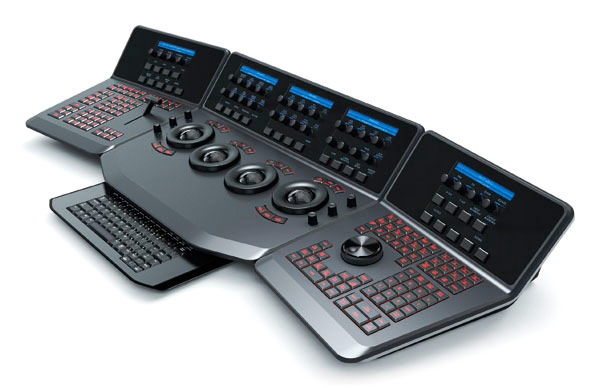
The Control Panel
A computer keyboard and mouse is a versatile duo. Unfortunately, as gamers know only too well, they’re not always suitable.
Professional Colorists have the option to use special control panels or “surfaces” to make their life easier and faster. These panels are designed for supreme ergonomic advantages, and work similarly to analog audio mixers.
Whether or not these are necessary depends on the kind of training or speed one is used to. It is definitely not mandatory, except when you’re busy on many commercials or films and you need a fast turnaround.
Some popular control panels are:
- Low Budget
- Blackmagic Design Panels – for Resolve
- Tangent Panels – supports many color grading applications
- High-end
- Blackmagic Design DaVinci Resolve Advanced Control Panel – – for Resolve
- FilmLight Slate Control Surface – for Baselight
I hope by now you have a general idea of what color correction or color grading is, and what it involves.
If you have any questions, please feel free to ask me in the comments below.

Thank you for sharing this great information. In this post give good explanation in detail that helpful for many people also step by step explanation in detail that very helpful.