
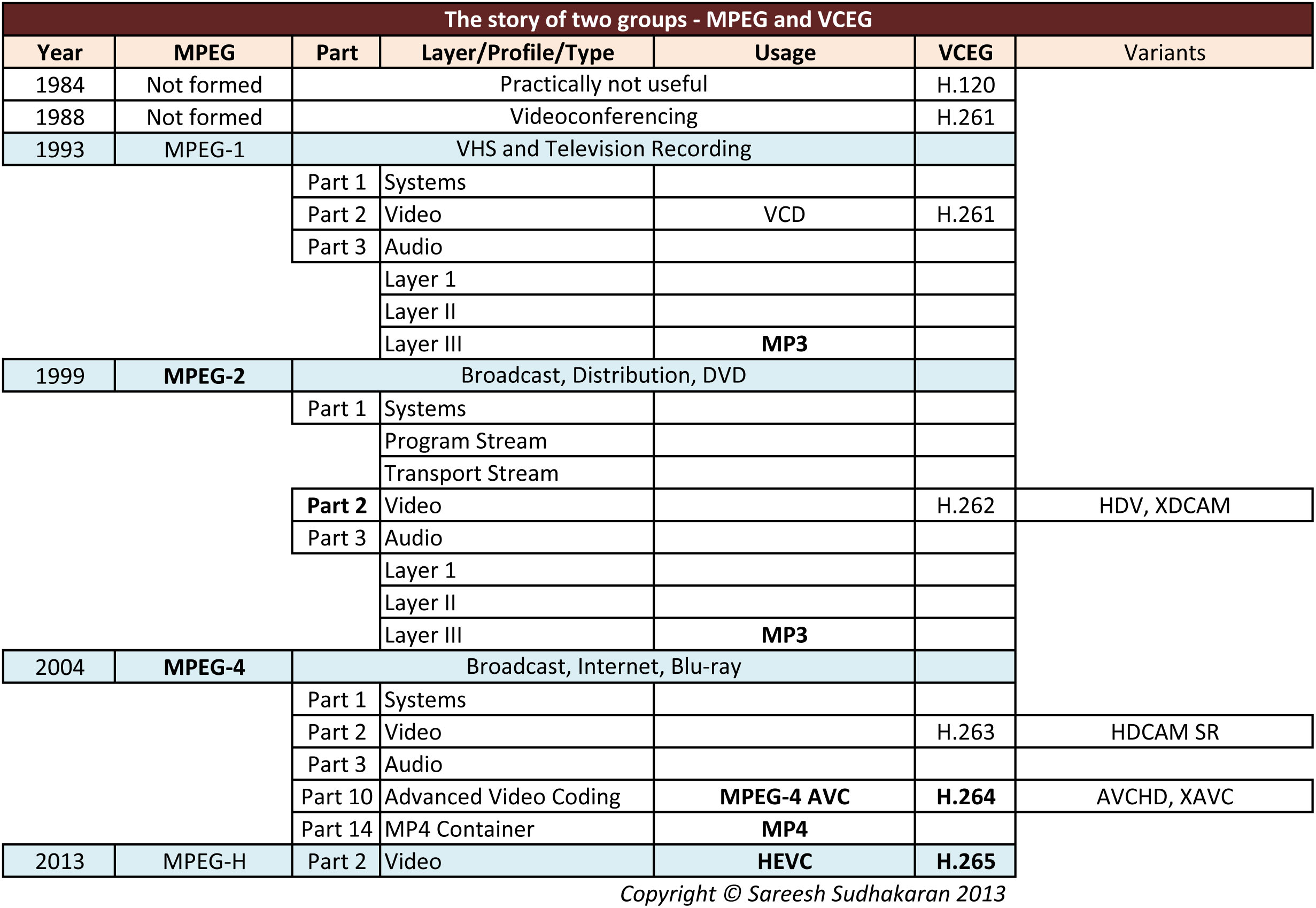
The names of codecs are complicated – MPEG-2, MPEG-4, H.264, AV1, VP9 and H.265, its impossible to know what they mean!
This article explains these codecs simply, without going into technicalities. By the end, you will have a clear idea of what each offers.
If you’re totally new, and don’t know anything about video compression, start by reading What is Video Compression?

We’ll use the above table as reference.
MPEG and ITU-T VCEG
In the beginning there was COST 211 (don’t worry, they don’t exist anymore). They created the H.120 standard, which basically flopped. But it paved the way for what we have today.
The ITU-T VCEG (Video Coding Expert Group) formed to improve upon H.120, and that’s all we have to know about that.
MPEG (Moving Pictures Experts Group) formed to find a way to incorporate codecs for broadcast work. To this day, the two committees – MPEG and VCEG, work side-by-side. MPEG specializes in broadcast (television), while the ITU (International Telecommunications Union) focuses on telecommunications (phone, internet).
In today’s world, their goals mostly overlap, because everything is going the way of the Internet. This association is likely to continue.
H.120
This started it all, but didn’t do well. It had two versions, one for PAL and the other for NTSC.
H.261 and JPEG
In 1988, H.261 was created by the VCEG, mainly for ISDN/Videoconferencing work. It had a maximum bit rate of 2 Mbps, but was limited with a chroma sub-sampling of 4:2:0.
JPEG (Joint Photographic Experts Group) became a popular codec of choice for images right about that time, and in the same ‘vein’, MPEG was formed to take care of the broadcast industry’s needs.
MPEG-1
MPEG adopted H.261 and JPEG together to form what is called a ‘Suite’. The specific name for the first suite is MPEG-1.
It was limited to 1.5 Mbps, 4:2:0 and stereo audio only. At the time, there was PAL, NTSC and VHS, and that’s all it had to cater to.
Parts and Layers
MPEG suites have sub-divisions, called Parts. Traditionally, Part 1 is always for the ‘System’ (file format). Part 2 is for video, and Part 3 is for audio. Look at the image and you’ll see this clearly.
MPEG-1 Part 2 is also H.261, for our purposes.
Parts are further sub-divided into Layers. Audio has three or more layers, called Layer I, Layer II and Layer III and so on.
They make everything so complicated!
But you’ll like what MPEG-1 Part 3 Layer III is.
MP3
It just so happens that MPEG-1 Part 3 Layer III is called MP3. It does NOT stand for MPEG-3, but the third layer of the third part of the MPEG suite.
This version of MP3 was also limited to stereo (two channels).
MPEG-2
In 1999, technology had advanced enough to warrant an upgrade of the suite.
Part 1 of the MPEG-2 suite had two major classifications: Program Stream and Transport Stream.
Part 2, video is also called H.262. It had additional support for interlacing and 4:2:2. The big change for audio was the addition of 5.1 channels, and MP3 was revised to incorporate this specification.
Most of broadcast television adopted MPEG-2. Additionally, DVD, too, incorporated this technology, and was able to include surround sound as a result. You didn’t have surround sound in VHS.
MPEG-2 also had more than three parts. The most important of these (not shown in the image) is Part 7, called the Advanced Audio Coding (AAC) audio format.
Professional camera codecs that used MPEG-2 included HDV and XDCAM. Today, these codecs are obsolete.
MPEG-4
By 2004 the world had suddenly discovered the Internet!
MPEG was ready with the third suite, MPEG-4 (MPEG-3 was not used). This suite incorporated a whole lot of technology from the beginning of this century till 2012 or so.
Part 2, or technically MPEG-4 Part 2, is also called H.263. It included a new concept called ‘Profiles’ which we’ll look at later. HDCAM SR used this specific Part.
Part 3 is still audio. AAC has been incorporated into Part 3.
MPEG-4 has about 30 parts, one for each technology. The two parts we are most concerned with are Parts 10 and 14.
H.264 or MPEG-4 Part 10/AVC
Part 10, or technically MPEG-4 Part 10, describes the AVC (Advanced Video Coding) format. This is H.264. Rather than start a new suite, they decided to add this as a Part.
It is the codec that drives standard Blu-ray. Many broadcast pipelines and distribution channels had adopted H.264 (and MPEG-4 Part 2) as well.
Sony used a variation with the XAVC codec (notice the ‘AVC’ in the name?) to its line-up of cameras because XDCAM couldn’t deal with 4K resolutions and above.
H.264 is the most widely used codec on earth, simply due to the power of the internet. It is gradually being replaced, but it’s still a few years off.
MP4
Part 14 describes a container format for MPEG-4 codecs, as in *.mp4. That’s all this is.
AVCHD
Sony and Panasonic took the parts they liked about H.264 and called it AVCHD (MPEG-4 Part 10 AVC+HD). The “AVC” in the name tells you the source.
The key differences between AVCHD and H.264 is the former supports Dolby AC-3 encoding in addition to LPCM, and is limited by a total bit rate of 24 Mbps.
Whereas H.264 is designed as a distribution format (all MPEG suites are distribution formats, for the end user), AVCHD was designed for cameras as an acquisition format as well. Quality-wise, there’s no difference.
AVCHD 2.0 kept a newer version of H.264 with better compression and sampling. But, it was still 4:2:0 and was limited to 28 Mbps.
AVCHD is also becoming obsolete, if not already.
HEVC or H.265
The next kid on the block was MPEG-H.
Part 2 (video) is also called H.265 or HEVC (High Efficiency Video Coding). Here are its key benefits:
- Up to 8K UHDTV (8192×4320 maximum)
- 12-bit color bit depth
- 4:4:4 and 4:2:2 chroma sub-sampling
- Supports up to 300 fps (earlier versions only supported up to 59.94 fps)
- Data rates of several GB/s
- File size ‘subjectively’ half the size of H.264 with better quality.
H.265 has enough features to keep most people happy for a long time. We’re far away from maxing out this codec in terms of its features. H.265 is the codec of choice for Ultra HD Blu-ray.
You have to remember, H.265 is a delivery codec. I know cameras use this, but it’s not a professional format for filmmaking.
Profiles
Beginning with MPEG-4, is the concept of Profiles and Levels – in addition to Parts and Layers. Profiles are like presets, specific variants of the specification to be used for specific applications.
The MPEG-4 specification with its thirty parts is quite large. Why would an encoder or software need to comply with all of it, if its chosen function is only for a specific need?
Profiles are unfortunately a necessary evil. Technology is moving too fast for committees to keep up, and many vendors don’t have to comply to the broadcast model anymore.
Internet means freedom, and anyone can create a new variant of a codec (after paying the right licenses) and stream in that proprietary format. You could even invent a completely new format, or encode your videos in H.120 if you like!
If H.265 is so great, when why doesn’t large streaming services like YouTube or Netflix not use them?
As the world of video compression evolved, not all the advancements came from the traditional powerhouses like MPEG or ITU-T. The rise of the internet brought about new players in the game, most notably Google and the Alliance for Open Media.
Why did they go to all that trouble? Simple. They didn’t want to pay the licensing fees associated with standards like H.264 or H.265.
VP9, by Google
Google introduced VP9 as a successor to their earlier codec, VP8. It was created specifically to compete with H.265 (HEVC), aiming to provide similar or better compression.
VP9 quickly became the default codec for YouTube. It is also royalty-free, but, its adoption outside the Google ecosystem is low. Most content creators use software that already have H.265 built-in. There’s no need for content creators to pay for licensing.
So, why would the software developer (like Blackmagic Design or Adobe) pay to include VP9 when hardly anyone’s asking for it.
Which brings us to AV1.
AV1
AV1 was developed by the Alliance for Open Media, a consortium that includes Google, Amazon, Netflix, and Microsoft. AV1 is designed to be the heir to VP9 and a superior alternative to HEVC (H.265).
Here are some key features of AV1:
- 30% better compression than H.265 and VP9.
- Supports for resolutions up to 8K 120fps and HDR
- Support for up to 12-bit color and 4:4:4 chroma subsampling.
- Is royalty-free, and has the support of the biggest streamers on the planet.
- Can preserve film grain
Netflix and Amazon Prime Video uses something called Film Grain Synthesis. It removes film grain from the original video and sends the grain estimate “formula” to the player (in this case the Netflix app). The app/player then adds the film grain back to the video on playback, trying its best to match the original grain.
This could be the reason why film grain is preserved in a lot of films now, even with extremely heavy compression. You can see the difference in this white paper by Andrey Norkin, a research scientist at Netflix:

AV1 video is usually accompanied with AAC or Opus audio in an MP4 container. Software like Davinci Resolve Studio already has support for it, with an Nvidia RTX 40*** card or higher.
AV1 is poised to become the dominant codec for streaming in the coming years. It, or its newer version, will slowly overtake H.265.
Why? I think the era of codec licensing is over.
Oh, don’t forget this one important thing – AV1 is a delivery codec. It’s not meant for acquisition. None of the codecs listed on this page are.

Superb article
Thank you very much, I think am beginning to understand all this formats now. well explained
I’m thinking of buying the Sony PXW-Z90. It comes with the video formats XAVC QFHD: MPEG-4 AVC/H.264 4:2:0 Long profile, XAVC HD: MPEG-4 AVC/H.264 4:2:2 Long profile
XAVC Proxy: MPEG-4 AVC/H.264 4:2:0 Long profile. Are these high quality formats?
They sell a license for MPEG HD422 (CBKZ-SLMP required): MPEG-2 422P at HL 4:2:2 Long profile, MPEG HD420 (CBKZ-SLMP required): MPEG-2 MP at HL 4:2:0 Long profile
MPEG HD Proxy (CBKZ-SLMP required): and MPEG-4 AVC/H.264 4:2:0 Long profile
Are the XAVC and MPEG formats that this camera come with very good or am I going to have to purchase the licensed formats to get good quality. I shoot a lot of stuff that goes on the net and sometimes gets projected at events. I also want to start shooting 4K stock footage. Your advice would be appreciated.
Los
Superb info i wd like to recive regular updates on HEVC Advance
Great article, thank you for the information
i want to write one article for imendoorbin.ir my university about h.265 and and i find this artice very good
Hi there, queostion, Coming out of Premiere CC and I want to burn Blu Rays for festival submissions an possibly festival playback.
Mpeg2-Blu Ray or H264BluRay ?
Please let me know
Follow the guidelines of the festival.
Thanks, that’s what I’m going to do but all festivals are different and that doesn’t really answer my question.
I guess my question is, which format is better for the highest quality playback?
I’ve got an article on Blu-ray, check it out.
Please post a link.
If you were going to burn a Blu ray, what format out of CC would you export it?
Thank you so much, quite useful!
thanks for the info
hi.. its very much useful for beginners like me .. I hope its very good valuable information …Thank U
You’re welcome!
now I know what to do. thanks
Thank you
It is higher bit rate and I read people say also lower compression, so h.263 would be logical.
It is higher bit rate 35 Mbps instead of 24, also I’ve read it is lower compression so I think it is h.263.
PhilosoScienceI haven’t touched a camcorder in a long time, but I think it’s more likely h.264 in an MP4 container.
PhilosoScience I don’t have any camcorders but mp4 supports so many video codecs that is misleading as it could be anything as listed in wiki: MPEG-2 Part 2, MPEG-4 ASP, H.264/MPEG-4 AVC, H.263, VC-1, Dirac, others
When camcorders say they can record “MP4” instead of AVCHD I think that is h.263. MP4 is just the container, so it isn’t clear. That is a good consumer question.
EdwardHeldmanIIIYou’re welcome!
This is the most helpful and easy to understand way of explaining it. Thank you very much.