

A filter is something that holds back some kinds of light, but let others through.
What are ‘in-camera’ filters?
These are filters that come between the sensor and lens mount, and are usually housed inside the camera body.
There are other kinds of filters, like ‘lens filters.’ If you’re looking for lens filters, head over to The Complete Guide to Lens Filters for Cinematography:
We can broadly divide in-camera filters into two groups:
- Those that are needed to get the sensor to work to its full potential.
- Those that are needed for creative control.
The filters between a sensor and the lens mount
The filters that are needed to get the sensor to work properly usually remove things, just like a water or dust filter would.
Here’s a visualization of how light falls on the sensor:


I know it looks complicated. Let’s take it one step at a time.
Stage 1 Filters
Light falls through the lens mount to the first set of filters. This is stage 1 in the above image. In this stage, we have three filters:
- Coatings
- Optical Low-pass filter (OLPF)
- Piezoelectric element
Sensor Coatings
This is what you see when you look at a sensor through the lens mount. Whenever a sensor is exposed to the elements, it is in danger of getting ‘attacked’ by dust and particles that have no business being inside a camera body.
Coatings (just like lens coatings, or a layer of varnish) protect whatever comes after it and also helps in dust reduction by not allowing dust to stick to the sensor.
Optical low-pass filter (OLPF)
Primarily, the sensor has a fixed number of “sensels” (To know what sensels are, read the section below about the sensor). If it is given more information to sample that it can, you will see aliasing in the image.
The OLPF has the unenvious task of eliminating frequencies that the sensor isn’t capable of resolving. These frequencies are not color frequencies (or wavelengths) but spatial frequencies.
The spatial frequency limit of a sensor is determined (to a certain extent) by the Shannon-Nyquist limit. Any frequencies below this limit (low frequencies) are allowed to pass (hence the word ‘low-pass’).
And, because what we are passing is light, this filter is called an optical low-pass filter.
On some modern cameras, you’ll see that OLPFs are absent. Some camera manufacturers don’t deem it necessary to add an OLPF simply because they know the aliasing is negligible or within certain tolerances.
Sometimes they don’t want to spend money to design or install good OLPFs to keep their cameras cheap (and spin the marketing to make it seem like it’s a good thing). However, under certain conditions, these cameras will create aliasing. It’s unavoidable.
The best camera in the world currently, the Arri Alexa 35, has an optical low-pass filter.
The low pass filter blocks high image frequencies that would lead to artifacts when captured by the sensor. It is made from a modern, high-performance crystal with optical properties that have been fine-tuned for a perfect match between the transmitted image content and the sensor’s photosite structure in the camera. The result is the creation of super sharp yet natural images.
Arri
All said and done, an OLPF reduces aliasing, but it doesn’t eliminate it entirely.
The cost? There is a loss of resolution with OLPFs, but that’s deemed a reasonable tradeoff.
Piezoelectric element
The piezoelectric element is a vibrator. When it vibrates, dust is supposed to fall off the coatings so it can be cleaned. When there is too much dust, manual cleaning is the only alternative.
Now let’s sum up stage 1.
It is obvious that it only has one major element, the OLPF, while the other two elements are support functions to ensure the OLPF performs smoothly.
Stage 2: The IR filter
Light is electromagnetic radiation. It has both Ultraviolet (UV) and Infrared (IR) parts. Modern sensors are not very sensitive to UV radiation, but are definitely sensitive to IR radiation.
The purpose of the IR filter is to eliminate IR radiation that produces color casts in the image. If a UV filter is required, this stage will also include it.
Those who are interested in IR cinematography will need to find a way to take this filter off!
Stage 3: Another optical low-pass filter
Why do we need two of these things?
An OLPF is a spatial filter. The first OLPF might filter in the horizontal direction while the second filters in the vertical direction. This is because pixels are divided into rows and columns, and sampling happens both horizontally and vertically.
I know it’s a bit technical, but we don’t need to understand it beyond this.
Stage 4 Filters
In this stage, light (photons) is focused on to the sensels for maximum efficiency. This stage has the following elements:
- Micro lenses
- Color Filter Array (CFA)
- The sensor
Micro lenses
These are tiny lenses that focus photons on to the sensor, for maximum efficiency.
Color Filter Array (CFA)
This is a Bayer pattern filter that comes in different configurations, depending on the sensor and manufacturer. One thing they all have in common is that greens are more represented than either blue or red.
Here’s an example of the simple Bayer sensor pattern:
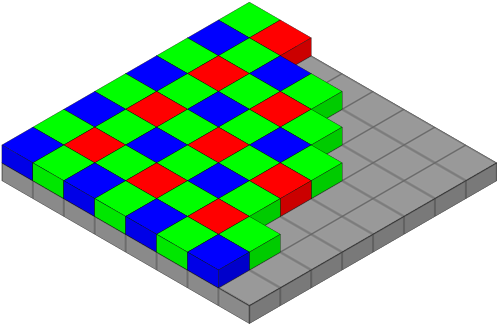
To learn more about how a Bayer pattern is converted into RAW, read this:
The Sensor
A sensor is also a kind of filter. It collects photons and converts them into electricity. The layout of the sensor is arranged ‘pixel-like’, so, in a way you could say the sensor samples light horizontally and vertically.
A camera sensor is not a simple circuit or construction. There’s a lot of electronics under the hood, just like what you see under a car hood.
Therefore, instead of calling each ‘box’ a pixel (because it can be confused with display pixels), some people combine the word ‘sensor’ and ‘pixel’ to call it sensel. Not everyone uses this term, mind you, but it does have the connotation that the end result of the operation is a pixel, but it’s not as simple as monitor pixels are.
Stage 5
In stage 5, analog electrical signals are collected, sampled and encoded into a digital file, that which we call a RAW file. The system that does this contains an:
- ADC (Analog to Digital Convertor, might also include an amplifier),
- Processor (circuitry that does the calculations, like a mini-computer),
- Firmware (intelligent program that does the math and encodes the results to a digital format) and
- temporary storage or Buffer (for the sensor readout).
Of course, all this generates a lot of heat, so it also needs a heat sink.
Each element in the chain is actually a filter that eliminates something – spatial frequencies, radiation, color, photons, analog signals, heat, and so on.
So far we’ve looked at filters that you can’t control. These are built-in and when you use the camera, you get the combined effects of all of them.
Now let’s look at filters that affect creativity.
In-camera filters for creative control
We are only concerned with those filters that are applied before light hits the sensor, namely:
- Time or temporal filters, electronic shutters, etc.
- The ND filter
The Time Filter and Electronic Shutters
I won’t be covering electronic shutters, because that’s also something not in your control.
What is a time filter? A company called Tessive invented this kind of filter, though now it’s been discontinued. In their own words:
When panning, the background judders. Wheels appear to spin backwards, picket fences and brick walls jump across the screen, and helicopter blades look, well, just wrong…
Tessive has an answer to this: the Tessive Time Filter… It’s a global liquid crystal shutter that is placed in front of the lens and is synchronized with frame acquisition.
The Time Filter dramatically changes the look and feel of motion in-camera, recording the natural fluidity of the real world without loss of sharpness.
The Time Filter improves any motion and in all cases will result in a cleaner, more organic scene. It is especially useful for:
1. Fixing judder in pans.
2. Correcting repeating motion, such as wheels, fences, and aircraft propellers.
3. Eliminating flicker from lighting, regardless of frame rate or line frequency.
4. Virtually eliminating flicker on plasma or CRT displays.
5. Reducing striping or tearing artifacts from uncontrolled strobes and flashes.
6. Rendering human movement more accurately and flowingly.
The RED Motion Mount is similar (or maybe even the same thing). As of now, I don’t see it listed on the Red website.
I don’t think there are any time filters available right now, as of this writing.
The in-camera ND Filter
An in-camera ND filter is extremely useful, depending on the quality of the ND and the number of stops you can reduce.
Any serious cinema camera must have internal ND filters. Here are some examples:
| In-built ND Filter? | |
| Canon C80 | 2, 4, 6, 8, 10 stops |
| Blackmagic PYXIS | No |
| Sony FX6 | 2 to 7 stops |
| Canon C400 | 2, 4, or 6 stops |
| Red V-Raptor XL | 2 to 7 stops |
| Arri Alexa 35 | No |
| Sony Venice 2 | 1 to 8 stops |
In-camera ND filters have the advantage of being specifically calibrated for the sensor used.
Sometimes, you might not have to worry about things like IR pollution, etc. But, please check first!
Seriously, you can’t beat the convenience of pushing a button to switch on or switch off an ND filter. Not only is it faster, but your ND is safe inside the camera at all times. Glass ND filters are expensive, and you need matte boxes to use them, too.
That’s it for in-camera filters!
You can understand why cheaper camera systems might not have OLPFs or internal ND filters – these are expensive to design, calibrate and fabricate.
There’s nothing wrong in this, it’s simply their business model. It’s one of the big reasons why a camera can cost $1,995. On high-end commercials, documentaries or films, the time it takes to change filters cost a lot more than the filters themselves.
All said and done, there’s nothing much you can do once you have selected a camera. You use what you get with in-camera filters.
However, I hope knowing the intricacies of what happens inside will help you choose the right camera, and then use it to your best advantage.
That’s how this game should be played.
