
The definitions are straightforward enough:
An inter-frame codec is one which compresses a frame after looking at data from many frames near it.
An intra-frame codec applies compression to each individual frame without looking at the other frames
However, which one do you pick and why should it make a difference to your footage? To understand the difference, let’s take it step by step.

Intra-frame Compression
When you take a still picture and compress it, you are applying an intra-frame codec.
There is only one frame, and you are analyzing the data within this frame to compress it. Nothing more, nothing less:
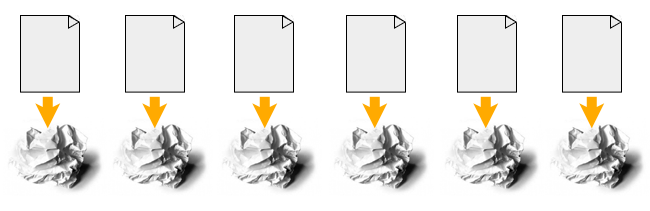
The algorithm doesn’t look at the photo you took before this one, or the next one in the folder. It just looks at one frame and tries to compress it as best as it can.
It stays within the frame, hence intra-frame.
There are two variations of an intra-frame system.
First, if the individual frames are saved as separate files for film or video, they are called image sequences. Some popular image sequence formats are:
- TIFF – used for mastering
- DPX – Used in film scans and digital mastering, the film industry standard
- EXR – Used in VFX
- JPEG2000 – DCI, used for cinema projection
Second, an intra-frame codec can also be “bunched” as one file in a wrapper. A few popular intra-frame codecs:
- MJPEG – JPEGS bunched together, not used much in the industry
- Prores – Apple’s favorite
- DNxHR – Avid’s baby
- ALL-I versions of H.264 and H.265 – Found in low-end cameras
Inter-frame Compression
Video is nothing but a stream of images called frames. In film-land, each second holds 24 frames.
Computer scientists realized that if video is always going to have more than one frame, then why not look at every frame before compressing one frame?
If the video is long, like a movie, looking at every frame is madness. The scenes and imagery changes anyway. So why not look at a few frames before and after each frame and then compress those together?
The “number of frames” is always specified beforehand so there’s no confusion. The number is known by the term GOP (Group Of Pictures):
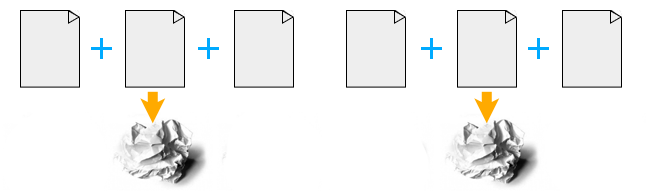
An image is two-dimensional – it has rows and columns of pixels. You could visualize it in this way: An intra-frame codec compresses two-dimensionally. An inter-frame codec compresses three-dimensionally, which means temporally as well.
If all it did was look at neighboring frames for compression, it wouldn’t be much more efficient than intra-frame codecs. Modern inter-frame codecs employ both inter-frame and intra-frame voodoo for as much compression as possible.
This is what makes streaming on YouTube or Netflix possible.
Because an inter-frame codec compresses both ways, the file sizes are smaller than intra-frame codecs.
Here are a few popular inter-frame codecs:
- H.264 (A variant of MPEG-4)
- H.265
- MPEG-4
- MPEG-2
- AVCHD (A variant of H.264 AVC)
- XDCAM – Sony’s baby
- XAVC – Also Sony’s baby
Which One needs more Processing Power and Why?
Let’s look at two common scenarios for codecs: Decoding and Editing.
Decoding
Imagine a person standing in an assembly line. On a conveyer belt in front of him, he gets compressed intra-frames one at a time. He or she unwraps each frame and passes it on. Then the second frame is pulled up, and so on.
In an inter-frame codec, when a frame is pulled up, the person has to look at the frame before it, and after it and then decide how to unwrap it – before unwrapping it.
If the person had to unwrap and display the frame within the same time period, which one would take more time do you think?
Editing
When an intra-frame codec sits on the editing timeline, and is sliced, the slice happens between two frames. Since they have no connection to each other, the application can proceed to the next step, which is unwrapping the frame for further use.
If an inter-frame codec sits on the timeline and is sliced, the application will have to calculate its effect on the frames before and after it. It will have to re-draw the frames and put everything in order before the unwrapping can happen.
Which do you think takes more calculations per second? That’s right, inter-frame!
Here’s another analogy:
What if you are dictating something, and your personal secretary (you wish!) is taking notes in shorthand? Each syllable has a one-to-one symbol associated with it. As soon as Siri hears you she jots down the corresponding symbol. This is intra-frame.
What if you are dictating the same thing, but in a different language? The person this message is going to is very important, and you can’t make mistakes. Siri now has to hear your complete sentence first, and then start the process of rephrasing the sentence so your meaning is preserved. This is inter-frame.
I hope you understand this is always going to be slower than decoding intra-frame, no matter how much you’re willing to pay Siri!
This is why inter-frame codecs need more processing power in editing or color grading.
Which One is Better, and Why?
Both are crap.
If I’m shooting something worthwhile, I want it to be in the best format possible.
However, for budget reasons, we might not have access to the best cameras, so we compromise. So, both are compromises.
Compression is fundamentally a compromise, however you slice it.
If you really want the best image quality, film in RAW.
If you can’t film in RAW, then film in whatever best codec you can.
This means, if your camera supports inter-frame codecs like H.264 or H.265, edit native without re-compressing it. The logic behind why people transcode to Prores or DNxHR is:
- Editing is easier on the CPU.
- It’s a better file system so color grading or visual effects is easier.
Modern CPUs are capable of handling inter-frame codecs easily, especially those from Intel. So there’s no advantage to go intra-frame only for this reason.
As far as the second is concerned, it’s BS. If you really cared about color or visual effects or green-screen work, you’ll film in RAW. Call it what it really is – a compromise, nothing more.
However, intermediary codecs do have an advantage when you need to edit 6K or 8K material, even on beefy workstations. On my latest film Gin Ke Dus I had to work with DNxHR Proxies because the source format was 8K RAW.
If you are facing issues while editing inter-frame codecs, converting it to a intra-frame proxy format (like Prores LT or DNxHR LQ) might help.
Please take a few hours to test your workflow in this manner:
- Try to edit and grade a few seconds or minutes of your native codec on a new timeline.
- Transcode the native footage to an intermediary intra-frame codec and apply the same edits.
- Render both timelines out to your delivery spec and write down the times.
- Whatever works faster and without compromising your vision is good.
Also, always remember: Just because intra-frame codecs are better theoretically doesn’t mean the manufacturer’s implementation of it is good! Heavily compressed ALL-I H.265 isn’t better than DNxHR LQ or Prores LT. Test it!
I hope this article helped you understand the difference. Very generally, pick your codecs for filming in this order:
- RAW
- Intra-frame
- Inter-frame

You said: “If an interframe codec sits on the timeline and is sliced, the application will have to calculate its effect on the frames before and after it. It will have to re-draw the frames and put everything in order before the unwrapping can happen.”
Then you said: “modern CPUs are capable of handling interframe codecs easily, so there’s no advantage to go intraframe only for this reason.”
If the latter is true then why does the former matter? What I’m saying is, it doesn’t just depend on CPU power, it depends on how the software utilizes the CPU. When I run a video editor, I can experience extremely choppy viewer playback, regardless of whether I’m editing source media or just compositing. I look at my resource monitor and none of my hardware (CPU, GPU, RAM) is over 25% usage.
So if I’m not mistaken, interframe codec editing can be very laggy as a limitation of the software application not the CPU. Also I believe that some loss of quality can result while editing if the application constantly has to decompress and recalculate every time you make a change to a clip… errors are bound to happen.
Anyone have any thoughts on this or things they might add?
Extremely informative and very well written. It cleared a lot of things to me. Keep it up
Representation is so good.
Thank you so much for this comprehensive explanation, which was so easy to understand. The job application said I had to know the difference between these two and now I do! Awesome. Thanks, man.
You’re welcome!
canikickit_H.264 is not necessarily interframe…you can always bypass the interframe part of the specs and just stick to intraframe.
check this out: https://wolfcrow.com/blog/understanding-mpeg-2-mpeg-4-h-264-avchd-and-h-265/
First, I would like to say thanks for the amazing read. I’m currently trying to understand and study video compression and your article has clarified a lot of questions I have.
I’m glad you mentioned the Panasonic GH3. I’m currently shooting with that camera and something has really been bugging me about the formats it allows you to shoot. one of the options is:
1920 x 1080 72mbps All I
If I’m not mistaken this is supposed to be an INTRAframe codec. However, when I look at it on my computer it says h.264 which i believe is INTERframe. So technically its not actually intraframe. Right?
It’s a little confusing to me but if you can give me your thoughts on it that would be great thanks.