

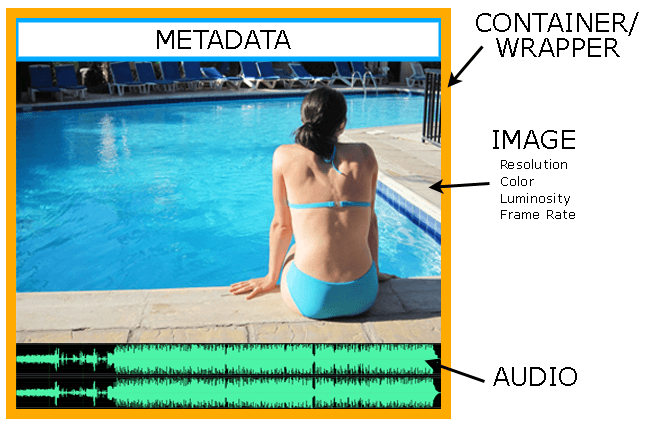
A typical video file contains image, audio and metadata; in addition to the file wrapper or container. You could compress each of these properties, since all of them are made up of 0s and 1s.
Compression is the practice of reducing the number of bits (0s or 1s) in a file. A video file typically can contain more than one type of compression:

Why do we need Video Compression?
One word: Bandwidth.
Video is transmitted as electrical signals. These signals usually move around via air (radiowaves, microwaves, etc.) or via cables (HD-SDI, HDMI, etc.).
For simplicity’s sake, it might be useful to think of cables as pipes. A pipe has a limited diameter, and there’s only so much water that can flow through it, no matter how much force you apply. Signals are like water, there’s only so much you can push through.
The limit of a broadcast system is called its bandwidth.
In the case of wireless transmission, the ‘pipe’ is called the spectrum. It’s like an invisible bowling alley, where only a limited number of frequencies can travel (one per alley).
The governments of each country limit the spectrum within their territory. The point is, even though birds have the freedom to fly any which way, your video in the air isn’t allowed that freedom.
Or at least, there’s a cost associated with ‘freedom’.
On a fundamental level, you can understand what happens when everyone wants a piece of a pipe. Ask yourself: How many people can drink from the same straw at the same time?
It’s the same with bandwidth.
To get more, everyone must pay more. Since this is not how humans usually deal with their money, bandwidth is distributed according to the auction methodology. Pay more, get more. Pay less, get less. Pay nothing, and be at the mercy of everyone else.
Video compression allows the efficient utilization of bandwidth by reducing file sizes.

What if you could shrink a bowling ball into a marble without ‘changing’ its utility? Each alley could become smaller, and you can fit more alleys in the same arena.
What if you could look at subsequent bowling balls and compress them into one single bowling ball? Weird? That’s what interframe compression does. To know more about interframe and intraframe compression, click here:
What are the ways in which video can be compressed?
Some of the ways in which video is compressed, but are not very obvious are:
- Spatial Resolution
- Color bit depth
- Chroma sub-sampling
- Gamma
- Color space
- Frame Rate, Field Rate (Temporal)
- Audio Sampling
- Audio bit depth
- Data Compression
Out of these, when we think of video compression we always tend to think of data compression, and forget every other type.
Data compression is the power of algorithms to find ‘patterns’ in the video to ‘reduce’ redundant information.
What are the most popular Compression standards?
Here are a few major worldwide standards for delivery:
- MPEG-2 (DVD)
- JPEG 2000 (Digital Cinema)
- H.264
- H.265
Here’s a table of the most common display formats and the data compression applied (in 1080p):
| Mbps | Codec | |
| Youtube | 8 | H.264, H.265, VP9 |
| Blu-ray | 48 | H.264 |
| Low end mirrorless camera | 100 | H.264 or H.265 |
| 2K/4K DCI | 250 | JPEG 2000 |
| 2.8K Arriraw | 1,372 | Arriraw |
| 16-bit TIFF Sequence | 3,736 | Uncompressed |
Compare this with the average internet bandwidth of the world, which is about 50 Mbps for downloads. It’s a mind-boggling chore to fit all that data into existing infrastructure to please everyone.
Nothing works without video compression. And it’s going to stay like this for a long time.

Video compression support