
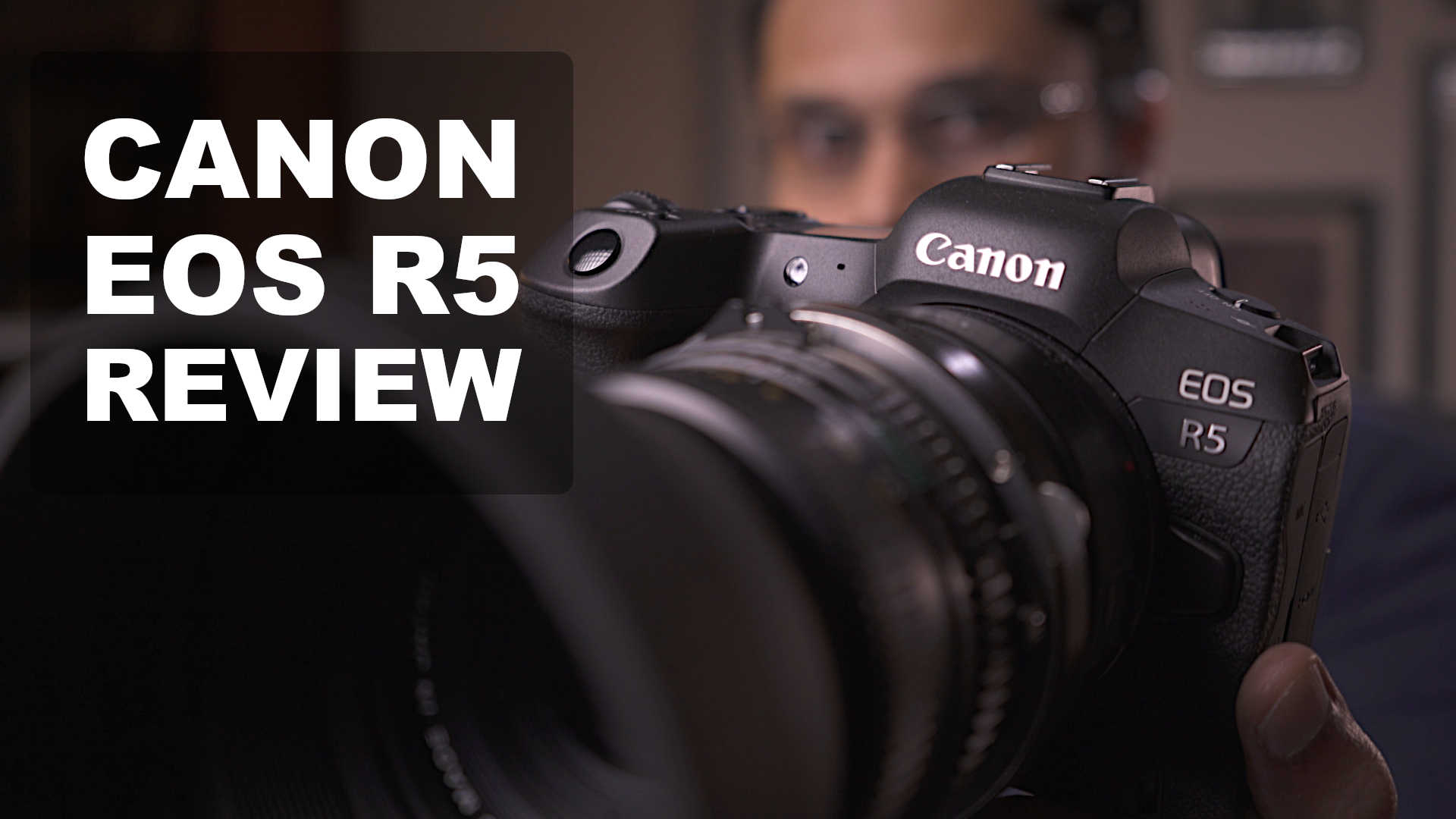
| Review type: Comprehensive |
| List of sponsored/free gear: None. I paid about $4,000 for my EOS R5. Lenses were rented or are my own. |
| Did I get paid for this review? No |
| Warning: The findings of this review are based on the particular sample tested, and might not be true of all samples. Even though I’ve tried to be as objective as possible about image quality and usability a large measure of subjectivity and personal preference is inevitable. |
This is my comprehensive review of the Canon EOS R5 (Amazon, B&H) for filmmaking. If you like watch the video first:
Important features of the Canon EOS R5
The Canon EOS R5 (Amazon, B&H) is the only full frame camera in its class that can record 8K RAW internally (though it overheats), and can also shoot 45MP stills.
I won’t be covering photography in this review, but if you’re young and in the business, you might want to keep watching. Somebody’s going to ask you to shoot video soon. It’s your choice whether to incorporate stills and video both in your business. If you don’t, somebody else will.
For important quirks and features of the Canon EOS R5, check out this article:
Image quality
The first order of business is to understand how good the camera is for image quality. Does it deliver? I did a range of comprehensive tests and here are the results:
8K vs 4K HQ vs 4K Comparison in the Canon EOS R5: Resolution
All shots are blown up to 200%:

Result
As the images clearly show, 8K just blows the other two out of the water.
What about 4K HQ vs 4K normal mode?
There is definitely a difference, and 4K HQ is objectively better. However, I can hardly see a major difference in resolution in HQ. There is a difference between resolution and sharpness. You can add sharpness later, but resolution cannot be created.
At 100% the difference exists, but it’s too small to fret about. I’m really not sure the 4K HQ mode is true downsampled 8K, because the dissimilarity is striking. I don’t know why 4K HQ mode is this bad, when it should be a lot better.
And because you risk overheating, I only recommend 4K HQ if you really have your shoot under control. For most people, I have no hesitation in recommending the normal 4K mode up to 30p. The other reason to pick 4K 30p is if you shoot 60p or 120p, the footage will match. 4K HQ is only available to 30p.
8K vs 4K HQ vs 4K Comparison in the Canon EOS R5: Color and DR
All shots are blown up to 200%:
Normal exposure

Overexposed by 2 stops
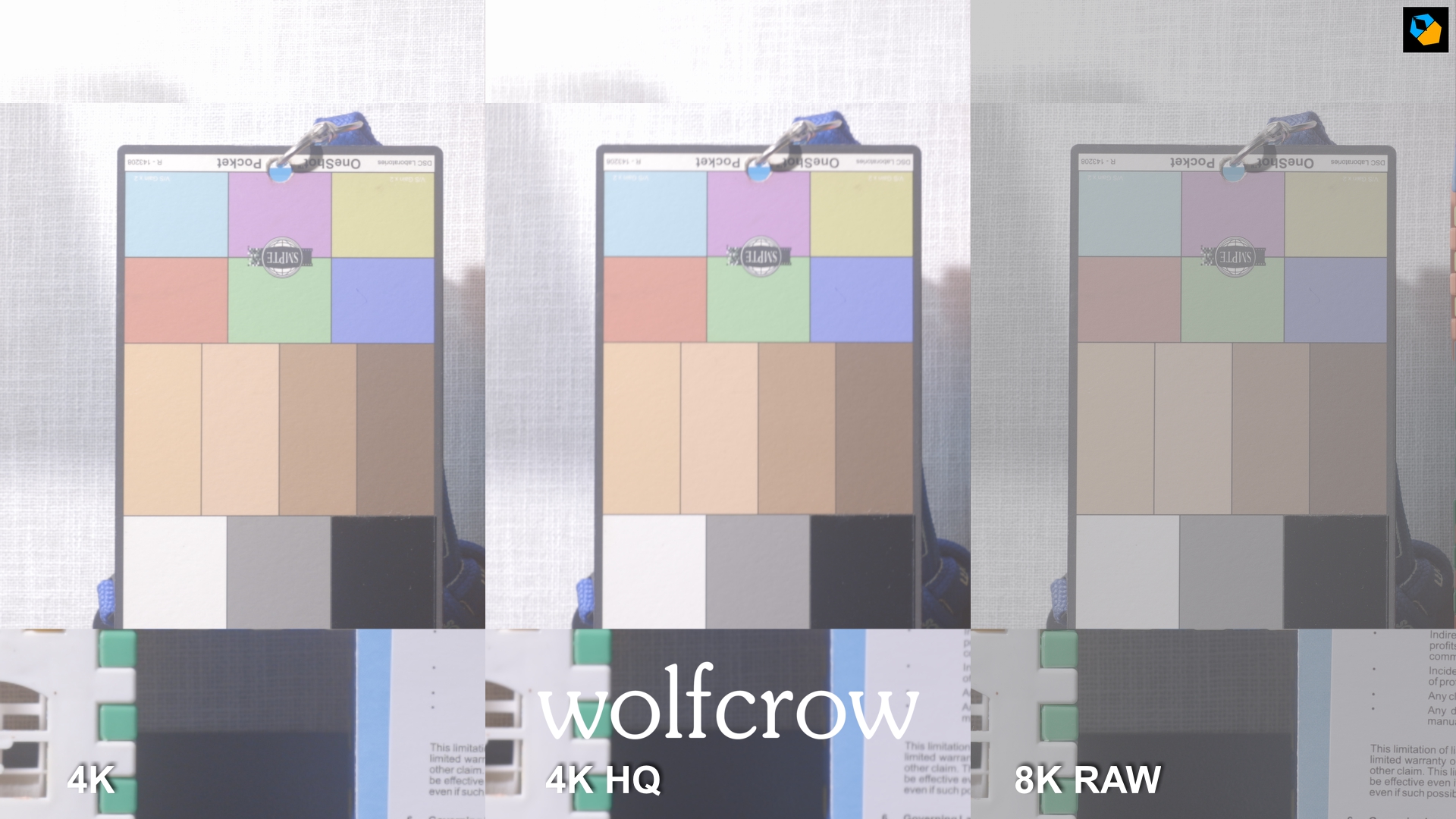
Underexposed by 2 stops

Result: Color and DR
8K really wins here as well. Look at the overexposed bit (top) and underexposed bit (bottom) and the results are clear. 8K has more dynamic range for sure.
One thing to note is you change the log encoding in 8K to Canon Log 2 or Canon Log 3. I prefer Canon Log 2, which is what I’ve set it to in Resolve. That’s the advantage RAW has. that cannot be matched.
The other two are encoded in Canon Log, which is similar to what you find in the Canon 1D X Mark III.
What about 4K HQ vs 4K normal mode?
You can see quite clearly 4K HQ has no practical advantage in DR or color.
8K Stills RAW CR3 vs 8K RAW CRM in the Canon EOS R5
Adjusted by 3 stops over in DPP
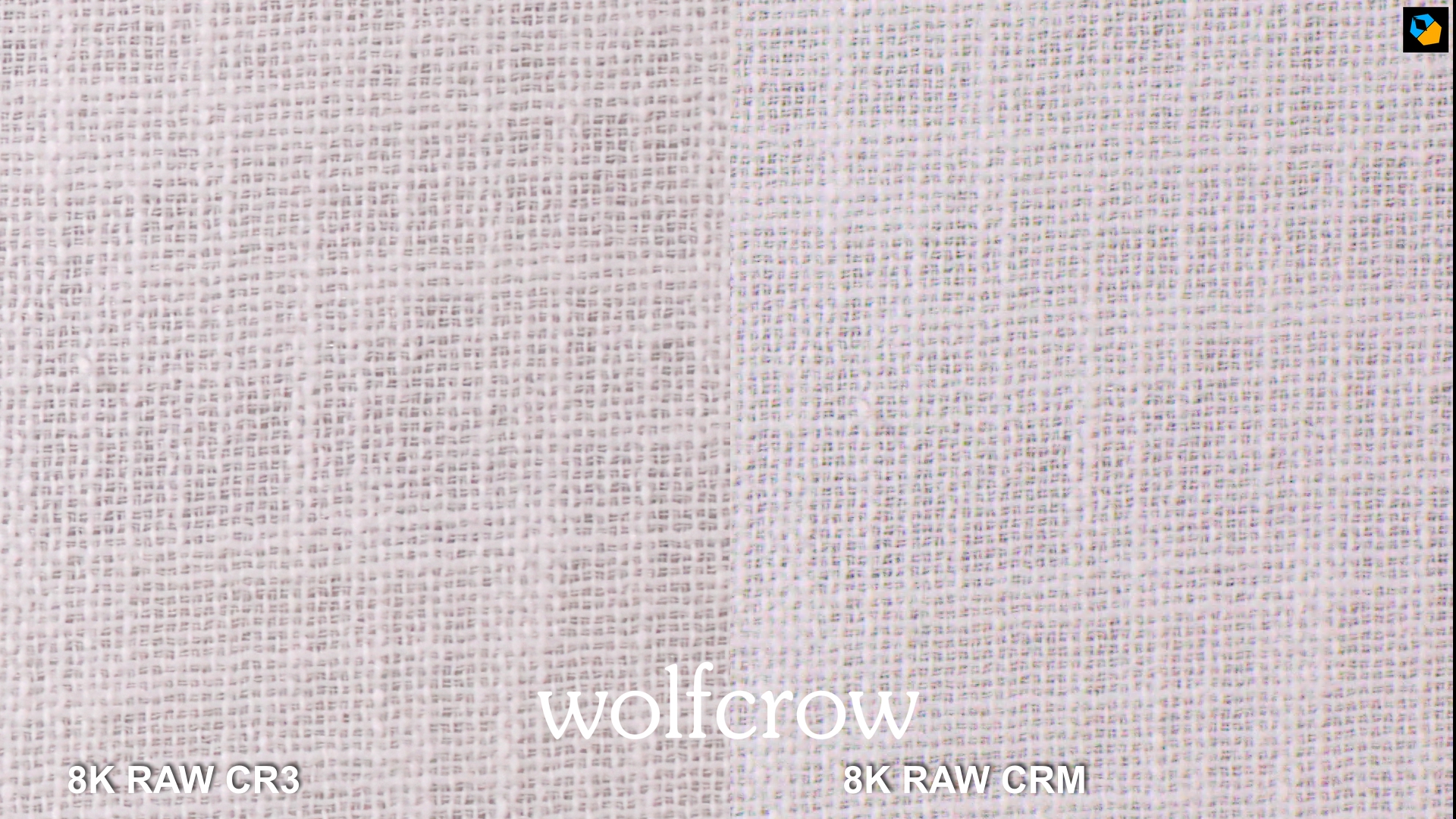
Adjusted by 3 stops under in DPP

Result
It’s a very interesting result!
8K CR3 (still) does better in the shadows, and 8K CRM (video) holds up in the highlights. I’m not sure why, but the CR3 file turns green on underexposure in DPP. The CR3 image is slightly sharper.
In practical terms, the differences are slight. The still RAW file is supposed to be 14-bit, and the video RAW is 12-bit. However, there’s hardly a difference for practical work.
4K HQ vs 4K Comparison for External Recording in the Canon EOS R5
All shots are blown up to 200%:
Normal exposure

Overexposed by 2 stops
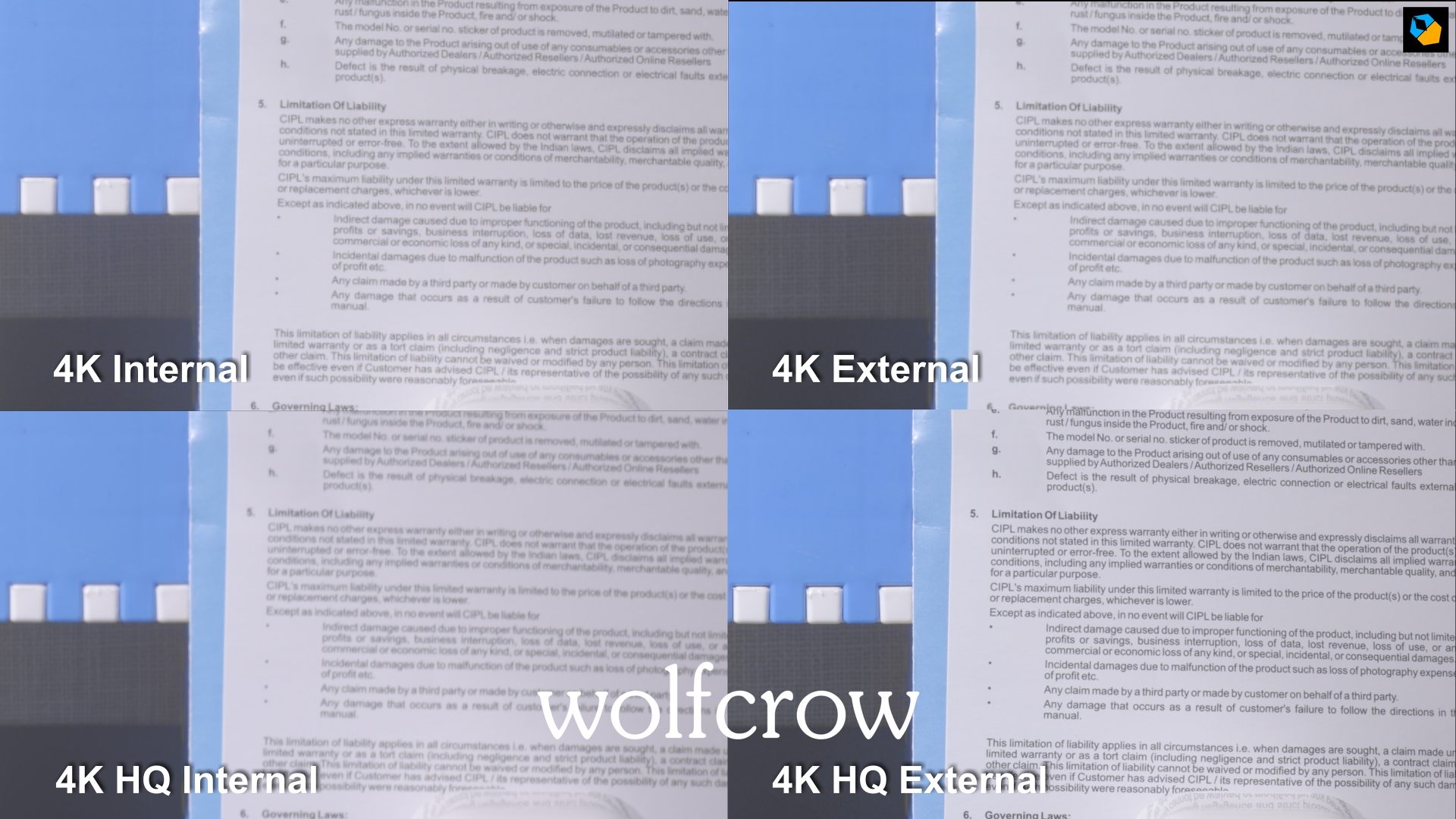
Underexposed by 2 stops

Result
4K HQ recorded externally is easily the best, and if you are using an external recorder this is the mode you should be aiming for. There is no overheating when using an external recorder in either mode.
However, if you’re shooting 4K 60p as well, the footage won’t match as cleanly, and you might have to add a bit of sharpening to the 60p footage.
APS-C 4K vs 4K HQ Comparison in the Canon EOS R5
All shots are blown up to 200%:
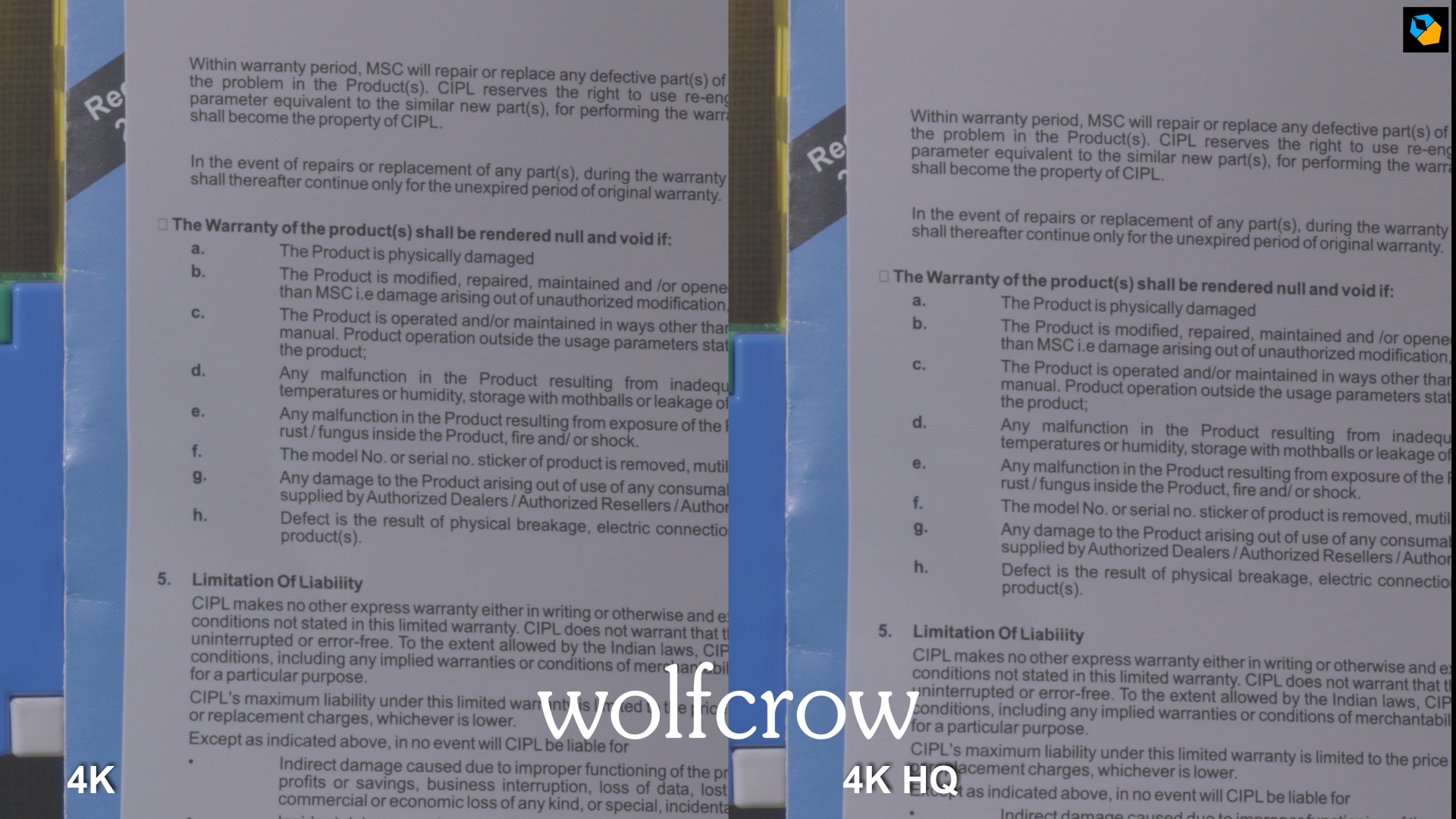
Result
Hardly a difference. Both are probably sampled from 5.1K so it makes no difference which one you use.
UHD APS-C HQ vs Normal vs External Comparison in the Canon EOS R5
I used UHD here because I’m using an Atomos Shogun that is limited to UHD 30p. All shots are blown up to 200%:
Normal exposure
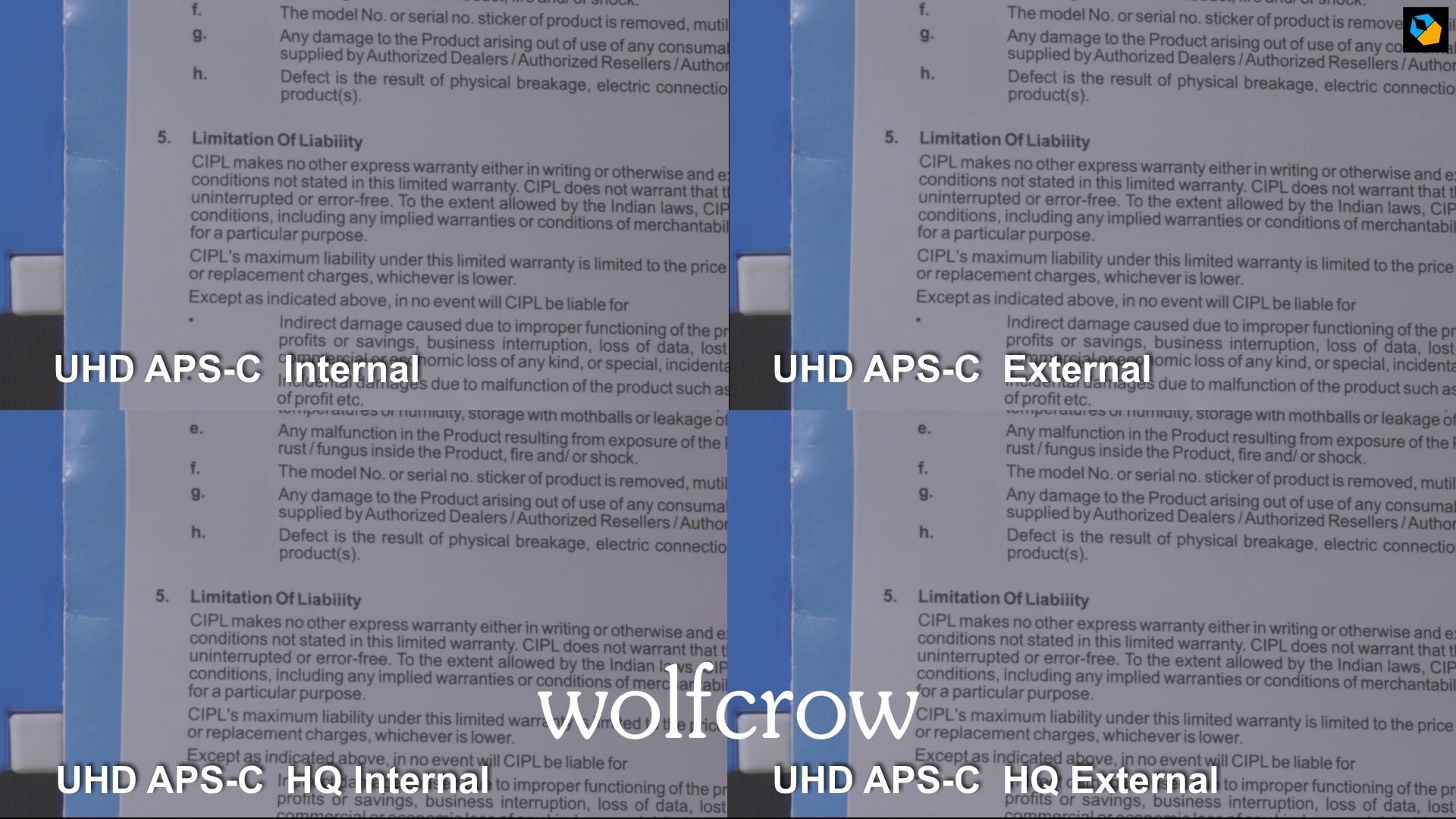
Result
No practical difference, so HQ doesn’t really make such a big impact here. Still, if all you need is up to 30p, 4K HQ APS-C is the way to go.
Before we talk about the best mode, let’s talk about overheating.
Canon EOS R5 vs Canon 1D X Mark III
I prefer the Canon 1D X Mark III (Amazon, B&H). It has better video quality (5.5K RAW and amazing low light) overall and is a more practical tool without a doubt.
However, the EOS R5 does have certain advantages:
- Fully articulating screen.
- 45 MP stills.
- RF mount and newer (and more expensive) RF lenses, plus EF lenses with an adapter.
Overheating in the Canon EOS R5
Watch my test results here:
I did comprehensive tests with the Canon EOS R5 (Amazon, B&H) that you can read here:
;TLDR Summary
With the Canon EOS R5 (Amazon, B&H) here’s what I recommend:
4K up to 30p – Can shoot as much as you want, as long as your takes don’t need to exceed 29 minutes 59 seconds. If you want to bypass this limit, use an external recorder like an Atomos Ninja V.
4K 50p and 60p – should be fine for most filmmakers making shorts or feature films or web series, music videos, vlogs less than 30 minutes, etc. It’s doable with just a bit of patience and vigilance. Avoid APS-C mode internally in 60p. If you want to bypass this limit, use an external recorder like an Atomos Ninja V.
4K 100 and 120 fps is only for those rare occasions where you need 120 fps. Can’t recommend it for music video shoots that need 120 fps all the time.
4K HQ (up to 30p) is only when your production follows the pace of a Hollywood shoot, at less than 5 pages a day. Of course, it also means keeping retakes to a minimum, and switching off the camera. If you’re not vigilant your shoot could turn into a disaster. In short, it’s risky. However, if you want to bypass this limit, use an external recorder like an Atomos Ninja V.
8K RAW – can’t recommend this unless it’s for the rarest of rare shots where you absolutely need RAW or 8K. Avoid it. It will really put you in jeopardy if you forget to turn off the camera, or overdo it.
What’s strange is the camera doesn’t shut down when overheated if you switch modes. There’s a lot of unanswered questions and illogical things going on with overheating. I think it’s a combination of overheating and Canon crippling the R5 to protect the C200 or upcoming RF cinema cameras. I hope Canon can raise record times with a firmware update. They need to be brave, or lose a lot more professionals to Sony.
Line Skipping in the Canon EOS R5
I really didn’t see a single case of line skipping artifacts like moire or aliasing. The R5 has an anti-aliasing filter so that might explain it. The sensor readout is fast enough.
Rolling Shutter Performance in the Canon EOS R5
Unfortunately 8K and 4K HQ has worse rolling shutter than 4K normal mode. However, they’re both reasonably okay. Not as bad as the old 5D Mark II:


Low Light Performance in the Canon EOS R5
The EOS R5 isn’t as good as the 1D X Mark III or Nikon Z6 in low light. It’s not bad, but is definitely noticeable. You can see noise when underexposing shots.
The good news is the noise isn’t ugly, and might even help with YouTube compression artifacts. I turn off Noise Reduction for all my shooting. I prefer to do it in Resolve Studio.
That’s all for image quality and overheating. So, what’s the best mode for video and filmmaking?
What is the most practical resolution and codec for the Canon EOS R5?
For the Canon EOS R5 (Amazon, B&H) I recommend:
- 4K Full Frame or APS-C “normal” mode, for all frame rates 23.976 to 119.88 fps
- 10-bit 4:2:2 ALL-I (HEVC, H.265)
- Canon Log On, with View Assist
- For external recording, if you are shooting up to 30p only, use 4K HQ mode for best results.
Why am I not a fan of 4K HQ?
Here are all the reasons
- Overheats internally
- Image quality isn’t a massive improvement
- Rolling shutter is worse
- You can’t match it easily with 60p and 120p footage
- Only shoots up to 30p
I hope this answers the image quality conundrum. I did a real world shoot with the camera (as much as possible with a tiny team during the lockdown), and here’s my video test:
Can you tell which mode was used for which shot? I shot in all modes, and I couldn’t tell which is which on my FSI grading monitor and 4K LG monitor!
Gear used:
- Canon EOS R5 with RF to EF adapter (Amazon, B&H)
- Sigma 50mm and 85mm Art lenses (Amazon, B&H)
- My associate Shyam’s world-worn tripod. This had some pan issues in the last take.
How good is Dual Pixel Autofocus in the Canon EOS R5?
I didn’t get any RF lenses due to shipping delays so I opted to test with both Canon EF lenses and Sigma Art primes.
It’s pretty good. For EF I used it with the Canon 50mm f/1.2 and 85mm f/1.2, and as you can see in the review video it performed fine.
The eye and face detection works great even at f/1.2 in mid to low lighting. This is a department Canon excels in, so I’m happy to say you can use this lightweight camera on gimbals and shoot a lot of moving video.
For the test shoot I rented Sigma Art lenses and it did okay. It struggled more in low light as compared to the Canon EF lenses.
This is specific to face and eye detection. As you can see in my test video, eye detection doesn’t do so well in low light, but face detection does.
You can also touch the LCD to lock focus, and drag to change focus. I don’t like doing this because it induces shake in the footage. But it’s fast and snappy just like in the 1D X Mark III.
This is as good as it gets.
Image Stabilization in the Canon EOS R5
The in-body image stabilization (IBIS) is a great addition that will save a lot of shots. It doesn’t replace a gimbal, but it’s good enough.
You also have the option of Digital IS, which I turn off.
It must be noted that IBIS works well with the right lenses. If the lenses have IS, you get the best stabilization.
Workflow
8K RAW is written as a *.CRM file that is easily read by most editing and grading applications. With Resolve, make sure you update to v16.2 or higher.
For 10-bit 4:2:2, the encoding is HEVC/H.265 and this is only supported by Davinci Resolve Studio. The free version does not support this codec. However, I’m pretty sure Premiere Pro, etc., will have no issues.
I would avoid the IPB codec completely. It’s H.264, though the data rates are not good enough for grading. I don’t see the point of spending so much money on a camera and using the worst codec possible. The IPB codec is supported by the free version of Resolve.
A note on editing and computer power
I have a fairly powerful workstation, but H.265 is murder. I won’t forgive any manufacturer who puts H.265 in their camera. 4K struggles, 8K H.265 is pure evil as an acquisition codec.
RAW works like butter, as it should (as long as your hard drives are fast enough). If you are considering a long shoot, I recommend getting an Atomos Ninja V (Amazon, B&H) to record directly to Prores HQ or DNxHR. It will make your life a lot easier.
External recording in the Canon EOS R5
The Canon EOS R5 (Amazon, B&H) has an HDMI Type D (micro) port which is flimsy but works. You have a cable protector.
You need a HDMI Type 2.0 or “high speed” cables for 4K 60p.
The camera is limited to 60p via HDMI – no 120 fps and no 8K. 4K HQ. You can roll for hours and you don’t need CFexpress cards if you’re not shooting 120 fps.
Should you use an external recorder with the Canon EOS R5?
I highly recommend it. Specifically the Atomos Ninja V (Amazon, B&H):

Here are some things to think about:
| Costs | Atomos Ninja V | Recording Internally |
|---|---|---|
| Cost of recorder | $600 | $0 |
| Cost of two media drives* | $200 | $700 |
| Cost of reader | $15^ | $50 |
| Cost of two additional batteries | $80 | $0 |
| Monitor adapter | $7 | $0 |
| Total | $902 | $750 |
| Advantages | More exposure tools, better codec, no overheating till 4K 60p, LUTs, frame markers and guides | Size and weight, less power draw |
^SATA to USB-C.
For about $152 more you are getting a lot of bang for your buck.
For regular shooting, I recommend one 128 GB CFexpress card and two UHS-II SD cards. This is for backups or the occasional 120 fps or RAW shots.
In India all I can find is 128 GB CFexpress cards. Unfortunately, the 128GB Sandisk Extreme Pro is not approved by Canon. Check this for compatible cards for the Canon EOS R5:
Note: I didn’t have issues recording 8K RAW to my 128 GB CFexpress card, but it might develop issues over a longer period. 8K isn’t really practical so I’m good.
The most annoying this is you can’t record 60p, 120p or 8K RAW to an SD card. These modes can only be written to a CFexpress card.
Battery life for the Canon EOS R5
I consistenly got about 3 hours with the newer Canon LP-E6NH batteries. The “regular” E6 clones got me 1.5 to 2 hours. You can buy 3 “clones” for one original. I suggest 2 originals and two clones, and one extra charger. Charging takes a long time.
I use a 90Wh Gold-mount brick with a Wooden Camera plate. You can buy a D-tap to dummy battery adapter and and P-tap to P-tap cable for the Ninja V. Two batteries and you’re good to go for an entire day.
Ergonomics and hand-holding the Canon EOS R5 for video
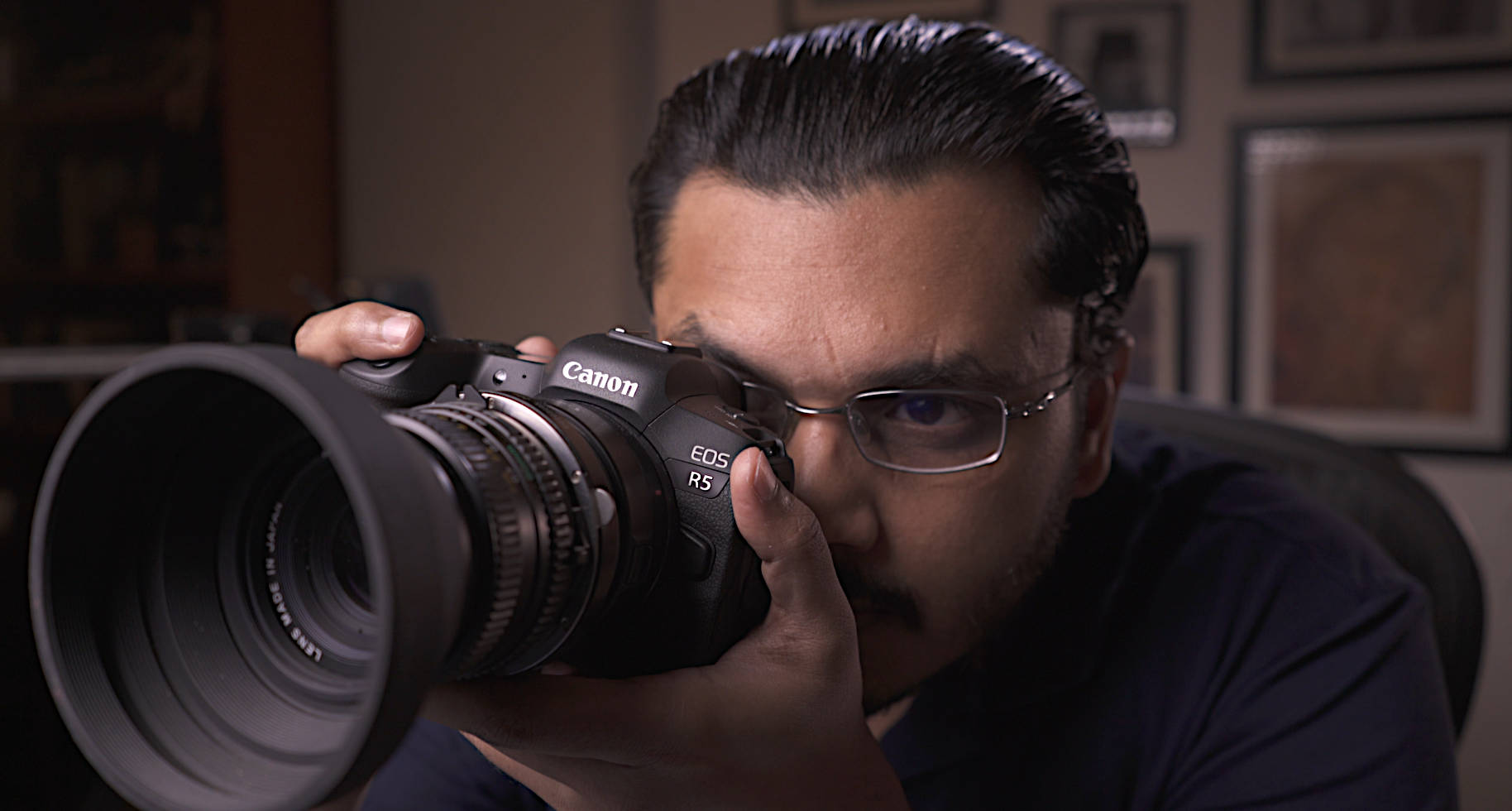
The Canon EOS R5 (Amazon, B&H) handles similarly to a 5D Mark IV, but I still prefer the 5D Mark IV’s grip and balance. It’s more well-rounded and fits like a glove, whereas theEOS R5 is slightly unbalanced and weighs down to the left due to its lighter weight. Of course, depending on your hand size, your experience might vary.
The menu is simple, as is expected of Canon. You can customize buttons and have your own menu with one curiosity. You can’t assign WB to any button. I find that strange, because you can change the mode dial on top to anything. I had it at Zebra for my shoot, and another button for focus peaking when i was using manual mode.
Please Canon, include WB on the buttons and also a frame guide. Customizable if possible. If you’re shooting 2.39:1 or other format, hard luck. That’s where a Ninja V can help, too.
The Canon EOS R5 has two Zebras, which works fine for exposure. I used it for skin tones. It’s the way to go without the Ninja V. The camera meter is pretty much useless, similar to the 1D X. The histogram is okay for RAW video, but will give you hard time for compressed video.
Some negatives are, I find it stupid you have to press Mode and Info to change to video mode.
The thumb joystick stick on the back is terrible. Sorry, it’s too rigid and not at all comfortable on the skin. You really might hate it after a while. I know I do, and I have only used it for a few weeks.
The EVF is great, large and wide. But a DSLR can help you frame your shot with the camera switched off. Mirrorless cameras can’t.
The LCD is fully articulating. It is blocked by the HDMI cable when fully open. An articulating LCD is great for video. Touchscreen works great. Touch AF is amazing.
I didn’t get a change to test the audio comprehensively, but the preamps sound decent enough for built-in recording. You really have to test with different mics and recorders to know its real worth. For professional shoots I recommend an external recorder anyway. The internal mic is actually very decent, good for decent scratch audio.
Ergonomics-wise, the R5 gets out of the way, sort of like Apple products.
Which professional market is this suited for?
Who buys the majority professional level mirrorless cameras for video? Wedding, corporate videos, low budget ad films and promos – they’re the main market.
This market has grown over the last few years because the wedding industry and corporate industry is lucrative. There’s always business. Even if there’s a pandemic or war, weddings and business must move on.
The biggest market for mirrorless cameras with video features is the wedding industry. The 5D Mark II was a revolution. Canon tried to ride the popularity for a decade and didn’t really take Sony’s ascendance seriously until now. The fact that so many revolutionary cameras came out of Canon in the last year alone shows they’ve woken up. The 1DX Mark IIII is an amazing camera, the C300 Mark III and the C500 Mark II are great cameras, and now the EOS R5 is in a league of its own.
It is the only camera in this price range that can shoot 8K RAW internally, and there is no camera that can do this and also give you 45 MP stills at a tremendous burst rate. Canon has really made a camera to please its biggest market.
Most people don’t need 8K. Clients can’t demand 8K. If they do, they had better be paying a lot more, and in that case you’re better off with a Red Monstro.
What they could really use is 4K 120p. Super slow motion is for some reason all the rage, along with low contrast flares and drone shots. It doesn’t matter whether you like it or not, that’s what a lot of clients want. That’s what their neighbors and relatives did, and if they are a company, that’s what their competition is doing. You have to give it to them or somebody else will.
4K 120 fps
This is where I think Canon dropped the ball a bit with this camera. The worst overheating performance is in 4K 120p. It overheats too quickly to be useful for anything but a few shots. The big question is, do you need 4K 120p or not?
In my test video I shot mostly in 4K 120p. I took my own time composing and rolling. So, it’s all doable, with restraint. You know how fast and how long you shoot video, so you should be able to tell if this is the right camera for you.
I know a lot of people would like to wow their clients with super slo-mo, whether or not clients will pay extra is a call you have to make individually.
The failure of a legit 4K 120 fps is the only “ugly” result in this review.
The Canon EOS R5 (Amazon, B&H) also has an HQ mode in 4K but it’s limited to 30p. It overheats as well. If you’re shooting 60p and 120p clips, it’s better to just shoot regular 4K so they match easily. The quality in normal 4K is good enough for the clients that pay for this class of camera and video shooter.
In other words, the difference in image quality will not really be noticeable in most practical work, and your clients will definitely not know the difference.
Wedding filmmakers and corporate shooters who also do double duty, which is unfortunate. This surprisingly large market gets bigger every year. If you’re a bit successful you start to build a small team of shooters and you can have two or three EOS R5’s in your hand. Now 8K RAW might be able to get you through a small ceremony from which you can grab stills. The next ceremony might be a few hours away, so no issues. It all depends on what you want to deliver to your client.
Canon knows all this, and it has made a calculated bet with this camera.
The bottom line. Is the Canon EOS R5 good for video?
Where the R5 really shines is Canon Log. You have an assist feature so you get very pleasing images right off the bat. I shot my test shots in Canon log because all the other modes seem silly after you see what this is capable of. If you don’t like log, my favorite profile is Faithful, for great skin tones.
In the real world, people complained about line skipping in the 5K Mark II, among other issues. Most professionals didn’t care. They made weddings and corporate videos and short films with it. Even today the Canon 5D Mark IV is an extremely popular camera in India for low budget shoots. That’s the reality. It doesn’t matter what the Internet says, because not everyone puts their views on the internet.
A lot of people will compare this to the a7S III. The difference comes down to 4K 120 fps, and general preference of colors. I like Canon colors, which is why I purchased the EOS R5 to replace my aging Sony a7S IIs. Here’s my comprehensive review of the Sony a7S III:
Both the R5 and a7S III are expected to be great hits with this segment. No client in this market segment will pay extra for 4K RAW, let alone 8K RAW. They will not pay extra even for 4K 120 fps though now you have that option if required. Music videos don’t count because the music videos that force you to shoot with mirrorless cameras have almost zero budgets anyway.
I have come to the conclusion that the Canon EOS R5 (Amazon, B&H) is clearly capable of producing money up to 4K 60p. The image quality is good enough for today’s clients, and you can do more kinds of jobs with this camera than you could do with any other camera model, except the Canon 1D X Mark III.
I hope you found this comprehensive review useful. Let me know what you think in the comments below.
Additional articles:

Meticulous detail, as ever.
Well done…great job!!!
Thank you!