

This article will show you how to find the right TV viewing distance, given the diagonal size and screen resolution. We’ll cover:
- The limits of the human eye and defining the ‘standard eye’ so we can get on with the show.
- The formula for the ideal TV viewing distance.
- How far forward or back can you go from the ideal viewing distance.
- How to put together a home theatre room experience (audio excluded).
Finding the right TV viewing distance is a matter of understanding the relationship between ppi (resolution), your eye and your distance to the TV, monitor or display.
We start with the eyes.

Whose eyes shall we use?
We all want to use our own, but our eyes don’t all see the same way. As a primer, if you want to know the resolution of the human eye, start with this excellent video:
Here are the key takeaways we need for this article:
Here are the lp/mm numbers for the human eye based on what we’ve learnt so far:
| Resolution | lp/mm | ppi |
|---|---|---|
| 0.2 arc minutes | 1.41 | 71.6 |
| 0.4 arc minutes | 0.71 | 35.8 |
| 1 arc minute | 0.28 | 14.3 |
| 3 arc minutes | 0.09 | 4.8 |
| 10 arc minutes | 0.03 | 1.4 |
At a distance of 20 feet, if you can see one line one millimeter long, your eyesight’s pretty good. That’s 0.4 arc minute. The average is 1 arc minute.
3 arc minutes is the starting point for low vision – the point you have to wear prescription glasses. 10 arc minutes is the threshold for legal blindness. Since most television viewers will be under the 3 arc minute limit, that’s what I’ll use as the lower limit.
Random events (even biological) distributed statistically can be represented (for our purposes at least) as a bell curve:
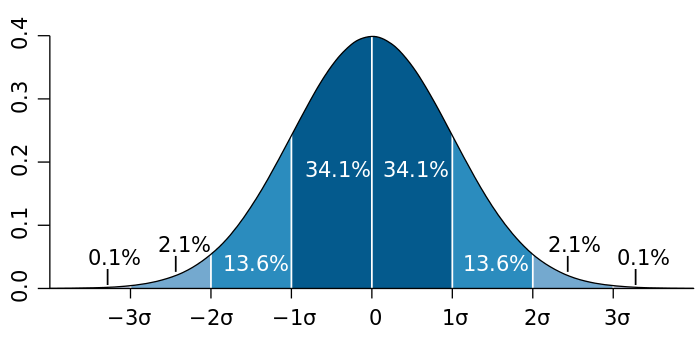
This means, the left most limit is 3 arc minute, and the right most is 0.4 arc minute. The middle would correspond to 1.7 arc minute (about 20/35). I want it to be 1 arc minute so bad, but life doesn’t work that way.
The area under the curve represents the population of the human race.
3? corresponds to 99.73% of the human race, and 2? corresponds to 95.45% of the human race. Is that additional 2.1% important? Let’s see, 2.1% of 8 billion is about 168 million! The population of the USA is about 335 million, and 2.1% is about 7 million people, or 140,000 people per state. That’s not a small market for any manufacturer.
Therefore, it is only reasonable to assume 3? to be the upper limit, which corresponds to about 0.7 arc minute.
For the lower limit, I think you need 20/40 vision for a pleasurable TV viewing experience. That corresponds to 2 arc minute, or roughly -1?.
Therefore, we have to satisfy two eyes – one with a resolution of 2 arc minute and the other with a resolution of 0.7 arc minute. Together, these two individuals represent roughly 84% of the humans on earth – whether they are in a position to buy TVs or not.
Regarding viewing distance, we can sort of find a minimum viewing distance through empirical and anecdotal evidence. Even though the average human can focus up to 4 inches, nobody gets that close to a TV.
Even if you did, imagine doing so and a close up appears on screen. Where will you look? Secondly, at that distance, a television also invades a person’s private space. We’ll get to the ideal viewing distance, but first, let’s find the formula for it.
Formula for TV Viewing Distance
Here’s the complete formula for TV viewing distance:

where
- D = Ideal distance from television in inches
- I = Screen diagonal size in inches
- A = Aspect Ratio
- ? = angle in degrees (discussed next)
- RH = Horizontal Resolution of the television
As we have seen earlier, we need to satisfy two individuals, capable of different resolutions. Here are the values for each of them:
- ? in degrees for 0.7 arc minute = 0.0117o
- ? in degrees for 2 arc minute = 0.0333o
For standard televisions with an aspect ratio (A) of 16:9, we can simplify the above formula to:
- D0.7= 4270 I/RH – we’ll call him eagle eyes
- D2 = 1500 I/RH – we’ll call him normal eyes
All you need to know is the diagonal size ‘I’ and the horizontal resolution. Here are three common resolutions for TVs:
- 1920 x 1080 – HD
- 3840 x 2160 – Ultra HD or UHDTV1
- 7680 x 4320 – Ultra HD 8K or UHDTV2
The first number in each group is the horizontal resolution or RH. Just to show you how it’s done, here’s a graph that shows the TV viewing distance for 1080p versus screen diagonal, both in inches:

The bigger the TV gets, the further away you need to sit. The green line represents 20 feet from the TV, maybe the longest anyone is going to sit (more later).
As you can see, eagle eyes (0.7 arc minuters) reach their ‘limit’ at 20 feet when the screen is about 105″ in diagonal. Anything bigger will force them to go further away. At this same screen size, normal eyes (2 arc minuters) must sit about 7 feet away to enjoy the same resolution.
Can TV manufacturers please both groups?
Why manufacturers can’t please both eyes
What you’re seeing quite clearly from the above image is that the lines don’t meet anywhere.
If eagle eyes needs to be at 10 feet for a 55″ screen, normal eyes must sit at 3.5 feet!
If normal eyes steps back to about 7 feet, the resolution of the TV is halved, which means, the 1920 x 1080 screen will now look like 960 x 540 (Standard Definition) to them.
If eagle eyes view a 42″ screen at 8 feet, the same screen demands that normal eyes sit at about 2.7 feet. If normal eyes have to sit at 8 feet, they have lost thrice the resolution.
People with different vision have to sit at different distances to enjoy the same resolution.
Cinema
In cinema, this is possible. The typical multiplex screen width is about 30 feet. Let’s assume for simplicity’s sake the closest seat is 10 feet away, the last seat is about 30 feet away. Let’s assume everyone’s watching a 4K 16:9 DCP film, and let’s ignore changes in the angles because that’s not necessary here.
Eagle eyes will have to sit about 35 feet away, or practically in the last row, and normal eyes will have to sit about 12 feet away, possibly in the first or second rows. Then they’ll enjoy the same resolution.
However, the experience will not quite be the same, because normal eyes will have to move their head more often, and eagle eyes won’t enjoy the best position for the audio mix. The best position for the audio mix is somewhat in the center of the cinema hall.
However, if you really need the same experience, cinema is the only possibility.
Home viewing
One TV size really cannot please everyone. Depending on your eyes and the practical viewing distance in your living room, the screen size must change for you to enjoy the same resolution as everyone else (assuming their eyes are better or worse than yours).
Is this practical? Of course not. Even assuming your living room is large enough for you to manipulate viewing distance (and your couch and furniture), you can’t have more than one individual watching. A whole family is a range of vision. You just can’t please everyone. And, as you get older, you’ll need to keep changing your TV and/or viewing distance.
Bottom line, it’s highly impractical to have a condition where you can please both ends of the spectrum.
So we’re left with the dubious solution of finding one average that will have to do – at least to bring closure to this article.
For better or for worse, I choose 1.3 arc minutes (slightly better than 20/30) as the standard resolution of the human eye for the purposes of calculating the TV viewing distance.
There is a mathematical basis for this estimate, but it is highly subjective and isn’t worth mentioning here.
Our formula for the ideal TV viewing distance for 16:9 content reduces to:

Where:
- D – Ideal TV viewing distance in inches
- I – Diagonal of your television in inches
- RH – Horizontal resolution in pixels
If all you wanted was a simple formula, here it is:
- For 720p D = 1.8*I
- For 1080p D = 1.2*I
- For 2160p D = 0.6*I
- For 4320p D = 0.3*I
It doesn’t get any simpler. We can stop here. But, there are three important factors that are make things more complicated:
- People don’t always watch from the ideal distance. There are limits to how far or close they can go.
- If people watch low resolution content (like SD on HDTV or 1080p content on 4K or 8K) it affects their viewing.
- If people watch content in other aspect ratios (like 4:2, 2.39:1, etc.) it affects their viewing. This is minimal though, as most content have standard horizontal resolutions (which is why I picked that instead of the vertical resolution).
Now that we know the ideal distance, we need to look at what the practical range is – how close can we go, and how far can we go?
When is a pixel not a pixel?
When we say the eye ‘resolves’ detail, we mean it can clearly and indubitably mark out that detail among everything else that surrounds it. However, we know, in the real world, things are not so simple.
Let’s start with a pixel:

It is important to consider both types of pixels, because real pixels are a combination of both. Now, let’s take two pixels:

You can clearly make out there are two pixels, right? What if I brought them closer enough to overlap a bit?

What about a greater overlap?

As you can see, the closer two pixels get to each other, the greater the chances that we start thinking of them as one thing. The eye no longer resolves one pixel clearly.
Next, pixels don’t change their position, only we do. We either go closer to it, or further away from it.
When we get closer, the pixel magnifies. When we get further away, the pixel becomes smaller. Let’s look a progression of pixels as they get smaller and smaller. At what point do you begin to think there is only one pixel instead of two?
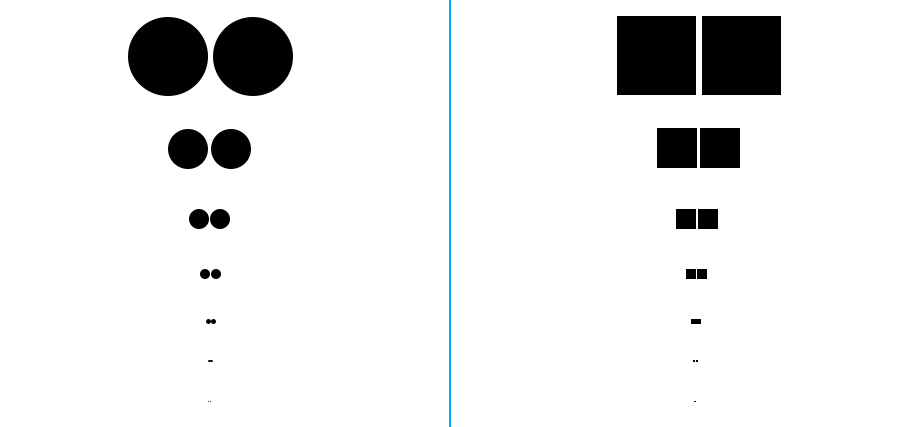
The point where two pixels become one to our eye is the point resolution is halved. What is so important about this point? If we know this point, we know the upper and lower limits of how far we’re supposed to sit from the ideal viewing distance.
The limits of TV pixels
Look at how it differs for round pixels and square pixels:
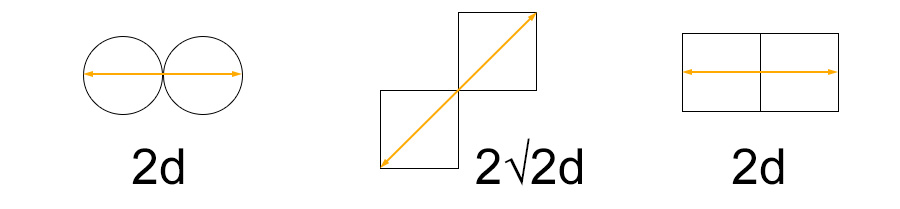
- If pixels are bunched perfectly next to each other, and if they are the same dimensions all around (circle or square), we can say the limit at which we know for sure they are separate is if the total length is twice the size of the pixel (2d).
- However, pixels can also be blended in diagonally (middle image). In this case, the minimum distance is 2?2d (almost three times d).
Unfortunately, in the real world, neither the pixels nor are the gaps are standard sizes. Take a look:

It is impossible to apply one formula for every kind of pixel technology. We do know, though, that there are pixels and there are gaps. From this, we can surmise:
- If we can see the gap between two pixels (i.e., if we can resolve the gap) then we’ll start to see a pixelated image.
- If the size of two pixels become the size of one pixel (because we’ve gone further back), then the resolution can be said to be halved.
Based on actual technology, we can assume that:
- You’ll start to see gaps when you can resolve about half a pixel (twice the ideal resolution).
- You’ll know for sure there are gaps when you can resolve about one-third a pixel (thrice the ideal resolution).
This is just a general rule of thumb, and cannot apply scientifically to any technology.
We break down this rule as follows:
- Closer – Twice to thrice the ideal TV viewing distance. Since we are looking for the ‘ideal’ viewing distance, we can ignore the greater number (who wants to see pixels anyway?).
- Further away – Twice to thrice the ideal TV viewing distance.
How far or close from the ideal viewing distance can we go?
As a general rule of thumb, we can assume that we shouldn’t go more than twice the ideal distance, and certainly never more than thrice the ideal distance – in either direction.
Easy to remember!
To keep things simple, let’s stick to twice the ideal distance in either direction.
We need to add to this a dose of practical reality. How far do people sit anyway?
The seating arrangement is usually based on the size and layout of the room, rather than the ideal TV viewing distance.
One factor that limits the size of the screen is the width of your wall.
According to THX, for an ideal viewing experience, you need to ensure the viewing angle is 40 degrees or less. Don’t forget, we have to consider audio and the locations of the speakers as well. Based on this, here are the maximum distances for different TV sizes:
| TV Size in Inches | Approx. Max. Distance in Feet | Ideal Distance in Feet 4K | Ideal Distance in Feet 8K | Ideal Distance in Feet 1080p |
|---|---|---|---|---|
| 55″ | 13 | 3 | 1.5 | 6 |
| 65″ | 15 | 3 | 1.5 | 7 |
| 75″ | 17 | 4 | 2 | 8 |
| 85″ | 19 | 4 | 2 | 9 |
| 100″ | 23 | 5 | 2.5 | 10 |
Having an 8K TV at home is a problem. Let’s say you splurge and get a 100″ 8K TV, and sit 6-10 feet away. All you’re seeing is 4K or lower, possibly lower!
Then, why 8K?
Three reasons: Partly to do with our eyes and partly to do with the actual resolution of the TV, and the content itself.
Problems with resolution
There are lots of points where you don’t get the true full resolution.
The camera
By the time the Bayer sensor in your camera captures a scene, and the lens and in-camera filters get done with it, you lose a ton of resolution, even before any processing has occurred.
On top of this, a camera can throw away some resolution in chroma subsampling, color space conversions and compression. Depending on the severity of these effects, the resolution drops that much further.
Then, in post production, curious and busy minds push the color, transcode or add filters to an already resolution-starved image.
We’re not done. Add TV or Internet compression, which drastically reduces image resolution even further.
The display
If there’s too much ambient light, you lose resolution. If the display isn’t very good, you lose resolution. If your viewing angle isn’t spot on, you lose resolution. If the screen plane isn’t 100% flat, you lose resolution. If the projector lamp or lens isn’t good, you lose resolution.
Who knows? What we’re seeing as 4K is probably only 2K.
Film was slightly different. It had its own issues, but none as drastic or depressing as digital video workflows. You lost about half the resolution, which is not bad. With digital, you might be losing three-fourths of it.
And this is possibly why, even though the math says 8K is total overkill, in the real world, 8K images look better than 4K.
If you’re standing in front of a cool 85″ 8K TV at 10 feet and going “Wow!”, that’s because you’re probably seeing only 4K, and earlier you saw even less – assuming our eyes are up to par, that is.
So feel free to splurge on any TV you think looks better than your previous one. It’s all subjective anyway!
