

| Review type: Comprehensive |
| List of sponsored/free gear: None. I rented the Sony a7S III with my own money. Lenses were rented or are my own. I used Sigma 50mm and 85mm Art lenses (Amazon, B&H) for my tests. |
| Did I get paid for this review? No |
| Warning: The findings of this review are based on the particular sample tested, and might not be true of all samples. Even though I’ve tried to be as objective as possible about image quality and usability a large measure of subjectivity and personal preference is inevitable. |
This is my comprehensive review of the Sony a7S III (Amazon, B&H) for filmmaking. If you like watch the video first:
Important features of the Sony a7S III
The Sony a7S III (Amazon, B&H) is a 12 MP camera that can shoot UHD 10-bit 4:2:2 Intraframe video internally, and RAW externally via HDMI.
For important quirks and features of the Sony a7S III, check out this article:
Image quality
The first order of business is to understand how good the camera is for image quality. Does it deliver? I did a range of comprehensive tests and here are the results:
Still RAW (ARW) vs S-Log3 (XAVC S-I 4K)

I used Sony’s Image Edge software to play around with the ARW file.
The software doesn’t recognize either of the log modes, but it does give you a clear idea of the highlight and shadow recovery.
RAW has its advantages, but what I was surprised to see is there isn’t a huge difference between still and video modes. Based on these tests I’m not certain RAW video would be that big of a difference to warrant the effort. After all, I suspect the feed will be curtailed somewhat via HDMI (as manufacturers have been doing since the beginning) and won’t be as good as RAW ARW.
The best codec is definitely XAVC S-I 4K. It is an intraframe codec.
What about XAVC S and HS?
XAVC S and HS are similar to older models like the Sony a7S II and a7 III, and are not as good for Log and color grading. 10-bit 4:2:2 is better, but the heavy compression all but kills a lot of color information.
However, if you want to record as-is, you’ll save a lot of space by opting for XAVC S 4K. I’d still pick the highest data rate for each mode.
For high-speed shooting up to 100/120 fps, you need XAVC HS 4K. 120 fps and 100 fps are not available in XAVC S-I 4K. With HD, you get up to 240 fps.
In all situations, pick the highest data rate possible.
Is there an APS-C mode in the Sony a7S III?
No, the sensor is a 4K sensor, so there is no APS-C mode to crop into. You’ll lose resolution.
Sony a7S III vs Sony a7S
Here are differences between the original a7S and the Sony a7S III (Amazon, B&H), both recorded to Prores HQ via an Atomos Shogun:


Clearly the a7S III has made great strides in the image quality department. It’s not a tremendous leap, and considering the time it has taken Sony to release this camera – and the competition – one has to think hard whether the image quality itself is worth the investment.
I have shot and owned the a7S, a7S II and a7R II. I’ve also shot with the a7 III. The a7S III is better image quality-wise. There is no doubt.
Overheating in the Sony a7S III
The Sony a7S III does overheat, similar to the earlier models. However, you do have a higher temperature cut-off mode (which you have to select in the menu) which gives you longer recording times:

In my 12 days with the camera, it never overheated once.
Recording limit in the Sony a7S III
There is no recording limit on the a7S III.
Line Skipping in the Sony a7S III
I didn’t see a single case of line skipping artifacts like moire or aliasing.
Rolling Shutter Performance in the Sony a7S III
The Sony a7S III (Amazon, B&H) has greatly improved rolling shutter performance. It’s more obvious at some focal lengths than others. Bottom line, it should make most people happy. Nothing to complain about.
Low Light Performance in the Sony a7S III
The Sony a7S III is a great low light camera. The noise performance has improved considerably over earlier models.
What is the most practical resolution and codec for the Sony a7S III?
For the Sony a7S III (Amazon, B&H) I recommend:
- XAVC S-I 4K up to 60p (240 Mbps at 24p; 600 Mbps at 60p)
- XAVC HS 4K up to 119.88p
- S-Log2 or S-Log3 with the respective Gamma View Assist
How good is Continuous Autofocus in the Sony a7S III?
The autofocus in the Sony a7S III (Amazon, B&H) is world-class. Both Eye AF (now available in video) and face detection work near instantaneously and I never had cause to complain.
I used Sigma 50mm and 85mm Art lenses (Amazon, B&H) for one of my tests, and the camera did a commendable job of tracking eyes and the face. This is a credit to both Sony and Sigma.
You can also touch the LCD to lock focus. I don’t like doing this because it induces shake in the footage. But, it’s useful sometimes.
One can’t complain about continuous autofocus anymore. It’s already. really good, and things can only get better.
Image Stabilization in the Sony a7S III
The in-body image stabilization (IBIS) doesn’t replace a gimbal, but it’s quite good.
There is a new “Active” mode, which is digital image stabilization with a small crop. This feature should, in theory, work great with Sony lenses, though it was impossible to test comprehensively in the 12 days I had the camera. What I’d look out for is artifacts, especially with quickly moving objects.
You also have the option of Digital IS, which I turn off.
It must be noted that IBIS works well with the right lenses. If the lenses have OSS, you get the best stabilization.
Workflow
For 10-bit 4:2:2, the encoding is H.264 or HEVC/H.265 and this is currently only supported by Davinci Resolve Studio. The free version does not support this codec. However, I’m pretty sure Premiere Pro, etc., will have no issues.
I would avoid the IPB codec completely. It’s not good enough for grading. I don’t see the point of spending so much money on a camera and using the worst codec possible. The IPB codec is supported by the free version of Resolve.
A note on editing and computer power
I have a fairly powerful workstation, but H.265 is murder. I won’t forgive any manufacturer who puts H.265 in their camera. 4K H.265 struggles even on the biggest systems.
If you are considering a long shoot, think about getting an Atomos Ninja V (Amazon, B&H) to record directly to Prores HQ or DNxHR. It will make your life a lot easier.
External recording in the Sony a7S III
The Sony a7S III (Amazon, B&H) has an HDMI Type A port. You need an HDMI Type 2.0 or “high speed” cable for 4K 60p.
You can record a 16-bit (highly unlikely it’s true 16-bit) RAW stream to 12-bit Apple ProRes RAW via an Atomos Ninja V (Amazon, B&H).
You don’t get 4K 120 fps via HDMI, in any format.
Should you use an external recorder with the Sony a7S III?
I highly recommend it. Specifically the Atomos Ninja V (Amazon, B&H):

Here are some things to think about:
| Costs | Atomos Ninja V | Recording Internally |
|---|---|---|
| Cost of recorder | $600 | $0 |
| Cost of two media drives* | $200 | $800 |
| Cost of reader | $15^ | $118 |
| Cost of two additional batteries | $80 | $0 |
| Monitor adapter | $7 | $0 |
| Total | $902 | $918 |
| Advantages | More exposure tools, better codecs, RAW, LUTs, frame markers and guides, more recording time | Size and weight, less power draw |
^SATA to USB-C.
You are getting a lot of bang for your buck.
CFexpress Type A cards are still a rarity. In India, the rental house did not have a CFexpress Type A reader (they provided a 160 GB CFexpress Type A card), so I had to use the USB transfer feature. It only gives about 20-20 MB/s. It takes about 2 hours to transfer 160 GB at those speeds.
Most of the higher data rates were giving errors with a UHS-II 300 MB/s Sandisk Extreme Pro SD card. I didn’t test with Sony Tough SD cards.
For more accessories check out this article:
Battery life for the Sony a7S III
I consistently got about 1.5-2 hours. I suggest you buy two originals and two “clones”, and one extra charger. Charging takes a long time.
I use a 90Wh Gold-mount brick with a Wooden Camera plate. You can buy a D-tap to dummy battery adapter and and P-tap to P-tap cable for the Ninja V. Two batteries and you’re good to go for an entire day.
Ergonomics of the Sony a7S III for video
The Sony a7S III (Amazon, B&H) handles similarly to the a7 III. It’s not as comfortable as the Canon EOS R5 or even the Nikon Z6. It’s not a huge issue for video work, though.
The menu is simple and straightforward. You can customize buttons and menus – everything. This is probably the most customizable mirrorless camera ever.
The a7S III has two Custom Zebras, which works fine for exposure. I use it to expose skin tones. It’s the way to go without the Ninja V. The camera spot meter has a great new feature where the focus point can be metered with the one-degree spot.
The focus magnifier. (4x zoom) can be set to magnify on button press, instead of pressing two buttons. Really grateful. The camera has focus peaking, too, as before.
Some negatives are, I find it stupid you have to turn the mode dial to S&Q for S&Q mode. I don’t use it, and prefer to conform the footage in Resolve.
The thumb joystick on the back is terrible. It’s too rigid and not at all comfortable on the skin. You really might hate it after a while. I know I do, and I have only used it for 12 days.
The EVF is great. I didn’t notice any major improvements over earlier Sony cameras, at least not in any practical way.
The LCD is fully articulating. It is blocked by the HDMI cable when fully open. An articulating LCD is great for video. It allows you to film from higher or lower angles, or in tight spaces – or make vlogs.
Touchscreen works great. You can turn it off if you want.
I didn’t get a change to test the audio comprehensively, but the preamps sound decent enough for built-in recording. You really have to test with different mics and recorders to know its real worth. For professional shoots I recommend an external recorder anyway. The internal mic is actually very decent, good for decent scratch audio.
Ergonomics-wise, the a7S III gets out of the way more than any Sony mirrorless camera before it.

Which professional market is the Sony a7S III suited for?
Who buys professional level mirrorless cameras for video? Wedding filmmakers, corporate video filmmakers, low budget ad filmmakers and promo filmmakers. But wedding’s the main market.
This market has grown over the last few years because the wedding industry is lucrative. There’s always business. Even if there’s a pandemic or war, weddings happen.
Sony has really made a camera to please its biggest market. And I think this market will be pleased. It’s a hit.
Is the Sony a7S III good for video?
The Sony a7S III (Amazon, B&H) is at this moment the best mirrorless camera for video. All the improvements combined just make it extremely good value for money.
Having said that, I picked the Canon EOS R5 (Amazon, B&H) over the a7S III. My needs are different. I thought I’d share my perspective in case you are thinking along similar lines.
Sony a7S III vs Canon EOS R5
The three main reasons I picked the Canon EOS. R5 are:
- I like the skin tones better. You get better colors faster.
- It has 8K RAW internally, and the overheating isn’t an issue for me with the latest firmware update.
- It has an APS-C mode.
You can grade footage multiple ways, though in the following test I thought I’d color match them in the most precise way possible, using a DSC Labs One Shot and DaVinci Resolve’s color chart matching feature.
Here are five images comparing the a7S III with the R5 (ISO 640, 8K RAW vs S-Log3 XAVC S-I 4K):


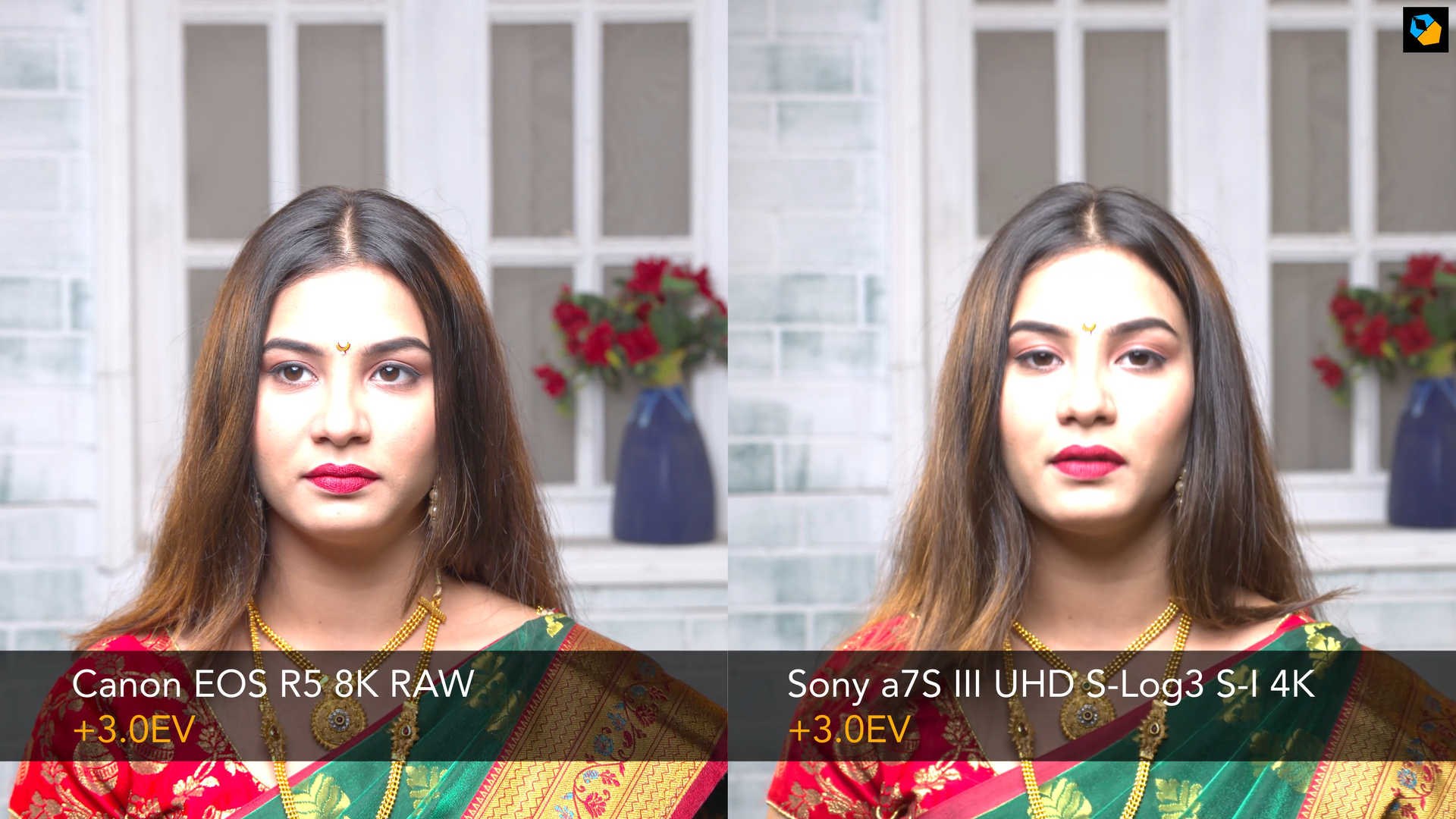

There are many ways to grade footage, and I think color is a subjective matter anyway. You’ll get different answers from different people, and different answers from the same people at different times. You pick what you like.
What you should notice is how close they are. Unless you put them side by side, most people won’t even notice. Here the R5 has an advantage of it being 8K RAW. Comparing Prores RAW from the a7S III might be a closer test, though the colors will still end up being the same. Where the Sony really shines is at higher ISOs. It has a better noise profile at higher ISOs and in low light in general.
More here:
Bottom line
If a professional were to ask me which is the best mirrorless camera for video, I’d say the Sony a7S III (Amazon, B&H) is, at this moment, the best mirrorless camera for video. As long as the financials make sense to you (you can buy two a7 III’s for the price of one a7S III), it’s a no-brainer. More here:
I hope you found this comprehensive review useful. Let me know what you think in the comments below.
Check out these articles for further reading:

The A7SIII also has APS-C Mode
Nice review! Very helpful. One thing you didn’t mention in this or the one comparing the Sony a7S iii to the Canon EOS R5 is anamorphic shooting. This is more a question of the lenses available, but there are way more affordable options for aps-c censors, e.g. the Sirui lenses, so if you want to shoot anamorphic 4k then the Canon is the clear winner, since it can shoot in aps-c at 4k-resolution still.
Thanks. Great point.