

The way pixels are arranged and the resolution of an image play a huge role in what you see as a cinematographer. This article breaks down the basics – what pixels are, how resolution is calculated, and why terms like megapixels can sometimes be misleading.
By the end, you’ll have a better grasp of how to judge image quality and appreciate the science behind those stunning visuals you encounter every day.
Let’s start with the building blocks of digital images, the pixel.

What is a Pixel?
A pixel is the smallest unit of a sensor.
It is almost universally rectangular in shape. You can think of them as atoms that make up an image, except these atoms are arranged in neat rows and columns like a table.
The more tightly packed the pixels are the more detail you can see in an image. Here are some common display pixels:
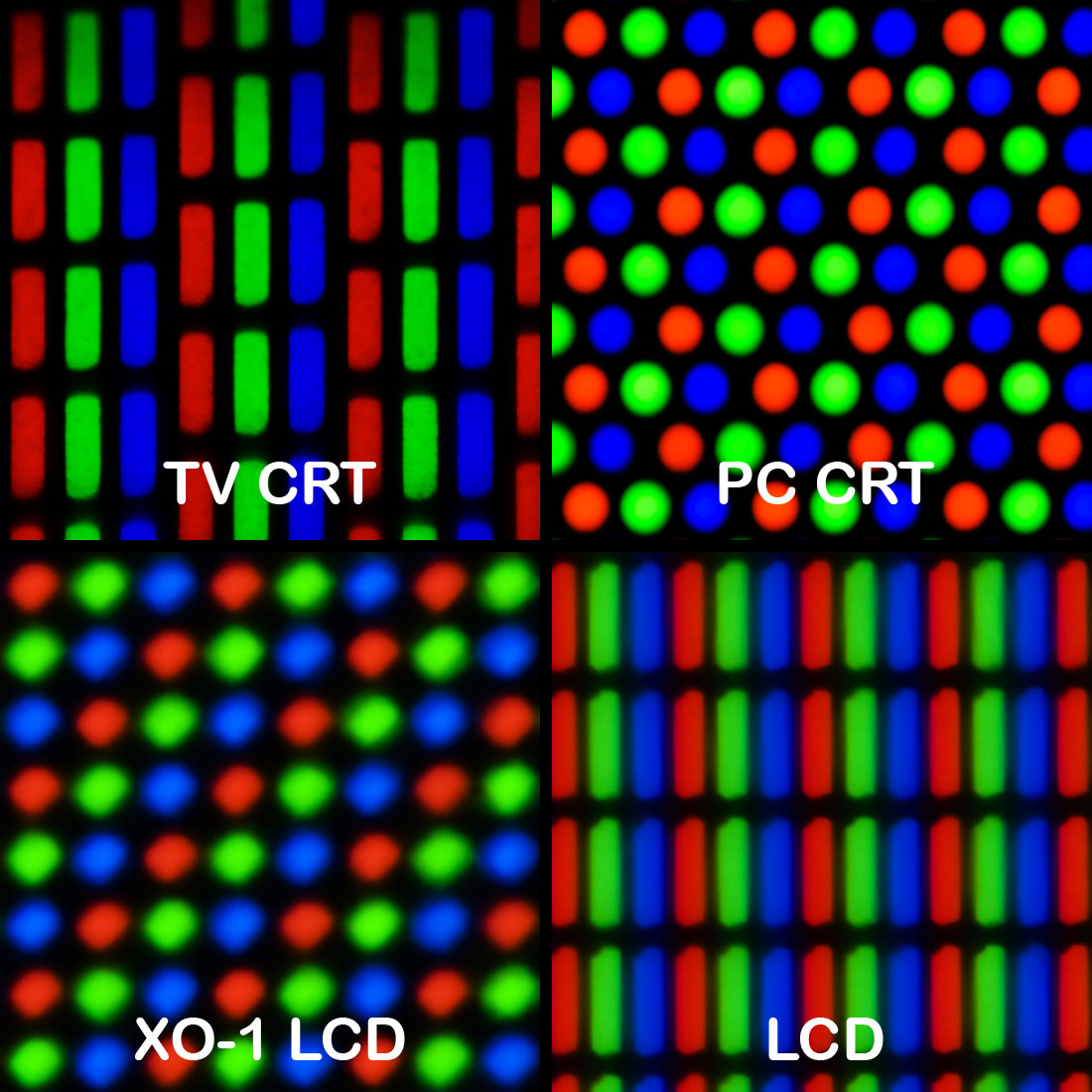
The Importance of Pixel Density
One of the most significant factors that influence the clarity and detail of an image is how tightly the pixels are packed. When pixels are more densely arranged, they offer greater detail and a sharper appearance.
Essentially, the more pixels you cram into a specific area, the finer the detail and resolution of the image. This is why high-resolution displays and images are more detailed than low-resolution ones. Simply put, more pixels equal more detail.
In layman’s terms, you could also think of it as how much you can zoom in to an image before it becomes pixellated:
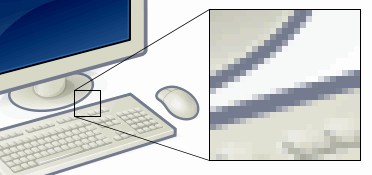
In digital imaging, pixel density is often described in terms of pixels per inch (PPI). This refers to how many individual pixels exist within a one-inch area of the display.
A higher PPI means that more pixels are present within that one-inch space, resulting in a crisper and more detailed image. For example, smartphone screens are often praised for their high PPI, which makes text and images appear sharp and clear, even at small sizes.
For sensors, the the corresponding measurement is sensor pitch (measured in ?m, micrometers).
The sensor pitch or pixel pitch refers to the distance between the centers of adjacent pixels on a camera sensor. Essentially, a smaller sensor pitch means that more pixels can fit into a given area, resulting in a higher resolution for the same sensor size.
Understanding the sensor or pixel pitch is important for cinematographers who need to balance resolution with light sensitivity, as smaller pixels may gather less light, potentially impacting image quality in low-light conditions.
What is Resolution?
Resolution refers to the amount of detail an image holds. An image with more detail is said to have a higher resolution than one with less detail.
However, things get more complicated when we talk about how we measure that detail. There isn’t one universally accepted standard for measuring resolution.
In some cases, people might refer to the number of pixels in the image, while others might use terms like “fine detail.” It’s also worth noting that detail can vary depending on the level of magnification. For instance, an image that looks detailed when viewed up close may appear much less detailed when viewed from a distance. You need to know what you’re comparing.
The challenge in defining resolution is that detail can be subjective. A large image viewed from far away might appear sharp and detailed, while the same image viewed up close could reveal imperfections and a lack of fine detail.
To make it simple, though, the resolution of a camera sensor (or display), is the number of pixels horizontally multiplied by the number of pixels vertically. Read the next section for details.
Before we carry on, keep in mind resolution should always be assessed in context. You need to take into account both size and viewing distance.
For a fascinating look at the resolution of the human eye, watch this video:
Horizontal and Vertical Resolution
One of the simplest ways to define resolution is by looking at the number of pixels along the image’s width (horizontal resolution) and height (vertical resolution).
Let’s break that down.
The number of pixels in the horizontal direction is the horizontal resolution of an image.
The number of pixels in the vertical direction is the vertical resolution of an image.
Resolution is usually written in the form H x V.
E.g. 1920×1080, which means, if there are 1920 pixels in the horizontal direction and 1080 pixels in the vertical direction, the resolution of the image is 1920 x 1080 = 2,073,600 pixels, or about 2 million pixels.
Here’s a visual representation:

The formula for Resolution is:
Resolution (in pixels) = Horizontal Resolution (in pixels) × Vertical Resolution (in pixels)
This is often referred to as the “H x V” format.
This format is easy to understand and is commonly used across a variety of devices, from television screens to computer monitors and digital cameras. The H x V notation provides a clear and unambiguous way to describe an image’s resolution, which is why it’s so widely adopted.
The higher this number, the more detailed the image will be, assuming other factors like image quality and compression are constant.
When we cross a million total pixels, it’s a megapixel. In our example, 1080p video (which is 1920 x 1080), has about 2 million pixels, which is about 2 Megapixels.
At the higher end of the spectrum, we have photography cameras that can go over 100 Megapixels, like a Hasselblad. That’s a resolution of 11,656 x 8742.
If Megapixels can define Resolution, what is 4K and 8K…and 1080p?
In the cinema world, resolution is expressed differently. One of the reasons for this is that the aspect ratio isn’t standardized, and we are free to play around with it.
It still uses the H x V format though.
E.g., 4K resolution refers to a horizontal resolution of approximately 4,000 pixels. The K refers to a thousand, like in kilogram. 8K would be 8,000 pixels horizontally.
Ultra High Definition is not exactly 4,000 pixels wide, or 8,000 pixels wide. The standards are 3840 x 2160 and 7,680 x 4,230. Still, they are close enough to be called 4K and 8K, because the small difference isn’t noticeable practically.
While the shorthands 4K and 8K is convenient, it can sometimes be misleading for newcomers because it doesn’t take into account the vertical resolution, which is also important in determining the overall resolution of the image.
In the video world, the tradition has always been to use the vertical resolution to define an image. E.g., in the early days of television, PAL was 576i, and NTSC was 480i, where i stands for interlaced format.
This trend carried on to High-Definition (HD), with 720p and 1080p, where p stands for progressive format.
The more precise H x V format is less ambiguous and gives a more accurate representation of the image’s true resolution. Here are some of the current standards:
- 1080p: 1920 x 1080
- UHD: 3840 x 2160
- UHD 8K: 7680 x 4320
- DCI 2K Flat: 1998?×?1080
- DCI 2K Scope: 2048?×?858
- DCI 4K Full Frame: 4096 x 2160
- DCI 4K Flat: 3996?×?2160
- DCI 4K Scope: 4096?×?1716
Why Megapixels Can Be Misleading
Why is talking about resolution in megapixels a bad idea? Imagine two images:
- 1,920 x 1,080
- 1,000,000 x 2
Both are 2 MP images but the second clearly has very poor vertical resolution. You can barely show anything in it, maybe except a line.
But, if all you had was the total megapixel count, which is 2, you wouldn’t know without knowing both the horizontal and vertical resolutions.
That’s why Megapixels by itself don’t mean anything.
A high megapixel count doesn’t necessarily mean the image will be high-quality if those pixels aren’t arranged in a way that provides meaningful detail. That’s why it’s better to stick to the H x V format, which provides a clearer picture of the image’s actual resolution.
Gigapixels
As camera sensors continue to improve and grow in size, we are beginning to see images with resolutions measured in Gigapixels (GP).
1 Megapixel = 1,000,000 pixels
1 Gigapixel = 1,000 Megapixels
A Gigapixel is equivalent to a billion pixels. These ultra-high-resolution images contain an astonishing amount of detail, allowing viewers to zoom in and explore the image at a granular level.
Gigapixel images are often used in scientific research, large-format photography, art reproduction and virtual tours. With this level of resolution, it’s possible to capture incredible detail, allowing you to zoom in on individual features that would otherwise be invisible to the naked eye.
Today, most of the images are stitched from images with smaller resolutions, but we’re getting there slowly.
As a professional cinematographer though, it would in your best interest to stick to H x V, and that will solve all your problems.
I hope you found this useful!

Don’t you mean to say…
1 Megapixel = 1,000,000 pixels
1 Gigapixel = 1,000 Megapixels
Since 2 megapixels was 1920 x 1080 = 2,073,600
hi
let’s say we have an image with 100 X 20 resolution
how we say total resolution for this image?? do we say it is 2 KiloPixels??
and the other point is that your title “Total Resolution or Megapixel count”
implies that the total resolution is always shown by Megapixels but i think Megapixel is just one way of showing total resolution. its correct to say that the total resolution can be showed by Pixels, KiloPixels, MegaPixels and GigaPixels
You can just say two thousand pixels. You are right about ‘megapixel’.