
A video container or wrapper is a file system that can be understood by your operating system.
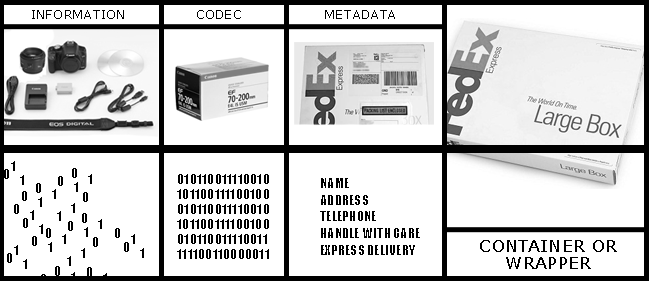
To understand this sentence, let’s take a look at the image above. It’s an analogy.
Random 0s and 1s are called data. When this data is grouped together in a way humans understand, it’s called information. The gift that you want to send a loved one is information.

Sometimes, information is compressed to save space (packaging – like stuffing a suitcase).
The ordering and packaging of data is done by a set of rules called a codec (coding-decoding). If the codec is designed to stuff your socks into every available space, that’s what it does.
Some codecs arrange socks nicely rolled up, others might not. In the above analogy, the way the items are packaged into a box represents encoding, or the codec.
What you write on the box is metadata – it’s information about information.
If your box is a gift, you put on a label, sticker or tag. The person delivering it doesn’t have to know what’s in it, only what he or she is supposed to do with it.
The outer box, a standard that makes it easier to process, send or read, is the wrapper, or container. When the recipient gets the package, he or she will hopefully know how to open it.
But imagine getting a gift that you just can’t open!
Why do we need containers?
Because that’s how operating systems are designed to work with data. They need to know what the data is, and what it’s supposed to do with that data.
They’re like the delivery guy.
E.g., A .exe file system tells the operating system that it needs to execute (run) this file. A .bat file (batch file) tells the OS that there are one or more executable commands that need to be run one after the other.
Similarly, how does the OS know the difference between an MP3 file with music versus a blank video file with the same music? It looks at the file system. Is it .mp3 or something else?
If you specify the wrong file extension, it won’t know what to do with it, just like an incorrect address on a package will be returned to sender.
Video containers or wrappers are file systems designed to interface (be the gate keeper) between the OS and the video data.
Think of them as customer service reps. When a client calls for help or support, the rep tells the customer: “I’ll gladly help you, no need to speak to the supervisor.” It deals with the OS directly.
Since file systems are closely tied in with operating systems, each OS has a ‘favorite’ for every purpose. For Windows, the favored video containers used to be WMV and AVI (which stands for Audio Video Interleave). Now it accepts MP4, but can also read MOV.
For Macs, it was and is MOV.
Here are few currently popular video containers:
- MOV – Mac everything
- MKV – Open Source, but not used in professional filmmaking or broadcast
- MP4 – by the MPEG group – the most common container along with MOV
- MXF – Material Exchange Format
- TIFF – Tagged Image File Format, by Adobe
- TARGA – non-proprietary
- DPX – Digital Picture Exchange, by the SMPTE
- EXR – OpenEXR, by ILM
How’s a container different from a codec?
A codec is a compression algorithm or specification. It has no bearing on the video container, even if sometimes they are named similarly.
E.g., MPEG-4 is a compression specification, and we also have a video container called MP4. They are two different things, like two people with the exact same name. Sometimes it leads to misunderstandings.
But operating systems know precisely how to deal with each container. If they see a container they recognize, they use an application designed to deal with it. E.g., MP3 files are automatically opened with your favorite music player, and so on.
Whatever app opens the container, the first thing it checks is if the contents are arranged as it should be.
If you’ve ordered something online, and you get a box which contains something else, you freak out. Applications do this too, but they are designed to vent their anger more gracefully. On rare occasions, they just shut down.
Once the app has recognized and confirmed the validity of the video container and its contents, it reads whatever metadata is available, and tries to find what codec has been used to compress the data, if any.
If it finds a matching codec, it proceeds to do its thing.
Every app has a decoder (as opposed to the encoder who did the coding). If the encoder is has done the packing, the decoder will know where your socks are.
Bottom line, next time you see a file extension with MP4 or MOV, that’s just the wrapper. The codec inside can be something else. E.g., MOV can contain Prores, DNxHR, H.264, H.265 and many others.
That’s the difference between containers and codecs.

wonderful article !!!
Well done article.