

The speed in which videos are generated, shared and transmitted is unprecedented. It was the case when I wrote this article over a decade ago. Since then the growth of online video and films have been exponential.
Have my views changed? Let’s find out.
This article will compare different file formats in the hope of discovering the best archive file format for films and video.
What do I mean by “archive”?

Before we define archive, lets answer two questions:
- What is valuable to you?
- How long do you want it to last?
What is Valuable to You?
For some people, even the most treasured works of humanity are low priority when compared to their personal “stuff”. To some people gold and diamonds are precious. To others they’re not even a consideration.
Only you can decide what is valuable.
I take it you know how to prioritize what is valuable to you, and why it is so. Be careful when you draw up this list, because there is a definite cost associated with each choice you make.
The more films you want to store, the more expensive it gets. Digital files need space and resources. Storing files for longer periods needs more resources. The longer you want to store what’s valuable to you, the more expensive it gets.
With that out of the way, I can define what I mean by archive and archival.
My Definition of Archival
What is an archive?
An archive is a collection of important things or information.
“Archival” is anything that relates to an archive.
As to how long something needs to be stored in an archive, it varies. To archivists an archive should exist in the order or hundreds of years. To computer engineers the timeline might be only in the order of a few decades.
E.g., LTO backup systems are designed to last for about 30 years. For some, this is a sufficient archival period. But not for me.
If 30 years is archival, then what do you call preserving work for hundreds of years?
My mom stores family photos going back over forty years. Her albums are not archives. When we use the word archive, it must be associated with the gravitas that comes with the work involved. Let’s not treat it flippantly.
When I use the term archive it implies a storage system that lasts for as long as current technology allows.
An archival solution is one which attempts to store information for the longest period. The best archival solution must store this information longer than any other solution, without corrupting or changing it.
In a hundred years, if somebody opens the archive and reads your files, they should be able to do it easily, without confusion.
The best archive file format must preserve films and video in the best possible quality for the longest duration, while ensuring maximum compatibility.
Computer technology is changing rapidly. It’s growth and direction is unpredictable to a large extent. Human history has shown that anything of value can only be preserved with great sacrifice. Nature isn’t kind to things that want to exist beyond their use-by date.
This is where digital technology has an upper hand. Unlike analog formats, digital has the potential to stay uncorrupted – as long as it is copied to a newer file format that preserves all the information without corruption.
The Matrix of Options
For the sake of simplicity I”m not going to talk about the original source format. E.g., if you shoot your movie on film stock, you could archive the original negatives. Similarly, if you shoot your movie in a RAW format, you could archive those as well.
What we’re more concerned about is the archival of the finished film. A finished film or video is edited, with music and audio, has been color graded or corrected, etc., and has titles or subtitles, and so on.
If we only preserved the original negatives or RAW formats, you wouldn’t be able to get the film a hundred years later, if that didn’t exist in some form.
On the other hand, if only the finished film existed after a hundred years, not many would complain about the source format unless the archive format was a terrible one. In fact, this very thing happened.
Here is a matrix of options that decide the route you are going to take:
| Source Format | Destination Format | Compressed or Uncompressed | Lossless or Lossy |
|---|---|---|---|
| Film Stock | Print Film Stock | n/a | Lossless |
| Digital File Format, Scanned | Compressed | Lossy | |
| Uncompressed | Lossless | ||
| Digital Video or RAW | Film Stock | Uncompressed | Lossy* |
| Digital File Format | Uncompressed | Lossless | |
| Compressed | Lossy |
I’m Staying Away from Compressed Formats
Compression destroys information. There are some codecs that claim to be “visually lossless”, but that’s true even of codecs like H.265. Just because you don’t see it doesn’t mean the information isn’t gone.
Compressed formats also have different challenges when it comes to posterity:
- Licensing issues
- The technology might have progressed, making the codecs redundant. The life of a codec is pretty low to be considered as an archive format.
- You can never get back the original image or film once it has been compressed, whether it is interframe or intraframe.
- You need decoders that can read the codecs. That’s only possible if the codec is still supported in the future.
The following chart was created over a decade ago, lists many file formats for images and video; and a few properties that will help us compare them (click to enlarge):
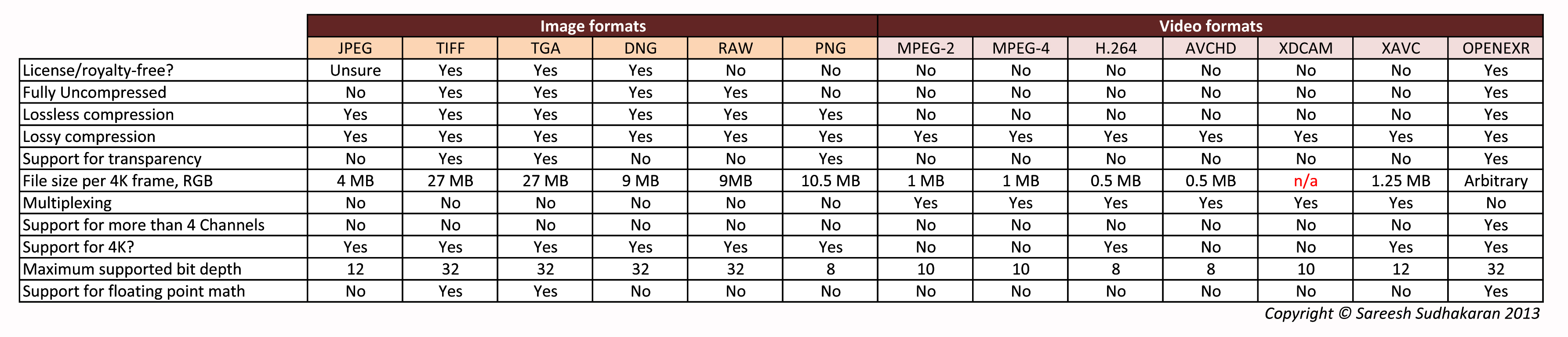
As you can see, some of the codecs are already old news in ten years.
What can we learn from the above comparison? Here are some ideas:
- A file format with a free license (zero royalty and unlimited rights) is preferable.
- A file format that offers the maximum flexibility in file size, resolution, color and bit depth is preferable.
- A file format that supports the most color spaces is preferable.
- A file format that supports all kinds of compression, and can also accept fully uncompressed sources, is preferable.
- A file format must support flexible metadata.
- A true archival file format must give the greatest odds of compatibility in the future. We can only guesstimate this from current trends.
- The file format must be compatible with all popular operating systems and applications currently.
You could use these as guidelines. Here are codecs that fail these guidelines:
- H.264, H.265
- FFV1*
- AV1
- VP9
- MPEG-2, MPEG-4
- AVCHD, XAVC, and all the flavors of H.264 and H.265
- Prores, Cineform, DNxHR, DNxHD and all intermediary codecs. Even if the film was finished in one!
- JPEG 2000, even though film DCPs are created in this format.
- JPEG, GIF or any compressed image format like PNG**.
- Compressed or Uncompressed RAW formats, including CinemaDNG.
- DVDs, Blu-ray, etc.
* The Library of Congress is okay with storing films in FFV1 in an MKV container. However, they only preserving a copy of the film in case it is lost forever. They just don’t have the financial means to store everything in its uncompressed state.
** There is no uncompressed variant of PNG. Even though it is an open format it isn’t designed for this purpose.
The Three Best Candidates
The best way to preserve a film is frame by frame. If you eliminate compressed codecs, the best alternative is an image sequence.
An image sequence is a sequence of still images, each representing one frame. If a film is finished at 24 fps, there will be 24 images per second of finished movie.
The biggest advantage of an image sequence is that each file is stored with the extension of the image format. E.g., DPX is *.dpx, TIFF is *.TIFF, etc. On the other hand, video codecs need to have containers like MP4, MOV, MKV, etc. Uncompressed formats simply don’t need these containers.
The contenders for this title are:
- TIFF (Tagged Image File Format)
- DPX (Digital Picture Exchange)
- TARGA (Truevision Advanced Raster Graphics Adapter), TGA (Truevision Graphics Adapter)
- OpenEXR
OpenEXR is a specialist format not designed for archival. It was created to hold multiple channels of data, which are not really relevant for a finished film. For this reason the only choices are DPX and TIFF.
TARGA (TGA) is a great format, too. But it has two disadvantages that are not particularly suited for films:
- It has limited support for metadata.
- For some reason it has lost a lot of popularity over the last 10-15 years.
DPX is a perfectly valid format, but it suffers from two issues:
- Licensing costs
- It is not as feature-rich and versatile as TIFF
However, the SMPTE is okay with both DPX and TIFF as archive formats.
What is the Best Archive File Format for Film and Video?
I feel TIFF is the ideal format for archival. Here are my reasons:
- TIFF is almost royalty-free.
- It can take 32-bit float images, which is as good as it gets.
- It can accept all kinds of compression.
- It can act like a wrapper, and is the basis for metadata design.
- It supports high resolutions and most color spaces.
- It is ubiquitous – there’s hardly an application, software, program or library that can’t deal with TIFF.
- It is designed to hold any kind of image, including print images, etc.
I’ve been using TIFF to archive my films for over 15 years now.
What about Audio?
I think uncompressed WAV, one for each channel, is as good as it gets!
I’d definitely avoid any Dolby, DTS or whatever codecs or systems. MP3 is lossy, for the same reasons mentioned above.
What about Metadata?
I would save metadata as sidecar TXT files, encoded in UTF-8; as it is used by 99.1% of top 100,000 web pages and 98.6% of the top 1,000 highest-ranked web pages.
How do you Store Archive Formats?
Where do you keep your TIFF and WAV files? Here are three options:
| Storage | Advantages | Disadvantages |
|---|---|---|
| Hard Drives (SSDs). I personally like exFAT as the file system, but NTFS is fine too. | 1. Cheap and readily accessible. Can last long. 2. Can be accessed by most computers today, and possibly in the future. | 1. The connecting port might become obsolete (like Firewire, USB 2.0, etc.) 2. Is prone to damage and corruption. |
| LTO (Linear Tape-Open) | 1. Can last up to 30 years. 2. Has high capacities at lower costs | 1. You need an LTO Tape Drive to read data. 2. Access times are very slow compared to drives. |
| Cloud Backups | 1. Scalable 2. Allows for Backups in multiple locations 3. Somewhat safeguards from natural calamities, wars, etc. | 1. You need a really fast Internet connection to download heavy files. A 4K film can run terabytes, and that’s just one film. 2. The service can go kaput, or can be hacked, etc. 3. You have to pay a continuous cost to maintain access. |
Cloud backups are a great idea for redundancy. But I feel your primary backup must be on hard drives, stored in vaults, a bank locker, guarded warehouse, etc.
I’m not an expert on archival or archive file formats, so please refer to an expert before you commit to an archival system.
I feel archival as a habit must be open and accessible to all filmmakers. It can’t be a technology or service only few can access or afford.
After all, who will love your film more than you do? My films are as precious to me as Titanic or Avatar is to James Cameron.
What do you think?

Hi Sareesh, I don’t understand what LTO has to do with the wrapper. LTO works the same as a drive but just tape (but slower). I can access the archived LTO material via the computer as I do with the drive. I can say 1st hand that my DATs from 1990 are still working fine. Some of the drives stored with them (carefully) are corrupt. (Maybe I’m coming at it from the wrong angle… lol)
Anyway, thinking about the future, going forward, What’s going to be around or even standard in 30 years? New always forgets the old (and doesn’t even care). Like the point I think Sicofante is saying, anything owned by a company, you’re putting your life into their hands which means they can change their minds and stiff you at any time, if and when they want. With all the tech companies looking to standardise USB3 and Thunderbolt 3, will standard USB be around in 30 years? Will we have the same issues in 30 years as we(I) do now trying to access our 30 year old floppys? lol
macsnapper EuroSiti Sareesh Sudhakaran No. Just use AVI (or output raw FFV1, if you don’t need audio), if your editor (like so many others) doesn’t have MKV support. FFV1 matters more than the container format, ofd course.
There is no need to switch to MKV at all, unless you want advanced audio sound, multiple audio, multiple subtitles or add metadata. I don’t know if you can add HEVC or VP9 video to an AVI container. XMedia won’t allow it. Haven’t tried it in Hybrid.
Short conclusion: MKV allows anything. MOV allows all proprietary formats – but no open standards. MP4 only allows compressed/lossy proprietary formats (plus the obsolete MJPEG lossless).
macsnapper EuroSiti Sareesh Sudhakaran AVI just has more limitations than MKV especially when it comes to audio formats. This partially has to do with its age (25 years).
The only equally format-unrestricted alternative would be MXF. MOV would be the commercial choice, but it’s really an ANTI open source choice (and extemely Apple-centered, if you ask me):
https://en.wikipedia.org/wiki/Comparison_of_video_container_formats
… Judge for yourself, but MKV is arguably the better supported choice.
With a tool such as XMedia (see link above), it only takes a second or two to switch the container format from e.g. MKV to MP4, if you have to… Of course, FFV1 and other lossless formats won’t work in MP4.
… And you will never have trouble pulling out the raw audio/video/metadata streams from an MKV container either. What goes in also comes out.
A professional photographer or a broadcasting company with buckets of
money probably don’t care about open standards, but archival / cultural
heritage institutions do. Apple and Adobe only listen to customers with money, so I wouldn’t expect them to ever start caring about open formats.
macsnapper EuroSiti Sareesh Sudhakaran AVI is a format created by Microsoft and I’m not sure what the licensing is. Otherwise it’s inferior to MKV in many respects, but you might as well save in AVI and then convert to MKV.
Actually, some of the first deployments of FFV1 where made with AVI, since MKV is relatively new.
EuroSiti Sareesh Sudhakaran
any reason why I shouldn’t save FFV1 in AVI container? My editor cannot output MKV but it can save FFV1 in AVI.
Sareesh Sudhakaran Sicofante EuroSiti You are missing a few things here.
1. FFV1 is not a new standard. It has been developed for many years already and it’s completely open source. (Check the Wikipedia entry.) Being open means effectively it cannot die. It might “stagnate”, just as TIFF is not being actively developed any longer, but that will rarely happen. The codec is part of FFmpeg, which is the pillar of open source video and will be for the foreseeable future.
2. The point here is that FFV1 is being adopted by governments and institutions. Not since yesterday, but for many years already. These institutions know one thing very well: they will always be able to open their files no matter what, because FFV1 and MKV are open source standards (again). The news here is Europe is adopting the standard now, which will obviously push it farther than any other for archiving purposes, but won’t be alone in that endeavour: many countries already use it.
3. TIFF is owned by Adobe. Whenever they decide that format isn’t supported or licensed anymore, it’s the end of your files. You’ll have to keep around old copies of software capable of opening your files. Sure, that is unlikely to happen. On the other hand, inability to open FFV1 files is not “unlikely” to happen: it’s plain impossible. Anyone will always, forever, be able to implement a player for it, in 500 years. No matter what.
It’s fine that you love TIFF but every closed source format will eventually die some time. You must understand open source formats simply can not die. It’s their nature. What is really naive is thinking of a future where Microsoft, Apple and Adobe are ethernal. Unless “the future” means “in the coming 20 years”. Then we might agree, but real archiving must withstand more, much more, than 20 years.
Sicofante EuroSiti I am not in agreement with these statements: “It simply will never go away”, and “because their customers are either too afraid to force them, or simply don’t care about preservation standards”
A format without accountability is in greater danger of going away. Most companies when moving on will give us some way to port to the newer ‘standard’. The current standards have all earned their place.
Regarding the second statement, will it be true if the codec is no longer supported? If the worst kind of disaster strikes, and we still have computers left, it is the simplest matter to get TIFF files to display images again. It is the cockroach of image formats! Compression formats by definition are always in danger of being made redundant by advanced algorithms.
I am not in disagreement with the merits of the project, just that it will be hard for it to thrive without the support of the major players. It is naive to think super-large companies like Microsoft, Apple and Adobe see a future in which they don’t exist to take care of their customers! ;)
Sareesh Sudhakaran EuroSiti I’m obviously with Sicofante here. You can play the MKV contained FFV1+LPCM format with VLC and other common (free) media players… I doubt that any of the other lossless formats (MJPEG, ISO) are that easy to view… so why use them? ;)
Support for the PREFORMA standards can be implemented in existing (professional) software at virtually no cost (otherwise Microsft would never have added native support for MKV, FLAC and WebM in Windows 10 and Edge).
The only “downside” is that Apple and Adobe refuse to support these formats. But that is because their customers are either too afraid to force them, or simply don’t care about preservation standards, if you ask me.
Sareesh Sudhakaran EuroSiti Actually, a totally open and free standard always has a point against proprietary or patent encumbered ones. It simply will never go away, as long as it’s properly documented. That’s the real crucial point, not its wider or narrower adoption (I honestly don’t understand why it’s important that others use it, when anyone can get free tools to open these files).
Since the PREFORMA project is precisely about getting documentation right, I expect this to become very usable and highly recommended very soon. A free and playable archive format will always be better than a huge collection of individual TIFF frames, IMHO.
EuroSiti Thanks for the information, though the documents show in parts why professionals will resist adopting it. No point archiving to a standard that nobody uses currently. I have nothing against it, though.
Sicofante EuroSiti There is no mention of this on the official FFV1 homepage, so try:
http://www.digitizationguidelines.gov/guidelines/FADGI_VideoReFormatCompare_pt3_20141202.pdf
http://www.digitizationguidelines.gov/guidelines/FADGI_VideoReFormatCompare_p4_20140908.pdf
(Search for “depth”)
This official report/study is from 2014. The PREFORMA project aims to standardize and fully document the FFV1 and MKV specifications. The lack of a complete specification is the (official) reason why so few professional archives use FFV1 at the moment.
EuroSiti This sounds interesting. I can’t find, however, the bit depth and encoding type (integer, floating, etc.) supported by FFV1. Can you provide some links?
Please consider the new PREFORMA standard (endorsed and subsidized by the European Union) for film preservation: FFV1 + LPCM wrapped in a Matroska (MKV) container. There’s already plenty of free tools capable of outputting to these formats. Xmedia Recode (www.xmedia-recode.de) or Hybrid (www.selur.de) are good examples.
FFV1 is without doubt the best performing truly lossless video format – and also more space-efficient than MJPEG or TIFF. Apple’s own movie codecs are lossy.
MKV is the only playable container format that actually supports ALL video and audio formats (plus additional content). MKV is technically superior to MP4/M4V and MOV. The only real alternative container standard is MXF.
Obviously this new standard conflicts with commercial professional software on the market. Apple and Adobe will definetely try to convince professional consumers that they should keep using their (old) patented formats, so that they won’t have to adapt to these new recommendations… But why not pressure them instead of adapting to their inferior commercial standards?
For Analog digitalization Huffyuv is pretty neat too.
Sareesh Sudhakaran Sicofante You’re simply wrong about open source and open standards, but since this is not your problem with PNG, I won’t insist on the subject.
I see your point about compression now. However, PNG’s compression schemes are guaranteed to be used forever. Of course you are free to not believe that. However, that same logic would apply to formatted file formats (excuse the redundancy). TIFF is not a plain format to read or write. You need libraries to open TIFF files or at least proper documentation to create those libraries yourself whenever TIFF disappears completely from the scene (a point in time which is closer to what you seem to think). Your worries about any compression scheme becoming obsolete and “unopenable” apply exactly the same to uncompressed TIFF as much as any other. It’s not a plain file format. If you really need absolute future proof files, your only choice is probably the old SGI RGB format… because it isn’t actually a “format”. It’s the closest to an equivalent of plain text. It’s just a pixel value after the other, written as binary integers, no formats involved at all.
Your fears are technically unjustified IMO, but of course you’re entitled to your choice.
Sicofante If MS DOS is made open source today, would you use it? Dead open source projects are a help to nobody.
I don’t support compressed TIFF, only uncompressed. Compressed PNG is restrictive in the same sense compressed JPEG is.
About ‘owning’ the source code, that’s assuming you and I are alive! Archival extends beyond our lifetime, that’s my definition of the term ‘archival’.
PNG is as widely accepted as TIFF, so your usage of it is following a certain philosophy of archival. Mine happens to differ in that respect. I do not accept compression as a valid feature of archival.
Sareesh Sudhakaran Sicofante Mmmhhh, I think you have a fuzzy idea of open source. There’s indeed a guarantee that current open source of anything will be forever open source. Once a piece of code is put in the open with a proper open source license, there’s no way to close it back. What can happen (and sometimes does) is that improvements or changes to newer versions aren’t open, but you won’t be restricted by these new eventually closed versions from using the original open ones. There can be derivatives that become close (with some particular licenses), but the oriignal, i.e, whatever you’re using today to archive, is “uncloseable”. The means to open a PNG file today can’t be removed from the internet at all, and won’t be. Even if a new compression method “du jour” appears and becomes standard practice in the future, old formats will always be usable.
Whatever your worries are about a chance to change a format, they apply in a much stronger way to proprietary formats or implementations. Nothing guarantees you that TIFF -especially with whatever particular compression scheme you’re using today- will be around some years from now (as a matter of fact, it’s less and less used everywhere, so its chances of surviving are slimmer than both PNG and OpenEXR). In other words, 20 years from now you might not be able to open your TIFF files. That simply can’t happen to PNG or OpenEXR, because you “own” the source code to decode them the way they’re saved today. Even it it becomes closed at some point (which is very unlikely, BTW) there’s no way the code to open your files saved under the current status is removed from the internet.
What exactly do you mean by restrictive when you refer to PNG? My only gripe is that it doesn’t support floating point formats (which it might in the future), but, honestly, I find its 64 bits per pixel capacity future proof enough for material being worked on in the current and next decade. :-) (I’m planning to use it for archival in a ProRes workflow in Lightworks.)
I’m hoping CinemaDNG to become an open standard soon enough (if I understand it correctly, it’s in a process to become one). That would be definitely a great master and archival format.
Sicofante You’ve got some great info here. If it were up to me I’d use OpenEXR.
But it’s not up to me, or you. There is no guarantee that software will be completely open source tomorrow. The concept of open source, like the concept of freedom, is a great thing. But humans have been known to destroy great things for immediate and temporary gains. In fact, that’s the only thing you can conclusively guarantee about humans!
Why not PNG? It is restrictive, that’s why. What if tomorrow there’s a new form of compression, and mountains of PNG data have to be re-encoded to the new standard? In the long run, I feel compression by its very nature is not suitable for long-term archival.
Lightworks can use ProRes material natively. It doesn’t export to ProRes, though.
There are three outstanding errors regarding PNG:
1. It’s completely free from royalties. It actually was born because GIF started to collect them. It’s a completely open format, free to use and not patent encumbered.
2. While not in the spec, it can support “fully uncompressed” storage, although I can’t see a use case for that (I’ve seen this mistake already made in another article of yours: mathematically lossless compression provides exactly the same information, bit for bit, than uncompressed, so there’s absolutely no reason to go “fully uncompressed”).
3. Maximum bit-depth is 16 bits per component, which makes it 64 bit for a four channel picture (color+transparency), not 32. (I don’t think archival masters should be saved with transparency, so I’d say either 24 or 48 bit is enough for non-floating point pictures).
Regarding TIFF, it may contain patent encumbered bits which might not be free to use. Also, since TIFF supports a lot of encoding formats, it’s hard to predict that it will be compatible with every application. That makes your choice pretty weird. While PNG is supported by every application (and there’s no excuse not to, since it’s completely open and free), the only reason I can think of for using TIFF is for saving in a floating point format, where anyway OpenEXR tends to be the industry standard and is as open and free as PNG, so, again, you”ll be able to open an OpenEXR file forever. BTW, the “baked” nature of OpenEXR is fully optional, not mandatory. You can use that format to store and archive “fully baked” pictures, which will be properly read for centuries. :-)
In other words, why not choose PNG for non-floating point archival (which by the way is almost 3 times smaller than TIFF) and OpenEXR for floating point archival? Or if you want just one, go with OpenEXR, which supports almost anything under the sun. Just make sure you’re archiving your OpenEXR masters with the information you want there, not app-dependant info.
I’d also point out that the fact that a format is not “ubiquitous” becomes highly irrelevant when that format is fully open, documented and free (such as PNG and OpenEXR), because there will always be a way to open pictures in that format, no matter how many years from now. Take LibreOffice vs MS Office files as an analogy. Sure, MS ones are “ubiquitous” TODAY, but you don’t know how that will be 20 years from now (as a matter of fact, some old MS Office files can’t be opened by today’s versions of MS Office itself…), while, no matter what, you will always, forever, be able to open an Open Document (LibreOffice) file.
Just my two cents.
macsnapper Look in the Editing Workflows section under your favorite NLE.
Please explain how to save something as tiff video- I didn’t know that was a video format?
thanks