

What is video compression?
Video compression is the elimination of data to reduce file size. The word ‘elimination’ is used with full intent. When the data is eliminated it is gone forever.
True Lossless Compression
When a file that has been compressed can be returned back into its original form with zero loss of information, the compression is a True Lossless Compression.

Is this just a pipe dream, or can true lossless compression really be achieved?
Here are two scenarios where this is possible:
- Vector images are scaled based on mathematical principles. Simple shapes can be made quite small in file size. However, complex shapes can be larger than raster images.
- An algorithm that stores duplicate pixel data can replace them when prompted. Just like vectors though, once the image gets complicated, the level of compression will become negligible.
Since films and video are made of raster images, let’s understand compression with a simple example.
The Idea behind Compression
Let’s take a teeny-tiny image with a resolution of 256 x 256.
We’ll assume this image is in 8-bit color. The file size can be calculated to be 256 x 256 x8 x 3 = approx. 197 KB (KiloBytes).
What if this image is totally black, end to end? Each pixel has a value of 00000000. A smart algorithm can:
- Study the file and decide that each pixel value can be changed to just 0, and
- Add metadata that explains the changes it made. E.g., it can add 00000000 in the metadata to show what each pixel value should be.
A decoding algorithm already expects instructions in the metadata. It will know that:
- 00000000 represents black that has to be used for all pixels, therefore
- Each 0 is to be replaced by 00000000
Theoretically, the decoding algorithm, can perfectly recreate the original image without any kind of loss.
How much can we reduce the file size by taking out all the extra zeroes and adding a simple instruction?
The file is now (256x256x1)+8 = 65,544 bits, which is about 8.2 KB.
That’s a 24x reduction!
This example is, of course, a highly simplistic view of the compression process. Computer engineers and mathematicians have found much more complex and brilliant ways to compress data.
It’s purely a mathematical idea, even with LLMs.
Most compression algorithms don’t understand the subject matter being presented. They apply generalized formulas and systems to reduce file size.
Is there a True Lossless Compression in Film?
Actually, yes. Arri and Codex have developed a system called HDE:
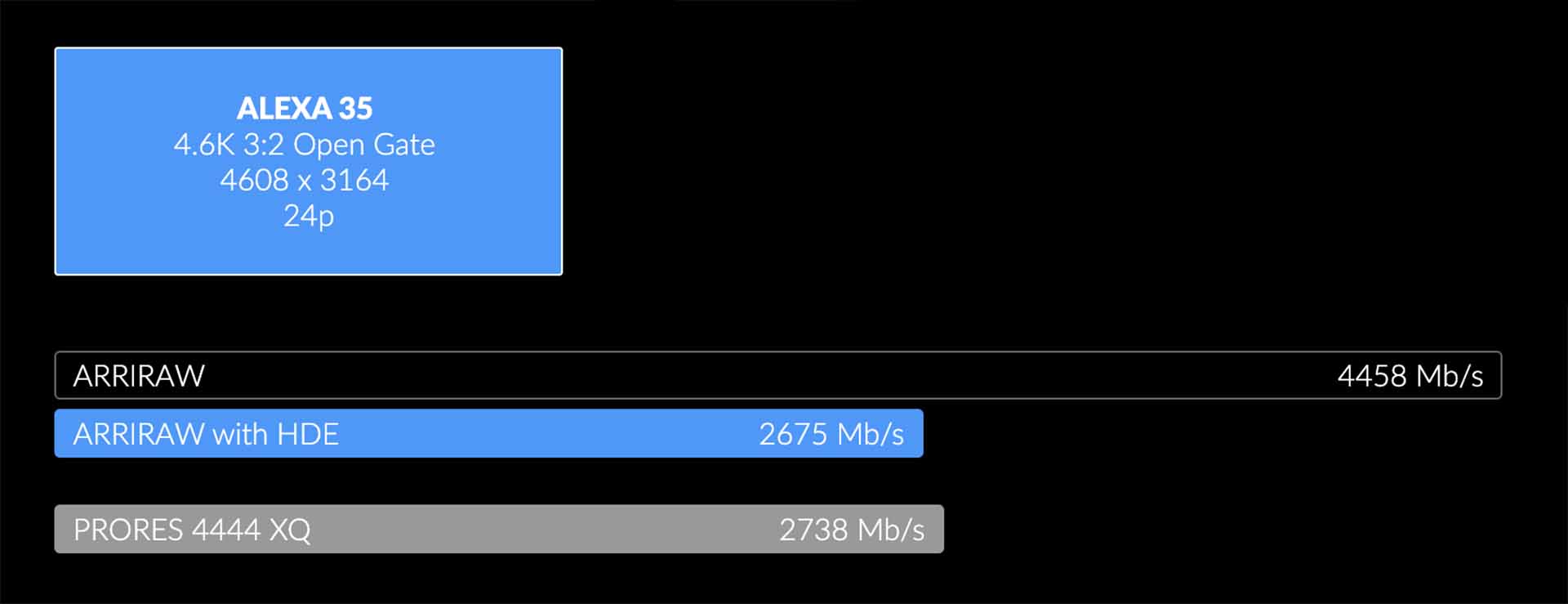
HDE stands for High Density Encoding. It is an encoding technique that is optimised for Bayer pattern images. ARRIRAW images encoded with HDE are approximately 60% of the original size. HDE encoding is completely lossless – when an HDE file is decoded, it is a bit-for-bit perfect match to the original file.
The above image shows how much data you can save with HDE. At the moment you have to use software to convert ARRIRAW files to HDE (*.arx) format. This format is recognizable by software like Baselight, Resolve, etc.
Lossy Compression
If, after compression, the original file cannot be brought back again (like humpty dumpty), then the compression is said to be Lossy.
As far as video codecs are concerned, I have yet to see lossless compression. Name your codec – it is lossy.
Compression in video is always lossy.
What about “Visually Lossless” Compression?
The aim of every compression algorithm is to achieve a visually lossless look. I
Visually lossless just means you can’t tell if it’s compressed or not just by looking at it. Whatever you stream on YouTube, Netflix, etc., are all compressed to the lowest possible data rate current technology allows.
However, most people who watch the same movie on Netflix or in cinemas won’t be able to tell the difference. Even professionals will have a hard time if it isn’t the film they shot themselves.
To help you understand it, let’s start with a test image.
I created a test TIFF file that was compressed to JPEGs under five settings – Maximum (12), High (8), Medium (5), Low (3) and Zero (0).
The original TIFF file has a resolution of 1920 x 1080, is 8-bit, with a file size of 5.95 MB.
Here are the compressed images compared (The numbers in orange show you the size in KB (5.95 MB = 6096 KB). The numbers in blue show the size relative to the original size):

What do you see? Here’s what I gather:
- After a point, compression makes the image worse, but does not reduce file size proportionally.
- Large expanses of color get worse faster than fine detail. The first and last boxes show degradation at level 8, while the fine detail holds up till level 5. One of the fundamental tenets of compression is the elimination of duplicate data. Fine detail makes that difficult.
- Once fine detail has been compressed to the limit, compression artifacts give birth to patterns of their own, giving the illusion of detail and sharpness.
- The maximum quality setting for JPEG is visually lossless, while at the same time being only 10% the size of a full raster image.
- If the quality of the original image is poor, even the best compression level will contain artifacts. Maybe the source footage will have artifacts, too!
- Level 12 has a size of 575 KB – visually lossless JPEG at maximum quality. If you had a JPEG image sequence at 25 fps, it would result in a data rate of 112 Mbps.
You can perform similar tests on any algorithm that claims to reduce file size. Some algorithms are designed to stop after a certain point – giving the illusion that they are ‘better’ somehow. Really cool codecs like JPEG gets bad publicity from misinformed souls who don’t know when to stop!
Why are the data rate requirements of inter-frame codecs smaller than intra-frame codecs?
If you don’t know what inter-frame and intra-frame codecs are, check out this article:
If you study broadcast quality specifications, you’ll see:
- The data rate requirement for inter-frame codecs is 50 Mbps, while
- The data rate requirement for intra-frame codecs is 100 Mbps.
Aren’t inter-frame codecs worse? After all, in cameras we’re encouraged to use intra-frame codecs (called ALL-I sometimes) for better image quality.
Shouldn’t they need more space if this were true?
Inter-frame codecs like H.265, H.284 and AVCHD are better at compression than intra-frame codecs!
In other words, Inter-frame codecs can provide similar visually lossless results in a lesser file size. Why it’s not recommended to film with them, is because any further processing (like color grading), will make it a lot worse. Intra-frame codecs hold up much better to grading and manipulations.
What about Common Camera Compressed Formats?
Here’s a table comparing multiple formats with a simplified “intended for” column:
| Family | Compression | Lossy or Lossless | Intended For |
|---|---|---|---|
| Prores | Prores XQ and 4444 | Visually Lossless | Grading |
| Prores HQ and 422 | Lossy | Delivery | |
| Prores 422 | Lossy | No Grading | |
| Prores LT | Lossy | Proxy | |
| DNxHR | DNxHR HQX and 444 | Visually Lossless | Grading |
| DNxHR HQ | Lossy | Delivery | |
| DNxHR SQ | Lossy | No Grading | |
| DNxHR LB | Lossy | Proxy | |
| Red RAW | HQ, MQ | Visually Lossless | Grading |
| LQ | Visually Lossless | No Grading | |
| Sony | RAW | Lossless | Grading |
| OCN XT, ST | Visually Lossless | Grading | |
| OCN LT | Visually Lossless | No Grading | |
| Arriraw | Arriraw *.ari | Lossless | Grading |
| HDE *arx | Lossless | Grading | |
| H.264 | Intra-frame or Inter-frame | Lossy | No Grading |
| H.265 | Intra-frame or Inter-frame | Lossy | No Grading |
| BRAW | 3:1, 5:1, Q0, Q1, Q3 | Visually Lossless | Grading |
| The rest | Lossy | No Grading |
How to choose the Right Compression
Keep it simple:
- If you want to color grade, pick RAW if possible. Otherwise, pick the highest data rate intra-frame codec you can afford to film in.
- If you are making a video straight for YouTube or social media, you can film in inter-frame codecs. Some software like Davinci Resolve allows you to bypass further encoding if the source and destination codecs are similar.
- If you’re using a camera that has no option but an inter-frame codec, try to get the look down in camera, so you don’t have to color grade later. With care, you can do some level of color correction work on inter-frame codecs.
- If your delivery spec mandates an intra-frame codec, then pick that strictly!
I hope this helps. You needn’t be concerned by all the myriad options available in your camera.
When in doubt, pick the one with the highest data rate!

SDub I’m no expert, not even close. But as far as I know, Zip compresses by removing redundant data, like spaces in file systems, etc. There’s always redundant space for metadata in a file system, and it adds up.
I could be wrong, but this is not a subject I want to study any further!
Sareesh Sudhakaran SDub Very interesting read! How does the counting theorem apply to a compression algorithm like .zip? Obviously .zip can be decompressed and have a data still retained. This article, as far as I can tell, doesn’t claim that the compression is for a certain file type/type of compression.
SDub Thanks for taking the trouble. You are using the word ‘lossless’ as you understand it. However, I have used it within the context of the definition I have formed – which is ‘true lossless compression’.
Such an algorithm doesn’t exist, and cannot exist. If you really want a technical but simplified explanation, here’s a great starting place: http://www.faqs.org/faqs/compression-faq/part1/section-8.html
The statistical analysis used in Huffyuv encoding is pretty smart, brilliant in fact. But it, like every other compression algorithm, cannot truly recreate humpty dumpty back again.
Lagarith is an implementation of the huffyuv encoding scheme, which is pretty much used in JPEG 2000 as well.
If you’re a working filmmaker then please don’t bother with this stuff. If practical compression is the goal, codecs like Prores HQ and better do a stellar job, at much better compression rates – and are supported by every NLE on the market. Proof of the both are available elsewhere on this site.
Sareesh Sudhakaran SDub You don’t literally say it, but here: “As far as video is concerned, I have yet to see lossless compression. Name your codec – it is lossy. Compression, if your intention is to reduce file size, is always lossy.” You say you have yet to see it, but Lagarith which is a lossless compression technique that aims to reduce file size. Am I misinterpreting something?
SDub Can you point out the exact sentence you are referring to? I can’t find the words ‘doesn’t exist’ anywhere.
Sareesh Sudhakaran SDub Right but you conclusively claim that such a codec doesn’t even exist, but they do. Maybe it’s just not applicable anymore?
SDub Unnecessary. I’ve used both huffyuv and lagarith many years ago. The world has changed.
Aren’t there multiple lossless codecs for video that are used to compress the master before delivering to DVD, Internet, or Bluray? These are used with the intention of being intermediary, but they still do exist. Codecs such as HuffYUV, utvideo, lagarith, etc.
Yes, lossless video compression can and does exist. for an extensive list see here:
https://en.wikipedia.org/wiki/List_of_codecs#Lossless_video_compression
They are not popular though, as huge size savings with ‘pretty good’ quality are obtainable with lossy compression. Lossless is generally used by professionals who use them only for their own archival purposes. Pretty much all published content is a lossy form of encoding.
Not good please explain it
Hi Sareesh:
Good article.
CinemaDNG is Uncompressed Raw as well.
I have worked with Uncompressed Raw/RGB video since 2006 recording with Streampix (starting with V3 now V5), recording with Machine Vision Cameras. Even before ArriRaw or CinemaDNG…
I also have worked with Cineform Raw material, and let me tell you this: There is NO comparison!
The Uncompressed Raw footage then de-Bayered in post to Uncompressed RGB (AVI or MOV) even at 8 bit, is FAR superior than Cineform Raw then de-Bayered to Cineform FilmScan2 444 (the highest quality, less compression setting with this codec)even at 12 bit.
The Uncompressed RGB video can be extremely pushed in post regarding color correction and even applying extreme gamma curves, and it preserves the image quality much better, whilst the Cineform video breaks up more easily when pushed.
Even when not applying any color correction at all, the Cineform video has mosquito noise that is not present as much in the Uncompresed video (with video shot at 0dB gain), and we are talking about the same scene taken with the same camera here…
So my conclusion is: There is not such thing as “lossless” compression at all!
Thanks,
Cesar Rubio.