
In this article I’ll try to give my thoughts on some important accessories for the Nikon Z6.
Batteries and Power
Battery and charger
The official battery life for video with the LCD or EVF turned on is 85 minutes. I have seen larger times when you are just intermittently recording.
The best battery you can get for the Nikon Z6 is the EN-EL15b 7V 1900mAh battery (14Wh). The advantage of this battery is you get the best performance as well as the camera can read the life of the battery and warn you when to replace it (see lesson one for details).
You can use the older EN-EL15 and EL15a batteries, and there are many knockoffs in the market. Wasabi is a brand I’ve used before, and Watson seems to sell well on B&H (Amazon, B&H). Try to get a charger dedicated to the battery as well. The knockoff batteries are all labelled as EL15. The ‘b’ is for the proprietary digital connection in the Nikon battery.
The official charger takes about 2 hours and 35 minutes and this has been my experience as well. The charger flashes orange when charging and stops flashing (constant orange) after it has been charged.
For professional video shooting, I think you need at least 4 batteries to get you through a normal day of shooting. You might need more if you’re shooting long events, or if there’s overtime, etc. You might need at least two chargers, but maybe even three if you’re depending on charging while you’re shooting.
AC Adapter
There is no direct AC powering but you can charge the battery in the camera along with AC via the Nikon EH-7P Charging AC Adapter (Amazon, B&H):
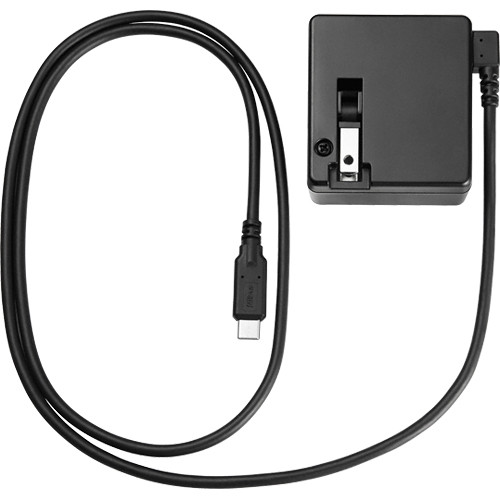
This means the EL15b battery must be in the camera for it to work. And, it only works with EN-EL15b batteries; not EN-EL15 or EN-EL15a batteries.
And of course, you might need an extension cord because the length is just too short.
Powering both the camera and external recorder at the same time
You can either use two separate batteries for different systems, but I’ve found that’s cumbersome in the long term. You have to keep on top of different batteries and chargers. If you’re trying to be as light as possible this is still okay, but if you’re on a more stable platform then the other option is using one single battery to power both camera and recorder.
The simplest way to handle this is via D-tap batteries, either Anton Bauer or V-mount type.
What you need:
- Atomos D-tap adapter
- D-tap to D-tap cable
- Battery slide to hold the battery. This also has a regulated D-tap port or more. You can get an Anton Bauer (gold) mount of a V-mount. The battery must match this.
- 15mm rods and baseplate
- D-tap battery preferably with a D-tap port.
- D-tap to dummy battery adapter, like the GyroVu D-TAP to NIKON EN-EL15 Dummy Battery
- A V-mount or gold mount battery. For cheap batteries, I’ve used FXLion with no issues. These are “brick” batteries.
- A charger for the brick batteries. Normally people buy the dual charger.
For a video on how I’ve setup power solutions for both camera and recorder, check out this lesson.
What’s the difference?
The Shogun (or any 7″ recorder) draws a maximum power of 20 Watts, approx. Smaller recorders might be a bit low, so please check the specifications of your recorder.
The Nikon Z6 draws about 14 Wh. So the total for both is 34 Wh.
This means, for an hour of combined usage, you need 34 Wh. A typical 90 Wh brick battery will give you 2 hours and 30 minutes approximately. If you buy a bigger battery then obviously you can last a lot longer. E.g., an FXLion 198Wh battery will give you a whopping 5 hours and 40 minutes. You just need two of those for an entire day of shooting.
And cost? A 198 Wh battery costs USD 425, which is $0.47/Wh. The Nikon ELb is $59.95, or $4.28/Wh!
Sure, you have to buy a lot of accessories, but most of them are reusable with other cameras and systems so will last you a long time. Most of what I have is from four years ago, and the only purchase I had to make for the Nikon Z6 is the Gyro Vu dummy battery adapter. Now this adapter will last me for future cameras as long as Nikon continues the same battery line.
Rigs and Cages
For a video on how I typically rig my camera and recorder, check out this lesson.
- The baseplate forms the core of the system. I use an OConnor baseplate, that I’ve reviewed here.
- The rails are 15mm standard, so the camera must be at a certain height or the lens will not center correctly to the mattebox.
- I’m using a Sunwayfoto PT-26 26mm Arca Swiss plate and some adhesive shims (you can use any thin textured tape) to level the camera to the FTZ adapter. If you’re not using the adapter then this is not a problem.
- I’m using an Arca Swiss quick release system to take my camera off the rig when I need to. Instead of relying on third-party quick release systems, everything I own is “universalized” with Arca Swiss systems.
- The mattebox is an Arri MMB2.
- If I were to take this outside for regular shoots, I would definitely buy a cage. A cage allows for a top handle and multiple mounting points, so I can even add a viewfinder to make it more cinematic if I wanted to. See below.
- Everything is powered by a brick and D-tap, as explained earlier.
Obviously for lighter rigs you would avoid the rails and matte box, and definitely the bricks. There’s always some give and take. No perfect system!
What’s the best cage?
There’s no such thing. A cage is great when you want mounting points and attach a top handle. It is not for protection. The cage also has an HDMI cable holder as well.
Currently, use and recommend this cheap Universal Cage:
Links to purchase: Amazon | B&H | AliExpress
For more details about the cage, read The Best Universal Cage for Mirrorless and DSLR Cameras.
This cage from SmallRig (Amazon, B&H) also looks promising because it offers a registration pin at the bottom to keep your camera from swiveling:
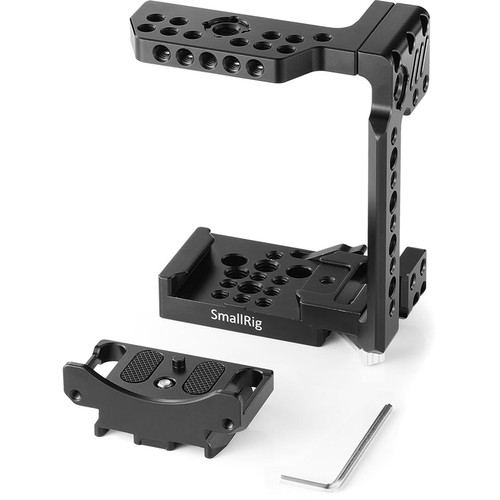
To this you would add a top handle and that’s it. If you want to connect an EVF it has a rosette or enough mounting points.
Media Cards
Update May 2020:
CFexpress cards are now relatively compatible with the Z6 as of firmware version 2.2 and above. So I recommend CFexpress cards from here on out because they are more future proof.
If possible, try to buy 128 GB cards and above.
The following cards are now recommended:
- Sandisk Extreme Pro CFexpress Type B Card (Amazon, B&H) with the suffix xxxNN in the model number
- Sony CFexpress Type B TOUGH Card (Amazon, B&H)
If you had to pick, I’d pick Sony over Sandisk because Sony is officially supported by Nikon.
I would follow this rule of thumb:
- For 4K work, buy 64 GB CFexpress/XQD cards (you get an hours’ worth of 4K at 144 Mbps)
- For 1080p work, buy 32 GB XQD cards.
I would at least have two cards, but if possible, three.
If you’re going XQD
I recommend Sony G-series XQD cards (Amazon, B&H) and readers. Luckily, I was given a free card and reader as part of the kit in India.
Note: Do not format your XQD cards in a computer. It needs to be formatted in the camera itself.
Is it a good decision to invest in XQD? What about CFexpress?
CFexpress is supposed to be more robust and faster than XQD, and the option to use it will be available with a future firmware update. How is this possible? It’s because CFexpress and XQD share the same form factor.
The thing is, very few people have adopted the XQD standard, and it might be a dying one. This is why it doesn’t make much sense to purchase many cards. I’ve read somewhere that all future Nikon cameras will support CFexpress. Nikon has not made clear whether it will support v1.0 of CFexpress or a newer one.
Right now, there’s nothing you need to do.
Miscellaneous
About sensor cleaning
Other cameras like the Sony a7S and Panasonic GH5 have wet sensor cleaning kits that you can use. However, Nikon does not recommend them at all.
All you can do, other than use the Sensor Cleaning mode in the camera, is to use a blower, like the Giottos Large blower.
Every other kind of cleaning might void your warranty. So better to just take it to a service center for cleaning.
To check of dust spots, stop down your lens to f/16 and shoot a white or light-colored wall or sky. You’ll see the spots on a monitor.
About LCD screen protectors
The LCD touchscreen on the Nikon Z6 responds to static electricity, so third-party films may not work with touch. If you need to use screen protectors, then you have to turn touch off.
I have never used screen protectors. My cameras are not investments, they are tools. I don’t mind scratches!
For my complete gear list, click here.
