
Have you ever seen a production set with cables everywhere? What if they all vanished?
That’s a true wireless video production setup, and the ultimate goal is to get there. This article goes into the basics of wireless video transmission, and how you can go about setting up a wireless video production set.

The advantages and disadvantages of wireless video
What are the advantages of wireless transmission? Here are a few:
- Increases mobility of camera and audio gear and crew.
- Nothing to trip over (though there are some individuals who can trip on air).
- Cables are also limited by distance, so the ‘traditional’ argument of range is moot. With the Internet, wireless can go where no cable has gone before.
- More than one device can ‘join the party’ and communicate.
- You can transmit different kinds of data (audio, video, metadata, photos, bad jokes) over the same wireless technology.
There are disadvantages too. Here are some major ones:
- It is easier and faster to connect a cable than set up a wireless system.
- Getting different kinds of devices to talk to each other over a wireless network is technologically challenging.
- There is the risk of data theft.
- If there are other wireless networks in the area, you have the problem of data interference. Commonly used Wi-Fi bands also compete with other wireless devices like security cameras, baby monitors, cordless phones, etc.
- ‘Overall’ speed over wireless is limited. E.g., you can string up two 3G-SDI connections to get 6G-SDI, but you can’t do that with wireless, yet.
- It adds to the production cost because you need a transmitter and receiver, or a device that has these built-in.
Overall, if we can protect the network from theft and set it up easily (Apple does wireless brilliantly, even a chimp can set it up), the advantages will far outweigh the disadvantages. When more people begin to use wireless devices, the cost will come down.
Finally, for those worrying about health issues, here’s what Wikipedia has to say:
The World Health Organization (WHO) says “there is no risk from low level, long-term exposure to wi-fi networks” and the United Kingdom’s Health Protection Agency reports that exposure to Wi-Fi for a year results in the “same amount of radiation from a 20-minute mobile phone call.”
Okay, let’s get our feet wet.
Understanding wireless technology
How does wireless work? I’m going to keep this as simple as I can. Let’s start with a large sports club with many swimming pools. There are small pools for the kids, ‘general’ pools for the low-paying members and Olympic-size pools for the elite.
As you can imagine, the size of the pool gives it its prestige. You want to be seen in the largest pool, even if you’re just a shrimp swimming with the sharks.
Due to physics and the nature of electromagnetic radiation, there are only limited swimming pools available in our airwaves. And these are all controlled by government and military bodies. Special ‘slices’ are allotted for consumers so they can enjoy radio, television, mobile, Internet, etc.
Such slices of the airwaves are called frequency bands. It’s nothing fancy, just a lower limit and upper limit that looks like: 2,412 MHz (lower) to 2,484 MHz (upper). If you subtract the smaller number from the bigger number, you get 72 MHz. This is the size of your pool.
Now, due to the nature of signals, we don’t want one signal to interfere with the other, so when we create frequency bands, we give them a slightly ‘wider berth’, like this:

Our signal needs room to move, so we create lanes in our pool. A lane in airwave terminology is called a channel. Each channel is about 5 MHz wide. In our example, the size of our pool is 72 MHz. If each channel is 5 MHz, how many channels can we have within this frequency range?
We can have 14 channels. What this means is, if the government says: ‘Though shalt use the 2,412 to 2,484 MHz band at this location’, it means only 14 channels can work on that network at that location. Which means, only 14 wi-fi networks can exist at that location. But it gets worse.
Now let’s enter a wireless technology (elephant in the pool) that wants a space of 20 MHz to swim. Each channel is only 5 MHz, but the elephant is an elite member of our club, so it will be allowed to swim in the 5 MHz channel-ized pool. Obviously, any poor soul who wants to go channel to channel with the elephant will be swiped hard. Signals have the same problem:

The three hard lines are three elephants in the pool. The dotted lines are the other 11 dudes who want to swim in the pool, but can’t. For this reason, only three elephants can set up a wireless network in the allotted frequency band in one location. From 14, we’re down to 3.
This above scenario is a real-world case. No, not the swimming pool, but the frequency band. 2,412 to 2,484 MHz is called the 2.4 GHz band. You’ll find it on common Wi-Fi routers used in your home. It can only hold about 14 channels. However, Wi-Fi technology needs 20 MHz to do its magic (20 MHz is called a band), so only three Wi-Fi networks can coexist in one place. When setting up a wireless network, you must choose a channel spaced 3 channels apart from any existing network. Luckily for us, the wireless routers do all this under the hood.
In densely populated areas (elephant convention) where everyone has a router and wants to play an MMORPG, the speeds must drop. Routers do this automatically as well, under the hood.
To counter this problem (what can the governments do? Wi-fi is popular and represents the vote-bank!), wi-fi technology was given another slice, the 5 GHz frequency range.
5 GHz is more popular because you have a frequency range from 4,915 to 5,825 MHz (910 MHz space, 182 channels). However, not all of these channels are usable because depending on which country you’re in, some are off-limits. The usable number of channels is about 42.
Wi-fi technology in the 5 GHz range uses two kinds of bands – 20 MHz and 40 MHz. With the former, you can have 10 connections in one location. With the latter, you can have 5. This is why it is popular, because more people can set up networks in the same spot.
Just to make things clearer, when I say ‘connections’ I don’t mean devices. I mean networks. A network can support multiple devices (television, computers, tablets, smartphones, etc.).
By the way, 5 GHz does not mean you get twice the speed of 2.4 GHz. Actually, the speeds are roughly the same, but slightly higher for 5 GHz. Don’t fall for the marketing on the box.
Comparing consumer wireless technology
The thing about wireless technology is that we will have to abandon traditional solutions like SDI, HDMI, XLR, etc.
Unfortunately, there’s more than one kind of wireless technology available. It’s a growing field, and new technologies are bound to come at regular intervals and replace the old. Let’s look at a chart comparing different wireless technologies as of 2013:
| Technology | Version | Frequency** | Maximum distance (feet) | Maximum bandwidth |
| Bluetooth | 3.0 | 2.4 GHz | 300 | 24 Mbps |
| 4.0 | 2.4 GHz | Wi-Fi*** | ||
| Infrared | IrDA-FIR | 33,000 GHz | 20 | 4 Mbps |
| GigaIR | 33,000 GHz | 5 | 1 Gbps | |
| Wi-Fi 802.11 | b | 2.4 GHz | 120-300 | 11 Mbps |
| g | 2.4 GHz | 120-300 | 22 Mbps | |
| n | 2.4/5 GHz | 240-600 | 450 Mbps | |
| ac | 5 GHz | n/a | 1 Gbps^ | |
| ad | 60 GHz | n/a | 7 Gbps | |
| Mobile | 2G/2.5G | 800 MHz to 2.7 GHz | Unlimited | In kbps |
| 3G HSPA+ | 28 Mbps* | |||
| 4G LTE | 100 Mbps* |
*Typical speeds can reach 1 Gbps, but mobile users won’t be able to download at those rates.
**Anything between 300 MHz to 300 GHz is Microwave radiation. Anything under 300 MHz is Radio. Anything over 300 GHz till visible light is Infrared. Bottom line, for our purposes, everything except infrared is Microwave. Fun fact: Microwave ovens also run on 2.4 GHz. You cook your food with the same radiation that brought you your recipe!
***Bluetooth can be used to send data over Wi-Fi. It’s called High Speed (HS) Bluetooth.
^ac can go higher, up to 2.5 Gbps probably, and the theoretical maximum is 7 Gbps, but the products aren’t there yet.
The biggest drawback with infrared is that it can’t go through walls or objects – even a human being. Mobile technology is okay, but is nowhere near what Wi-Fi is capable of.
Wi-Fi is king, and for small video applications, you should squarely focus on versions 802.11 n and ac (We’ll talk about ad in a bit).
Important: The speeds given above for wi-fi are theoretical maximums. In the real world you can expect about 25-40% of that for practical use (40 MHz bandwidth mode is slightly higher than 20 MHz, but not by much). This is how many streams of video we can get over such a network in the real world:
| Data rate (Mbps) | 802.11 n^^ | 802.11 ac^^^ | 802.11 ad | |
| HD-SDI | 1,500 | NO | NO | 1 |
| 3G-SDI | 3,000 | NO | NO | 1 |
| 6G-SDI | 6,000 | NO | NO | NO |
| Prores HQ | 220 | 1 | 1 | 8 |
| 50 Mbps | 50 | 2 | 5 | 35 |
| 10 Mbps | 10 | 11 | 25 | 175 |
At best we can squeeze in one stream of Prores HQ (220 Mbps) on current technology. As you can see, consumer wi-fi technology isn’t going to cut it for high-end productions.
^^The N speed is limited to 450 Mbps. Anything higher uses dual band (e.g., N750=N300+N450, N900=2xN450 and N600=3xN300). The maximum data rate per stream is always limited.
^^^ac also uses the 80 MHz band (dinosaur?)
Wireless technologies specific to video production
Basically you are limited by law (and physics) on the frequency at which you can operate in. This is why most consumer-grade microwave technologies operate in either the 2.4 GHz or 5 GHz band. Since neither will cut it for video, we are given an additional band to play with, 60 GHz.
In order to get greater speeds, for professionals who are ready to pay for it, there are special wireless standards (some proprietary). A few important ones are as follows:
| Data rate (Gbps) | Frequency | Range (feet) | |
| WirelessHD | 4-28 | 60 GHz | 30 |
| Wireless USB | 0.48 | 3.1- 10.6 GHz | 10 |
| Wi-Fi Direct | 0.25 | 2.4/5 GHz | 600 |
| WiGig | 7 | 60 GHz | 30 |
| WHDI | 3 | 5 GHz | 100 |
WiGig is actually 802.11 ad, which we’ve seen earlier. Both WiGig and WirelessHD works in the 60 GHz band. Is that good or bad? In one way, it’s good, because you can achieve large data rates with less interference from other wireless technologies.
In another way, it is bad, because as the frequency increases, electromagnetic radiation finds it harder to bend around corners to avoid walls and humans, etc. This is why infrared needs a ‘line of sight’ to work. 60 GHz isn’t that bad, but it won’t work reliably without a straight line of sight.
However, to address the problem, those who use the 60 GHz band also include a technology called beamforming, that lets signals go around walls and opaque objects. Otherwise it wouldn’t be of much use.
How do these standards perform for video? Here’s a chart that shows how many streams of video we can get:
| HD-SDI | 3G-SDI | 6G-SDI | Prores HQ | 50 Mbps | |
| WirelessHD | 19 | 9 | 5 | 127 | 560 |
| Wireless USB | NO | NO | NO | 2 | 10 |
| Wi-Fi Direct | NO | NO | NO | 1 | 5 |
| WiGig | 5 | 2 | 1 | 32 | 140 |
| WHDI | 2 | 1 | 1 | 14 | 60 |
The most promising technology is WirelessHD, which at present gives us about 3 Gbps and is able to go as high as 28 Gbps.
Okay, I think this is more than enough information to help you get a basic understanding of what’s possible with wireless technology. There’s tons of technical stuff I’ve left out, but they don’t concern us at this point.
Let’s see how all this affects our line of work.
The five kinds of wireless data transmissions on a video set
Let’s look at how data can be transferred on a production set. There are five major categories of data transfer:
- Video-Video (Video from one hardware device to another)
- Audio-Audio (Audio from one hardware device to another)
- AV-AV (Audio+Video from one hardware device to another)
- Device-Device (Communication between two devices directly)
- Device-Network-Device (Many devices communicate over a common network, a special case of which is Device-Internet-Device)
The first four choices are ‘special’ in a way. They don’t need computers or software or even a wireless network to exist. The primary goal is to maintain data integrity and speed over the connection. For this reason the number of devices talking to each other will be limited.
The last one is in a different league because you are no longer in the game of transmitting and receiving pure audio and video. It’s a community swimming pool. Here are some things you can transmit on a set to your crew:
- Metadata
- Photographs, images, and other forms of multimedia
- Social media updates (through a production collaboration tool – not Facebook or Twitter!)
- Schedule changes and status updates
- The latest score, crew jokes, wolfcrow.com links…
If you’re connected to the Internet, you have these additional options:
- Backup your data to a service like Backblaze, etc. Imagine not having to wait for software to load or hard drives to get up to speed.
- GPS
- Weather information
- Communicate with the editorial team, producers, even fans!
Device-Network-Device wireless transmission
The defining feature of this category is the ‘Device’. The device need not be a camera or a video-centric tool. It’s basically anything that resembles a computer – laptop, smartphone, tablet, television, etc. Another key feature of this category is that you can connect to multiple devices via one network.
There are two types of networks:
- Ad-hoc Wi-Fi network
- Internet
In the first case, somebody has to set up a wireless network, and every device must support one of the commonly available Wi-Fi 802.11 standards. In the second case, everyone needs a data plan (with sufficient speed and signal strength) that connects to the Internet. We have seen earlier that mobile Internet connection speeds are far lower than current wi-fi speeds, though they are quite sufficient for compressed video streaming. Smartphone advertising is at an all time high, so you probably know all the cool things we can do with them nowadays. They sky’s the limit.
If you secure this network via a password, then only your crew will see what you share. You can also set up a server (a laptop or an Android smartphone, nothing fancy) and control who gets to see what, within the network.
Of course, if you’re all packed into one room, it is easier to just say it.
Device to Device wireless transmission
The difference between this category and the former is that this category does not set up a network to talk to multiple devices. Its goal is to just link two devices to achieve a specific transmission of data. The best example of this is wireless follow focus and remote control, like what you can find in an Arri Wireless Remote System (WRS).
The defining feature of this category is that the wireless connection between two devices is sometimes proprietary, and only designed to fulfill the function of the network. E.g., Arri does not share details about this standard simply because it doesn’t want any third-party device interfacing or interfering with its functionality.
Another example of a wireless focus system is Hocus Focus, which utilizes a 433-434* MHz range with 10 channels to choose from, and can reach up to 200m (600 feet).
However, two ‘computer-type’ devices can also communicate directly via:
- Wi-Fi Direct
- Bluetooth
- Infrared
- Radio
Wi-Fi Direct is implemented in the latest Android phones, and Bluetooth is ubiquitous but without a clear path to the future (many say Wi-Fi Direct will replace Bluetooth). The underlying technology isn’t that important because the manufacturers ensure the connection works, and that’s all that matters. Remember, these connections don’t require the existence of a wireless network, just the two devices.
The common problems when pairing smart-devices are the same as file-sharing across any two disparate computers:
- Operating system and file system problems.
- Application and file-type compatibility problems.
- Not everybody on set will have compatible devices.
*A note about frequencies:
Many companies choose to release products in what is called ISM or license-free bands. These are slices of spectrum that are usually made available for industrial, scientific and medical (ISM) research. The cool thing about ISM bands is that any device operating in these bands must tolerate any other device – with no recourse to protection from any body or government. The other way to look at it is you can experiment and create wireless systems without following universal standards. This allows many manufacturers to build proprietary products that cannot be seen by consumer wi-fi devices.
The most common bands are 2.4 GHz (which is why microwave ovens run on them) and 5.8 GHz (it is close to 5 GHz). But there are many others as well. The important thing to remember is that the frequency allocation for ISM is different for different countries. So, don’t go about creating something and then fly it to a country where you might land in trouble for using it.
Audio to Audio wireless transmission
This category is only second in usage to device-network-device, because the data rates are so low. Most video productions utilize some form of wireless audio transmission, especially in the form of wireless lavalier mics.
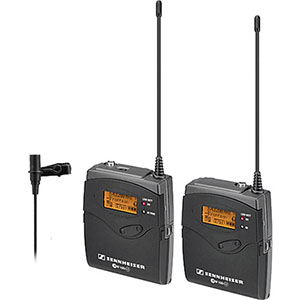
The Sennheiser G3
As a side note, you can also connect dynamic and shotgun microphones with wireless transmitters. E.g., the Sennheiser SK 100 G3 transmitter is compatible with the Sennheiser MKE 400
Can you record audio from wireless receivers? Sure. High-end recorders like the Sound Devices 788T are designed to be resistant to radio and microwave frequencies (together, they are called RF).
There are mixers with wireless connectivity – mostly to allow them to be controlled by tablets or other control devices. However, production mixers usually prefer to be connected to physical cables. Bottom line, any audio device can be made wireless, using common available wi-fi technology. There are no technological limits (you can transfer high-quality audio via USB 2.0), and the only two things you should be concerned about are:
- Quality and fidelity of the audio
- Range
Wireless headphones are usually designed to work over bluetooth, simply because the range is always assumed to be less than 30 feet. One of the advantages of bluetooth is the lower chance of interference. The other advantage is low power draw.
Video to Video and AV to AV wireless transmission
This is where things get interesting. As we saw earlier, consumer wi-fi standards are not going to cut it for serious video production.
Audio bit rates are so low that most devices that focus on high-end video transmission also include audio in their streams, whenever available. This is why I’ve clubbed them together.
You could classify (just for understanding) AV-AV systems according to their use scenario, as (these are my terms, forget them at the end of the article):
- Encoders (high latency)
- Streamers (low latency)
Encoders
The reason encoders have high latency (in case you didn’t know, latency is the delay between the event as it is being recorded, and the arrival of it at another point – a display or whatever) is because they need to process data and transcode them to a heavily compressed format that can be streamed over conventional consumer level wi-fi networks.
One such system that does this is the Teradek Cube
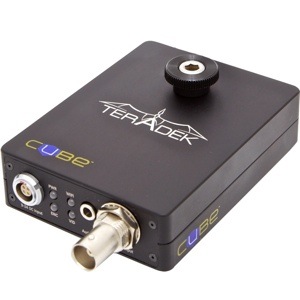
The Teradek Cube
The latency of the Cube is as follows:
- Just compression: 60 ms
- Total latency from encoder to decoder: 300 ms
E.g., if you are recording at 24 fps, then 300 ms represents about 8 frames. Let’s say you are a skilled focus puller, and your mean reaction time is going to be approximately 200 ms. Add in the time it actually takes time to turn the focus knob, and you’re looking at a fastest possible time of one second from the event as it happens. In the real world, through the pressures of production, age and dexterity, location, and a million other factors, this duration will be higher than one second.
Is this good or bad for focus pullers? If you’re shooting at a low f-number (say f/2 or thereabouts) and at a longer focal length, an interview subject can only move about 2-5 inches before going out of focus. When shooting 4K material, this is immediately obvious. Ask yourself, how fast can you move your head forwards or backwards by 2-5 inches? Inexperienced (and even experienced) performers and actors do this all the time, and it is the job of the focus puller to stay alert and react as quickly as possible. Even at a gentle rocking speed, I can cover 2 inches in less than a second. If my wireless focus pulling system has a latency of 300 ms at its best, I’ve already lost.
To be fair to the Cube and other devices like it, they are not meant to be used for critical focus pulling. The advantage of such systems is that they are cheaper to manufacturer, and the technologies used are already available widely (namely HD-SDI, H.264 and 802.11n in the case of the Cube). As long as your device can connect to a wi-fi network, you can receive streaming video. With a maximum data rate of 10 Mbps, it’s good enough for 5 simultaneous streams of client-monitoring and video villages, as long as the encoding quality level is high. The higher the data rate, the higher the latency. With an iPad or iPhone, expect 10-15 seconds of latency.
Here’s a video that explains how to get the best out of the Cube:
Streamers
Streamers are what you want for:
- Critical focus pulling
- Live switching
- 1:1 monitoring (mimicking an HD-SDI, HDMI or 3G-SDI feed)
The ultimate goal of a streamer is to reach zero latency (impossible) with zero signal loss (possible with digital technology).
For the sake of comparison, let’s look at a device that attempts to do this: the Teradek Bolt
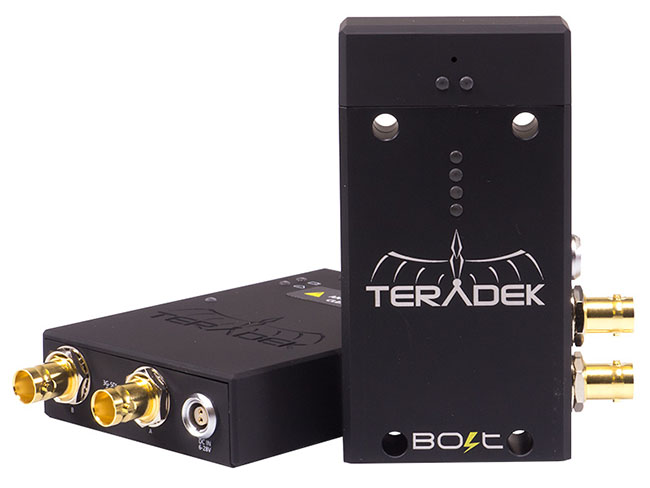
Here’s a comparison between the Bolt and the Cube:
| Bolt | Cube | |
| Range (feet) | 300 | 600 |
| Encryption | AES128 | None |
| Audio channels | 2 | Embedded |
| Wi-fi technology | WSDI Pro | 802.11 a/b/g/n |
| Frequency | 5 GHz | 2.4 / 5 / 5.8 GHz |
| Receivers | 4 | 5-10 |
| Data | 2.97 Gbps | 10 Mbps |
The major difference is the proprietary WSDI Pro (TM) wireless technology used, which is pretty similar to WHDI in results.
It can transmit a 3G-SDI signal (1080p60 10-bit 4:2:2) to 4 receivers, so one Bolt system (1+4 devices) can serve a focus puller, a DIT for critical monitoring, a director/DP and an encoder like the Cube – which will stream the video to 5 other people who are too lazy or scared to stand behind the DIT or DP to watch the footage.
What is the latency of the Bolt? It is less than 1 ms, according to Teradek. Here’s a video demonstration:
What other options are available in the market? Here’s a quick comparison of some wireless AV-AV systems (click to enlarge):
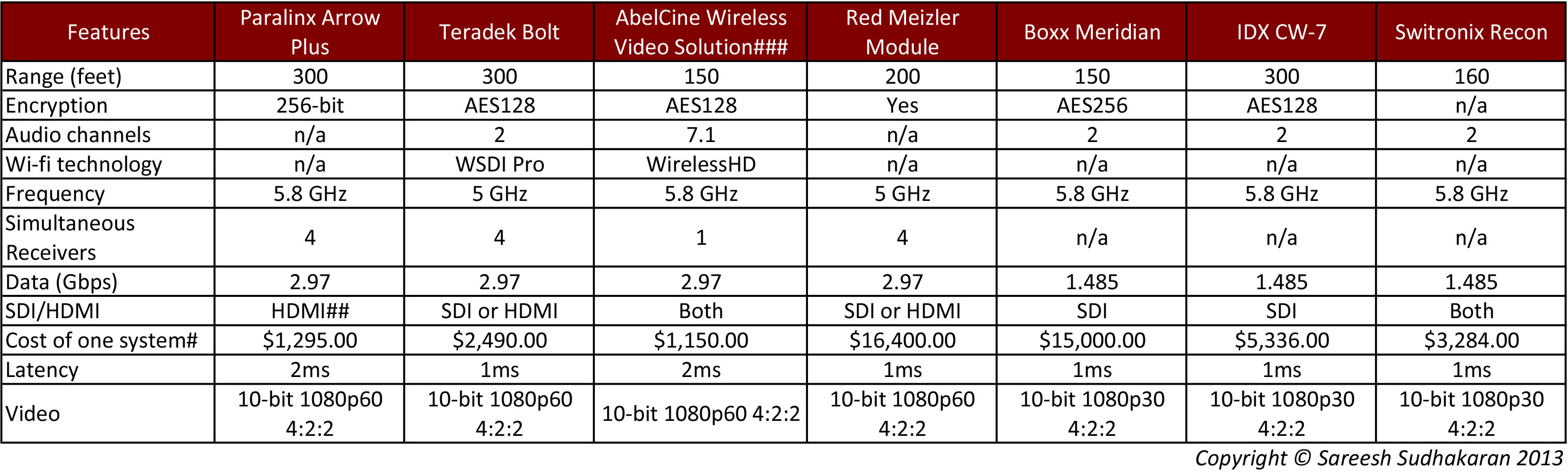
#Pricing and specifications might be totally inaccurate. Check the manufacturers’ websites for correct information. The price includes the cost of one transmitter and one receiver.
##SDI/HDMI option available at an additional cost.
###The kit is put together by Gefen and Atomos parts but works great according to AbelCine.
One important consideration I’ve left out is power draw. Wireless devices consume lots of power (just like smartphones do when connected to a data network) and you must study the kind of options available (like connector, power draw, etc.) prior to purchasing. I have tried to avoid comparing the above systems as a whole, and have solely focused on the wireless technology.
As you can see, most manufacturers are probably opting for the WHDI standard at the moment, and none have incorporated WirelessHD or WiGig systems for 2K or 4K material. They all offer a latency of < 1 ms (most of them, anyway) so focus pullers can get the job done. Going by the prices, openness to share information and industry ‘street-cred’, I’d say the Teradek Bolt
This brings us to the end of our article. I hope it has given you enough information to understand the concepts, problems and solutions available as far as wireless video technology is concerned. The big question you need to ask yourself is: Is going wireless worth the cost benefit?
What do you think? Has going wireless added any tangible benefits to your workflow?
